
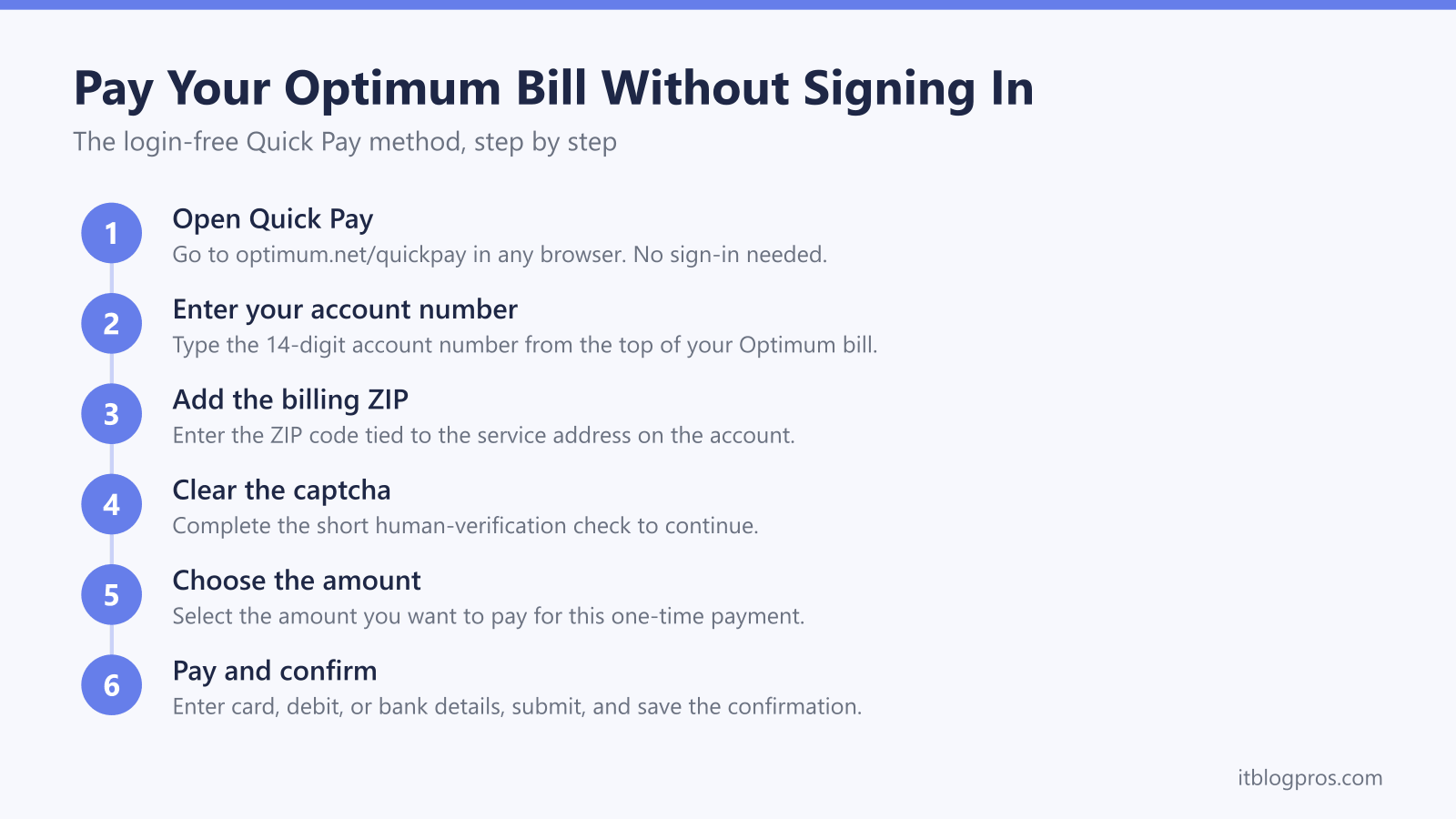
Optimum lets you pay your internet, TV, or phone bill without signing in to your account. The tool is called Quick Pay, and it only asks for the 14-digit account number printed at the top of your bill plus the billing ZIP code. No username, no password, and no account recovery detour when you just want the payment to clear before the due date. This guide walks through the exact login-free method step by step, covers the automated phone line as a backup, and then does the thing most bill pages skip: it shows cost-conscious Optimum customers how to stop paying the monthly equipment fee that quietly inflates every bill. If you are already logging in to manage this bill, you are exactly the person who can knock $10 to $14 a month off it by owning the right hardware instead of renting Optimum's.
Optimum customers can pay without logging in through Quick Pay at optimum.net/quickpay using the 14-digit account number and billing ZIP code. Card, debit, and bank account all work, and the automated phone line at 866-213-7456 carries no added fee. Cable customers can also cut the recurring equipment charge by supplying their own approved modem.
Key Takeaways
- Optimum Quick Pay at optimum.net/quickpay takes a one-time payment with no login, using only the 14-digit account number and the billing ZIP code.
- Quick Pay accepts a credit card, debit card, or bank account, and the automated phone line at 866-213-7456 charges no added fee.
- Speaking to a live Optimum representative to pay adds a $5 Payment Assistance Fee, so the self-service routes are the cheaper way to pay.
- Optimum charges an equipment fee of up to $14 a month, and cable customers can eliminate it by supplying their own DOCSIS 3.1 modem.
- Fiber plans and any plan with Optimum home phone require Optimum's own gateway, so the equipment saving applies only to standalone cable internet.
Quick Pay Is the Login-Free Way to Pay Optimum
Optimum's official no-login payment tool is Quick Pay, and it lives at optimum.net/quickpay. It exists precisely so you can settle a bill fast without hunting for a password or resetting a locked account. The page asks for two pieces of information: the 14-digit account number found at the top of your paper or emailed bill, and the ZIP code tied to the service address. After a short captcha to prove you are human, you choose the amount and enter payment details. Optimum accepts a credit card, a debit card, or a direct bank account (ACH) draft for a Quick Pay transaction. Nothing about this flow requires you to know or create account login credentials, which is why it is the right tool when someone else needs to pay the bill for you, when you are between devices, or when you simply do not want to sign in.
What You Need Before You Start
Have the 14-digit Optimum account number ready, because Quick Pay will not find your account without it. It appears at the top of the bill and on any Optimum payment stub. You also need the billing ZIP code, which is the ZIP of the service address on the account, not necessarily where you happen to be standing. Finally, have your payment method within reach: a card number and expiry, or a bank routing and account number for an ACH payment. That is the entire checklist. There is no security question, no last-four-of-SSN prompt, and no email verification step in the Quick Pay flow, which is what keeps it genuinely login-free.
Paying by Phone Without Logging In
If you would rather not use the website, Optimum runs an automated phone payment line at 866-213-7456. It accepts a check (ACH) or a debit or credit card through an automated menu, and Optimum states there is no added fee for using it. Keep the same two details handy that Quick Pay needs, the 14-digit account number and the billing ZIP, so the automated system can locate your account. One cost note worth knowing: as of June 3, 2025, Optimum applies a $5 Payment Assistance Fee when you pay by speaking to a live representative. The automated line and the online Quick Pay tool avoid that charge, so self-service is both faster and cheaper. Mail and in-person options exist too, through CheckFreePay or Western Union locations and Optimum stores, but they are slower and some third-party sites tack on their own handling fee.
Cut This Bill by Dropping the Optimum Equipment Fee
Here is the part that saves real money. Optimum rents you the box that powers your WiFi and bills you for it every month. The standard equipment charge runs up to $14 a month, often introduced at a promotional $5 a month for the first 12 months before it steps up to the full rate. That is $120 to $168 a year for hardware you never own. If you have standalone Optimum cable internet, you can legally replace that rented box with your own DOCSIS 3.1 cable modem and have Optimum remove the rental line item from your bill. A quality modem pays for itself in roughly six to twelve months and keeps saving after that. Two solid multi-gig DOCSIS 3.1 modems that match Optimum's speed tiers are the Motorola MB8611 and the ARRIS SURFboard S33. One honest caveat before you buy: Optimum runs a restricted approved-modem list and provisioning can vary by region, so confirm your exact model against Optimum's current certified list, or ask Optimum support to verify it will activate on your line, before you purchase. If you also want to stop renting the WiFi side and improve coverage at the same time, pairing a bought modem with your own mesh router such as the eero Pro 6E or TP-Link Deco X55 gives you full ownership of the setup. The best modem for Optimum guide names the approved picks, and the walkthrough on how to stop renting a gateway and buy your own modem lays out the same math step by step.
When the Equipment Saving Does Not Apply
The modem swap only works on cable service, so be honest with yourself about what you have before you spend a cent. Optimum fiber plans require Optimum's own fiber gateway, and there is no third-party fiber gateway you can buy to replace it, so fiber customers cannot avoid the equipment fee this way. Likewise, if your Optimum plan bundles home phone (voice) service, the phone feature depends on Optimum's gateway, and a store-bought data modem will not activate on that account. In both of those cases the rental is effectively mandatory and buying hardware would waste money. If you are unsure which service you have, the plan name on your bill or a quick check with Optimum will tell you. For fiber and bundled customers, the smart move is simply to make sure you are paying for the right speed tier and using the gateway well rather than replacing it.
Make Sure the WiFi You Pay For Actually Reaches You
Whether you rent Optimum's gateway or run your own gear, a bill only feels worth it when the signal reaches every room. If lights on your router are behaving oddly or rooms keep dropping, a quick diagnostic pass often fixes it without a service call. A general router lights guide explains what each color and blink pattern means across common routers and gateways, so you can tell a genuine outage from a simple reboot situation before you pay for anything extra or call support and risk that $5 live-agent fee. Getting the coverage right is also the honest reason many customers move to their own mesh system: the monthly rental buys you a single box, while a mesh set spreads coverage across the whole home and, on cable plans, ends the fee for good.
Check the Motorola MB8611 price on Amazon →
Check the ARRIS SURFboard S33 price on Amazon →
Check the eero Pro 6E mesh price on Amazon →
Check the TP-Link Deco X55 mesh price on Amazon →
More no-login bill-pay guides
The same guest-payment approach works across the other major US providers:
- Pay your AT&T bill without signing in (FastPay)
- Pay your Xfinity bill without signing in
- Pay your Verizon bill without signing in
- Pay your T-Mobile bill without signing in
- Pay your DirecTV bill without signing in
- Pay your Spectrum bill without signing in
- Pay your Cox bill without signing in
- Pay your CenturyLink bill without signing in
- Pay your Frontier bill without signing in
Using any Amazon link on this site supports these free guides at no extra cost to you, whatever you end up buying. Browse current router and modem deals on Amazon.