
Paying a DIRECTV bill should not require a password reset, a security question set up years ago, and a lie-down afterwards. Whether you are covering a parent's bill, the account holder is travelling, or the login is simply locked, DIRECTV has an official guest route that skips the sign-in completely.
DIRECTV calls it "Pay without signing in", and for satellite customers it is also branded EZPay at directv.com/ezpay. This guide walks through the online method, the phone option, what the myDIRECTV app can and cannot do, and, because payment pages are a favourite target for scammers, how to make sure the site taking your card details is actually DIRECTV.
Key Takeaways
- DIRECTV's "Pay without signing in" flow accepts guest payments using only the 9-digit account number, the billing ZIP code, and a bank account, debit card, or credit card.
- The online guest payment and the automated phone line on 800.531.5000 are free; a one-time $5 processing fee may apply if an agent makes the payment for you.
- The myDIRECTV app has no guest payment option, and text-to-pay only works when a payment method is already stored on the account.
- DIRECTV STREAM and DIRECTV over the internet accounts run on required autopay, so guest pay mainly applies to DIRECTV satellite accounts.
- Typing directv.com into the address bar yourself, rather than following search ads or PDF links, is the single best defence against fake payment sites.
Pay without signing in is DIRECTV's official guest service
"Pay without signing in" is DIRECTV's one-time payment route for satellite customers. DIRECTV's own support article on paying your bill (article 000080018) instructs you to visit "Pay without signing in" and select DIRECTV, then make a one-time payment using the unsaved payment method option. For satellite customers DIRECTV also brands this shortcut as EZPay, and its official Community Team describes it plainly: "Skip the login, DIRECTV satellite customers, pay your bill in seconds with EZPay. No account sign-in needed, just your account number and payment method." It is the same idea AT&T offers with FastPay; a quick guest checkout for anyone who just wants the bill settled.
You need three things before you start:
- The DIRECTV account number. It is 9 digits and printed in the upper-right corner of the bill.
- The billing ZIP code for the account.
- A payment method. Bank account, debit card, or credit card all work.
The guest route suits one-off situations: paying a bill for a family member, settling up while the account holder is away, or paying when the password is long forgotten. One important caveat applies, though. DIRECTV STREAM and DIRECTV over the internet accounts are on required autopay, with a stored card, debit card, or PayPal charged automatically every month, so guest pay is generally not applicable to streaming accounts. The flow is aimed squarely at DIRECTV satellite billing, which is why the page asks you to select DIRECTV as the service to keep the two apart.
Paying online takes about two minutes
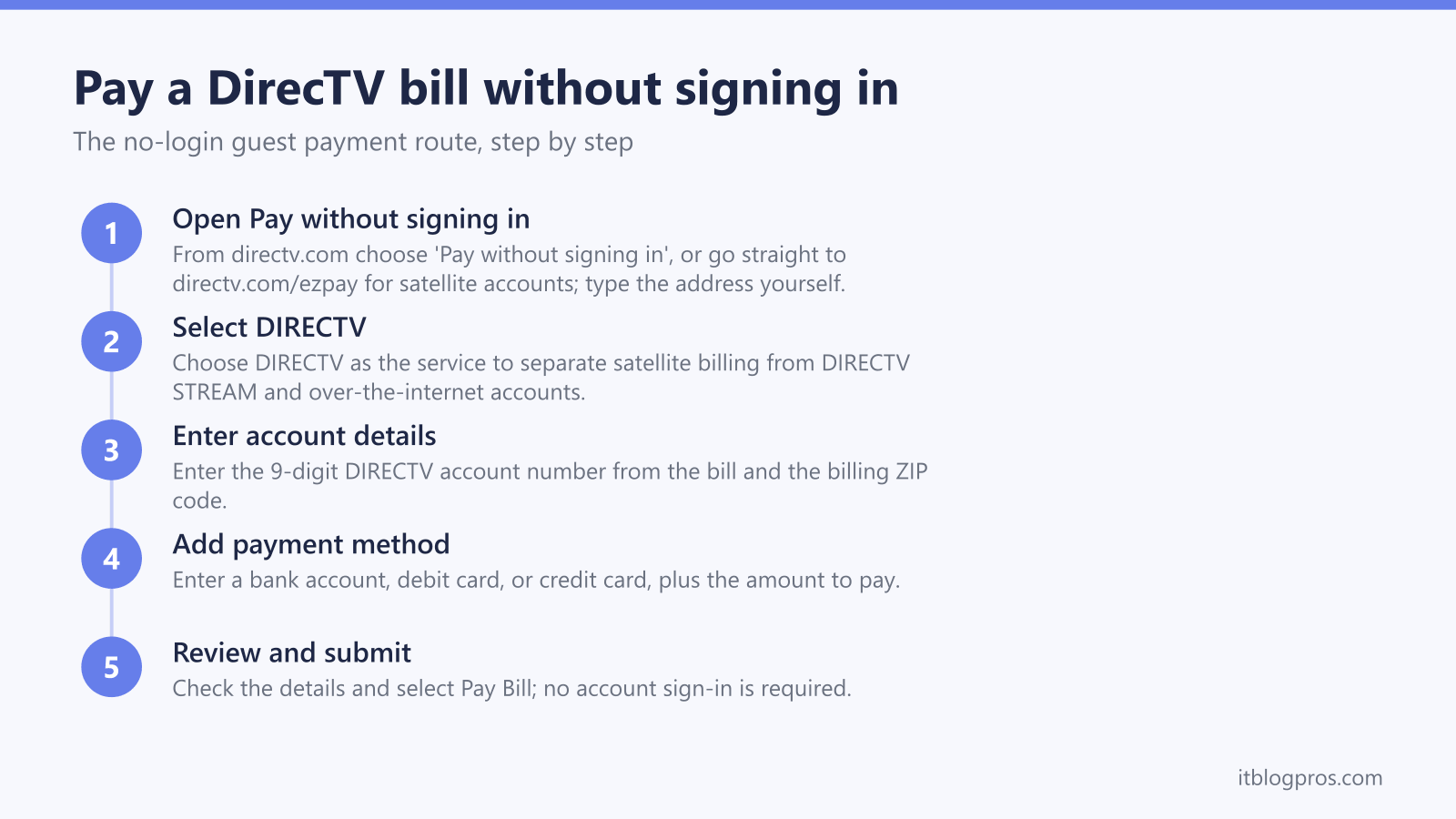
The online route is the fastest option and carries no fee. Here is the full flow:
- Go to directv.com and open "Pay without signing in", or go straight to directv.com/ezpay. The addresses people most often type, directv.com/paybill and directv.com/billpay, both reach the same guest payment flow, so any of the three gets you to the right place. Type the address directly into the browser rather than clicking a search result; the security section below explains why that matters. This is the same flow DIRECTV's official support article describes for guest payments.
- Select DIRECTV as your service when the page prompts you. This separates DIRECTV satellite from DIRECTV STREAM and DIRECTV over the internet, which handle billing differently.
- Enter the account number and billing ZIP code. The account number is the 9-digit number on the bill, and the ZIP code must match the billing address on the account.
- Enter the payment method and the amount. A bank account, debit card, or credit card all work online. If the account is in good standing, partial payments using more than one payment method are still possible, though DIRECTV no longer supports formal split payments.
- Review and submit the payment. Select Pay Bill to complete. No account sign-in is required at any point. Keep the confirmation details for your records, especially when paying on someone else's behalf.
The phone line on 800.531.5000 handles guest payments too
Call 800.531.5000 and say "make a payment" at the prompt. The automated system takes the payment with no fee attached, and it runs Monday to Sunday, 8:00 AM to 9:00 PM CT. If the call ends up with an agent and they process the payment for you, a one-time $5 processing fee may apply, so it pays to stay with the automated prompts where possible. DIRECTV's support article confirms this process, and the same number appears on DIRECTV's customer service page. The general line, 1-800-DIRECTV (1-800-347-3288), routes to the same support, but the payment number is the direct route to the automated payment menu.
Use that number only after verifying it on your bill or at directv.com itself. Numbers lifted from search results, social media posts, or unsolicited calls deserve zero trust; the security section below covers the reasons in detail.
The myDIRECTV app has no guest payment option
App payments require signing in to the account, so the myDIRECTV app cannot help a guest payer. The closest no-login alternative DIRECTV offers is text-to-pay; texting PAY to 21880 triggers a payment, but only against a payment method already stored on file. That makes it handy for an account holder in a hurry and useless for a third party paying on someone's behalf, because a guest has no stored card on the account to charge. For genuine guest payments, the website and the automated phone line are the two real options.
Posted payments and bank Bill Pay round out the options
Beyond the online guest flow and the phone line, DIRECTV accepts two slower no-login methods:
- Cheque or money order by USPS mail. Write the 9-digit account number on it and use the pre-addressed envelope that comes with the paper statement.
- Bank Bill Pay. Add DIRECTV as a payee in your bank's own bill-pay service and enter the account number without hyphens or spaces.
Both work without touching a DIRECTV login, though neither is quick. Posted payments depend on mail and processing time, so they are a poor choice when a due date is close; late and returned-payment fees are governed by DIRECTV's payment terms and conditions, and a payment that arrives late is late regardless of when it was posted.
Signing in still wins for regular monthly payments
The guest flow is built for one-off payments, not for running an account month after month. Signing in, or registering the account online if that has never been done, gives the account holder stored payment methods, billing history, autopay management, and access to text-to-pay once a card is on file. It also removes the monthly ritual of digging out a paper bill to find the account number.
For anyone paying their own DIRECTV bill every month, the signed-in route is simply less effort, and it makes missed due dates, and the late fees that follow under DIRECTV's payment terms, far less likely. Guest pay earns its keep when you are helping someone else or locked out; it is not a long-term billing strategy.
One legacy note: accounts still billed through AT&T from before the 2021 spinoff historically used AT&T FastPay at att.com rather than directv.com. If the bill carries AT&T branding, follow the FastPay route covered in our AT&T guide instead.
Troubleshooting failed guest payments
- The account is not recognised. Enter the 9-digit account number exactly as printed on the bill, with no hyphens or spaces, and make sure the ZIP code is the billing ZIP rather than the service address ZIP if the two differ.
- The page rejects the account type. Confirm DIRECTV is selected as the service. DIRECTV STREAM and DIRECTV over the internet accounts sit on required autopay, so guest pay generally does not apply to them.
- The bill comes from AT&T. Pre-spinoff accounts billed through AT&T use AT&T FastPay rather than the DIRECTV guest flow, as covered above.
- The page will not load. Type the address manually and retry in another browser. If no sites load at all, the problem is local; our guide to WiFi that says no internet covers the quick checks. The automated line on 800.531.5000 is the reliable fallback while the connection gets sorted.
- The payment bounces. Returned payments can attract fees under DIRECTV's payment terms, so confirm the funds and the card details before resubmitting rather than retrying blind.
Spotting fake DIRECTV payment sites and phone numbers
This is the part of the guide we care about most, because bill-payment searches are prime hunting ground for criminals. Searches for phrases like "pay DIRECTV bill without signing in" regularly surface sponsored ads, lookalike pages, and even hosted PDF files posing as payment portals, all built to harvest card details. From a network-security standpoint (the author holds CompTIA Security+), the defences are simple and worth turning into habits:
- Only type the official domain directly. Enter directv.com in the address bar yourself and reach the guest payment from there. Never reach a payment page through a search ad, and never through a link inside a PDF; DIRECTV does not host its payment portal in PDF documents, and PDFs ranking for bill-pay searches are a well-known scam pattern.
- Verify HTTPS and the exact domain spelling. The padlock must be present, and the domain must read exactly directv.com; not a lookalike with swapped letters, not the brand name with extra words such as "billing" or "support" bolted on, and not directv.com buried inside a longer address, because everything after the real domain's first slash belongs to whoever registered the rest.
- Treat the padlock as necessary, not sufficient. HTTPS only proves the connection is encrypted; scam sites buy certificates too. The exact domain spelling is the real test of legitimacy.
- Never give card details to an unsolicited caller. Anyone ringing to claim the service will be cut off unless payment is made immediately is running pressure tactics, not billing. Hang up and dial 800.531.5000 from the bill yourself; a legitimate balance will still be there when you call back on a number you verified.
- Ignore payment requests outside DIRECTV's real methods. DIRECTV takes bank accounts, debit and credit cards, posted cheques and money orders, and bank Bill Pay. Anyone asking for gift cards, wire transfers, or cryptocurrency is a scammer, full stop.
A buffering stream deserves a network check before a bill complaint
DIRECTV via Internet and DIRECTV STREAM deliver every channel over home broadband, so when the picture stutters, the fault usually sits inside the house rather than inside the subscription. Satellite customers can skip this section; a dish does not care about WiFi. DIRECTV's own speed guidance suggests 8 Mbps per stream or more, which almost any modern plan clears, so the usual culprit is weak WiFi between the router and the TV, not the plan being paid for each month.
Two fixes cover most cases. The standard Gemini box has an ethernet port, and a flat Cat6 cable slips under carpet or along baseboards to wire it straight to the router, taking WiFi out of the picture entirely:
See the Jadaol flat Cat6 cable →
The Gemini Air has no ethernet port and runs on WiFi only, so buffering there points to coverage. A mesh system such as the eero Pro 6E puts a strong signal in the room where the TV actually lives:
Either upgrade protects the money already going out every month, and more picks live on the recommended gear page.
Guest pay comes down to one flow and one phone number
Paying a DIRECTV bill without signing in is genuinely simple once the real addresses are in hand: "Pay without signing in" at directv.com, or directv.com/ezpay for satellite accounts, or 800.531.5000 with "make a payment" at the prompt. Keep the 9-digit account number and the billing ZIP code handy, type the address yourself, and the whole job takes less time than the hold music would.
More no-login bill-pay guides
The same guest-payment approach works across the other major US providers:
- Pay your AT&T bill without signing in (FastPay)
- Pay your Xfinity bill without signing in
- Pay your Verizon bill without signing in
- Pay your T-Mobile bill without signing in
- Pay your Spectrum bill without signing in
- Pay your Cox bill without signing in
- Pay your CenturyLink bill without signing in
- Pay your Frontier bill without signing in
- Pay your Optimum bill without signing in
Using any Amazon link on this site supports these free guides at no extra cost to you, whatever you end up buying. Browse current router and modem deals on Amazon.