
Paying a T-Mobile bill should not require digging out a forgotten T-Mobile ID password, or creating an account for a line that belongs to your mum or a mate you're helping out. T-Mobile agrees; its Guest Pay page exists for exactly this situation.
This guide covers every legitimate way to pay a T-Mobile bill without signing in: the Guest Pay website, the official phone numbers and what they cost, and the T-Life app's notable lack of a guest option. It also explains when a full account is the smarter move, and, because search results here are littered with fake bill-pay numbers, how to make sure your card details only ever reach the real T-Mobile.
Key Takeaways
- Guest Pay at t-mobile.com/guest-pay lets you pay your own T-Mobile bill or someone else's with just the phone number or account number on the account; no T-Mobile ID or login is needed.
- Guest Pay and other digital payments are free; an agent-assisted payment through Customer Care carries a $10 Payment Support fee, and an in-store payment completed by a Mobile Expert costs $5 plus applicable tax.
- Entering a prepaid number redirects you to T-Mobile's prepaid one-time payment flow, and a Metro number redirects to Metro by T-Mobile's own Guest Pay page.
- The T-Life app has no guest option; payments in the app require signing in with a T-Mobile ID, which makes Guest Pay a web-only service.
- The only pay-by-phone numbers published on official T-Mobile pages are 1-800-937-8997 (or 611 from a T-Mobile phone) and 1-877-720-5195 for prepaid; treat any other number you find through search as suspect.
Guest Pay Is T-Mobile's Official No-Login Payment Service
Guest Pay is T-Mobile's guest payment flow for postpaid accounts, covering both consumer and business customers. It lives at t-mobile.com/guest-pay, and T-Mobile's support pages also link to it as t-mobile.com/guestpay; both addresses land in the same place. The page opens with a single prompt, "Enter a T-Mobile phone or account number to proceed", and from there you can pay your own bill or someone else's.
You need three things before you start:
- The T-Mobile phone number on the account, or the T-Mobile account number
- The amount you want to pay
- A payment method; a debit or credit card, or your bank account details
That short list makes Guest Pay ideal for one-offs: paying a family member's bill, settling up when your login is lost, or clearing a balance quickly before a due date. It's the same approach AT&T offers with FastPay, which asks for an account number and ZIP code instead.
Guest Pay also quietly handles T-Mobile's family of brands. Enter a prepaid number and the site redirects you to the prepaid one-time payment flow at prepaid.t-mobile.com/one-time-payment. Enter a Metro by T-Mobile number and you're sent to Metro's own Guest Pay at metrobyt-mobile.com/guestpay/landing. The site works out the account type from the number, so you don't need to know it in advance.
Method 1: Paying Online With Guest Pay
The online route is free and takes a couple of minutes:
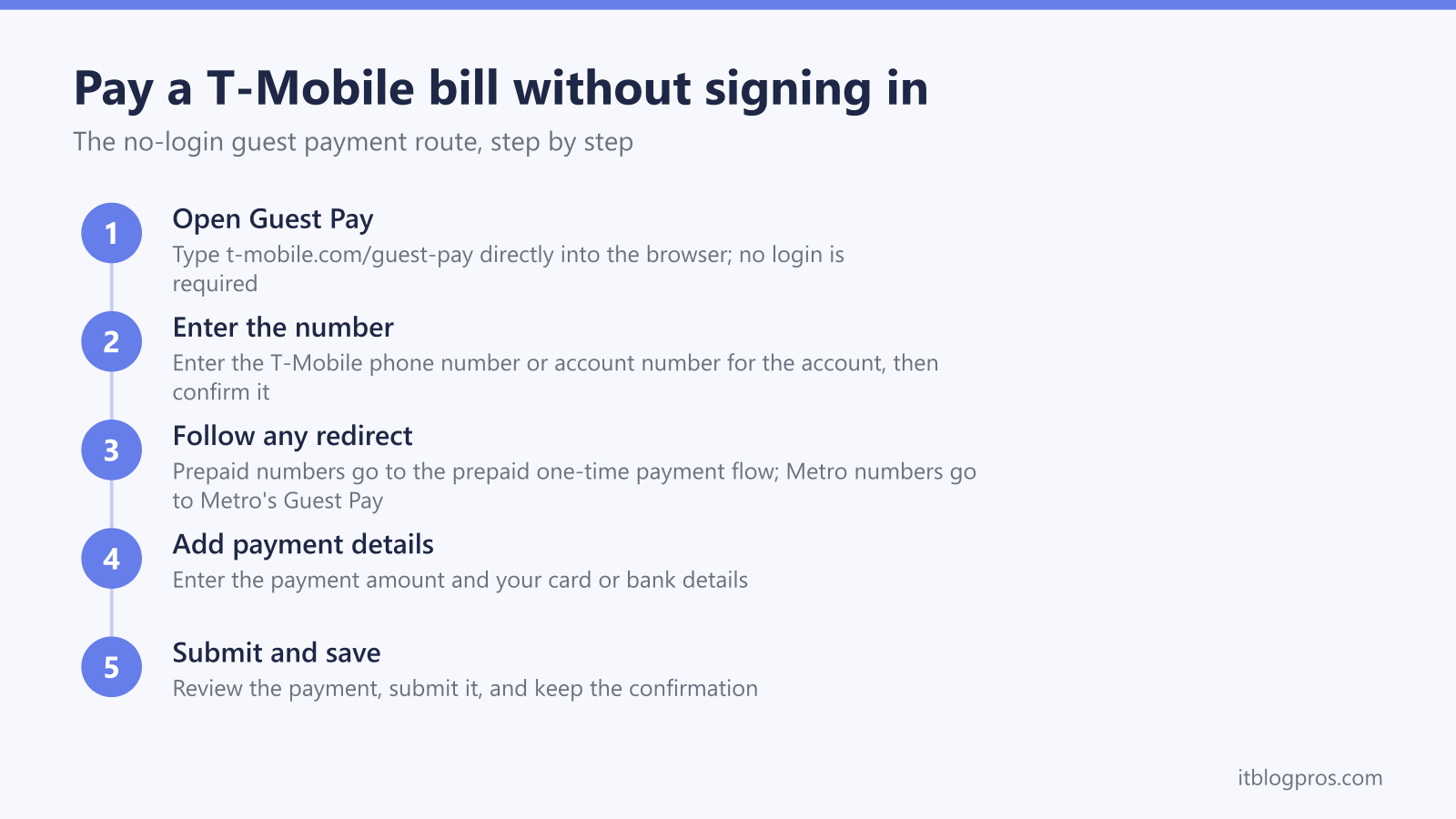
- Go directly to t-mobile.com/guest-pay. Type the address into your browser yourself rather than clicking a search result; the reason is in the scam section further down. No login is required.
- Enter the T-Mobile phone number or account number for the account you want to pay, then confirm it when prompted.
- Follow the redirect if one happens. Prepaid numbers go to the prepaid one-time payment flow and Metro numbers go to Metro's Guest Pay, as covered above; both are legitimate destinations, so carry on.
- Enter the payment amount and your payment details, either card or bank information.
- Review everything, submit the payment, and keep the confirmation. That confirmation is your proof if anything needs chasing later.
There's no charge for any of this; T-Mobile keeps its digital payments free.
Method 2: Paying by Phone, and the $10 Catch
Customer Care is reachable on 1-800-937-8997, or simply 611 from a T-Mobile phone; the line runs around the clock. Before you dial, know the cost. An agent-assisted payment through Customer Care carries a $10 Payment Support fee; T-Mobile's own framing is that consumer and business accounts with up to 20 lines "save $10 with digital payments". In practice, reps will offer to walk you through paying in the T-Life app instead, to spare you that charge. If you can open a browser, Guest Pay does the same job for nothing.
Prepaid customers do get a free phone option, because it's automated rather than agent-assisted: dial *ADD from a T-Mobile device, or call 1-877-720-5195 to use the automated line. Assisted prepaid payments handled by a Care expert attract a $5 payment support charge, a policy in effect since May 2024, so the automated line is the one to use.
Payment by post still works too: T-Mobile, P.O. Box 742596, Cincinnati, OH 45274-2596; allow at least five days, so it's no use for a bill due tomorrow.
Method 3: The T-Life App Has No Guest Option
This one catches people out. The T-Life app handles payments from its Manage tab, but it requires signing in with a T-Mobile ID first; there is no pay-as-a-guest mode in the app. Guest Pay is strictly web-only.
That matters when a Customer Care rep steers you towards T-Life to dodge the $10 fee; the advice is sound for account holders, but useless if you're paying someone else's bill or your credentials are long gone. Guest Pay in a browser remains the fee-free route.
Payment Methods and Fees at a Glance
T-Mobile's one-time digital payment flows, Guest Pay included, take a debit card, a credit card, or your bank account details. Save the confirmation screen at the end; that's your receipt.
AutoPay is the exception, and its accepted methods are narrower than the one-time flow. T-Mobile lists AutoPay as accepting a linked bank account (Pay by Bank), the T-Mobile Visa, or a debit card; other credit cards and digital wallets such as Apple Pay and Google Pay are not eligible for AutoPay, and cards billed to a foreign address can't be used. So a credit card that works for a one-off Guest Pay payment may not qualify for AutoPay.
The fees break down like this:
| Payment route | Cost |
|---|---|
| Guest Pay and other digital payments | Free |
| Agent-assisted payment via Customer Care | $10 Payment Support fee |
| In-store payment or payment arrangement with a Mobile Expert | $5 plus applicable tax |
| Prepaid assisted payment (store or Care expert) | $5 payment support charge |
| Prepaid automated phone line and digital guest payments | Free |
A T-Mobile ID Account Is Worth Setting Up for Regular Payments
Guest Pay is built for one-offs. If the bill you're paying is your own and it arrives every month, a T-Mobile ID account earns its keep quickly:
- AutoPay is free and takes the due date off your plate entirely; just confirm your method qualifies, since AutoPay wants a bank account, the T-Mobile Visa, or a debit card.
- Logged-in one-time payments give you control over the timing when you'd rather not automate.
- The T-Life app puts payments on the Manage tab, which is the route Customer Care recommends to skip the phone fee.
T-Mobile 5G Home Internet customers sit on the same T-Mobile ID and account system as wireless customers. The official Home Internet billing page describes paying by signing in with a T-Mobile ID and doesn't mention Guest Pay, although Guest Pay does accept an account number. The dedicated Home Internet support line is 1-844-275-9310 if billing on that service gets confusing. And if the connection itself is the problem rather than the bill, the guide to T-Mobile Home Internet not working on battery power covers the hardware side.
Troubleshooting Guest Pay Problems
The number isn't accepted. Re-enter it slowly; transposed digits are the most common culprit. If a phone number keeps failing, ask the account holder for the account number instead, since the Guest Pay prompt accepts either.
You were redirected somewhere unexpected. A jump to prepaid.t-mobile.com/one-time-payment means a prepaid account; metrobyt-mobile.com/guestpay/landing means a Metro line. Both are normal behaviour, not a hijack, provided the spelling of those domains is exact.
The payment was declined. Confirm the card has funds available and allows online transactions, then try the other method; bank details where a card failed, or the reverse.
The page won't load. Retype the address, try a private window or a different browser, and check your own connection. The phone line on 1-800-937-8997 is the fallback; just remember an agent-assisted payment adds $10.
You need proof the payment went through. The confirmation at the end of the Guest Pay flow is that proof. Save or screenshot it, and quote it if the balance doesn't update.
Spotting Fake T-Mobile Payment Sites and Phone Numbers
This section comes from the network-security side of the work, and it's the part most worth remembering. Search for a way to pay a phone bill and you'll find paid ads above the real site, "helpline" numbers on answer sites, numbers buried in YouTube descriptions, and PDFs stuffed with toll-free numbers that rank surprisingly well. Some are merely useless; some exist purely to capture card details or connect you with a fake agent. The defence is simple:
- Type the address yourself. Reach t-mobile.com/guest-pay by typing it into the address bar. Never open a payment page from a search ad, a link in an unexpected text or email, or a PDF promising a bill-pay shortcut. A document or advert can paint any label it likes over any link.
- Check the connection and the exact domain. Before entering a card number, confirm the padlock (HTTPS) is present and the domain reads t-mobile.com exactly, character by character. The legitimate redirects in this flow stay on prepaid.t-mobile.com and metrobyt-mobile.com. Extra words, swapped letters, or a different ending mean it is not T-Mobile, however polished the page looks.
- Treat phone numbers from search results as untrusted. The only pay-by-phone numbers published on official T-Mobile pages are 1-800-937-8997 (or 611 from a T-Mobile phone) and the prepaid automated line 1-877-720-5195. A number lifted from a forum thread, a YouTube description, or a downloaded PDF carries no such guarantee, and criminals seed exactly those places.
- Never pay an unsolicited caller. If someone rings claiming to be T-Mobile and asks for card details to "avoid disconnection", hang up, then call back yourself on 611 or 1-800-937-8997 and ask about the account. A real provider survives that round trip; a scammer doesn't. T-Mobile doesn't take gift cards either, so anyone demanding them is a criminal, full stop.
These habits add about ten seconds to paying a bill. They're the same habits applied to corporate networks, scaled down to a single payment page.
Home Internet Customers Pay No Gateway Rental, So Put the Savings Into Coverage
Most readers here are settling a phone bill, so this note is only for T-Mobile 5G Home Internet customers. The good news on that service is what the bill does not include: T-Mobile supplies the 5G gateway with the plan and currently advertises no monthly equipment fees, so unlike a cable modem rental there is no recurring equipment charge to cut. The trade-off is the WiFi. The gateway works best near a window facing the nearest tower, and that spot is rarely the right one for covering a larger or multi-story home. The gateway's ethernet LAN port solves it. Plug in the main unit of a mesh system, let the mesh handle WiFi through the whole house, and the plan stays exactly as cheap as it was. The TP-Link Deco X55 three-pack covers most homes for a modest one-time cost, while the eero Pro 6E three-pack adds the 6GHz band for busier households.
Check the TP-Link Deco X55 3-pack price →
Check the eero Pro 6E 3-pack price →
More tested picks are in the recommended gear guide.
Guest Pay Covers the One-Offs, and an Account Covers the Rest
Guest Pay at t-mobile.com/guest-pay is the quickest legitimate way to settle a T-Mobile bill without signing in; it's free, it needs only a phone or account number, and it happily handles other people's bills. Save the phone line for genuine emergencies, since the agent fee is $10, and set up a T-Mobile ID with free AutoPay if the bill is your own and arrives monthly. Type the address, check the domain, and your payment lands exactly where it should.
More no-login bill-pay guides
The same guest-payment approach works across the other major US providers:
- Pay your AT&T bill without signing in (FastPay)
- Pay your Xfinity bill without signing in
- Pay your Verizon bill without signing in
- Pay your DirecTV bill without signing in
- Pay your Spectrum bill without signing in
- Pay your Cox bill without signing in
- Pay your CenturyLink bill without signing in
- Pay your Frontier bill without signing in
- Pay your Optimum bill without signing in
Using any Amazon link on this site supports these free guides at no extra cost to you, whatever you end up buying. Browse current router and modem deals on Amazon.