
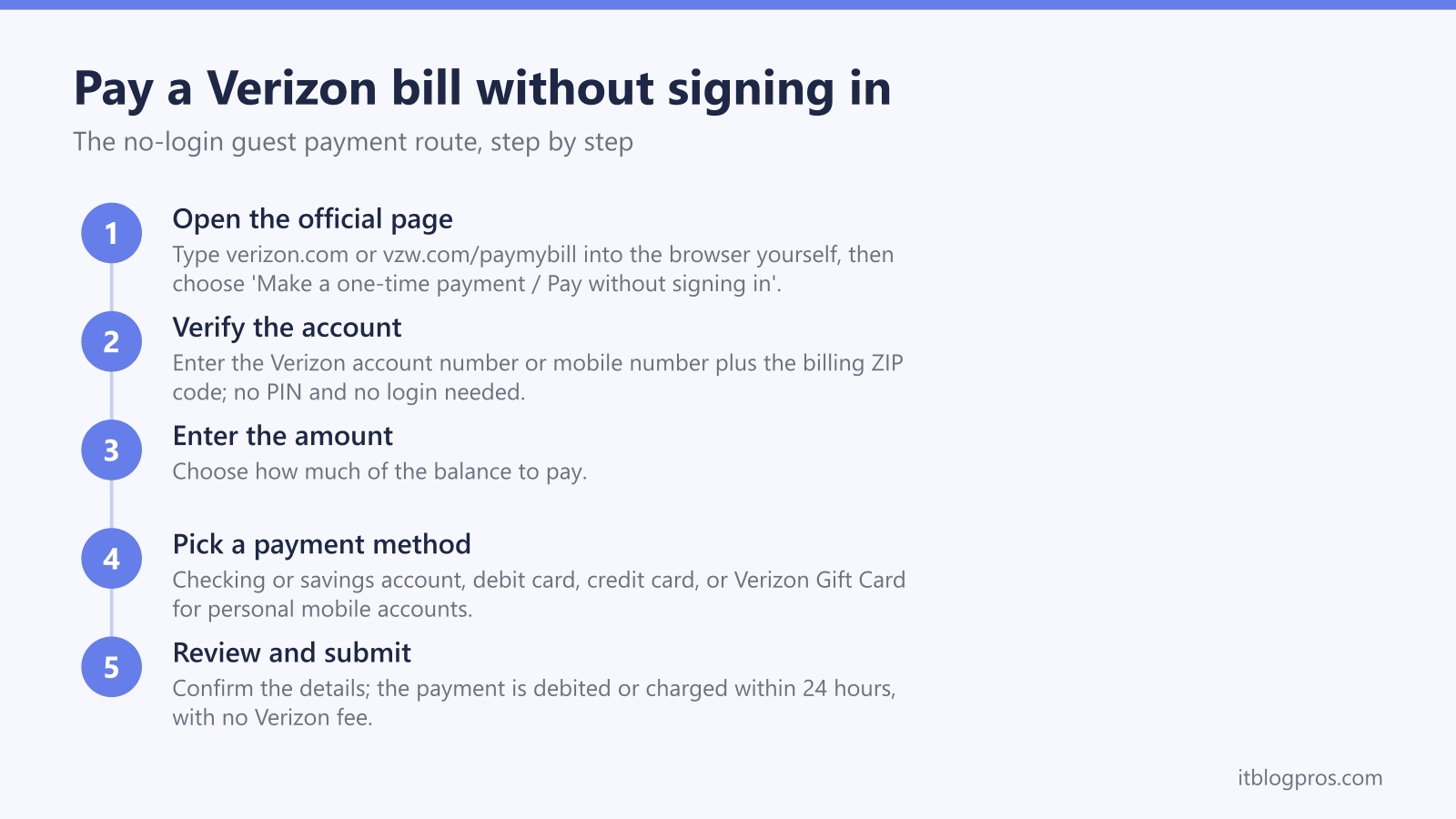
Verizon keeps an official side door for exactly this job. It is the one-time payment route, the site frames it as "Pay without signing in", and it asks for nothing more than an account number or mobile number, the billing ZIP code, and a way to pay; no login, no app download, no account creation.
This guide covers every guest route Verizon supports: the official web page reached from verizon.com, the automated phone line, in-store bill-pay kiosks, cash retail networks and mail. It also explains the one fee worth dodging, the separate rules for Fios, prepaid and disconnected accounts, and how to steer clear of the fake payment pages that crowd these search results.
Key Takeaways
- Verizon's one-time payment page accepts guest payments for mobile accounts with just an account number or mobile number plus the billing ZIP code; no PIN and no login.
- Online guest payments, the automated phone line on #PMT, and in-store bill-pay kiosks carry no Verizon fee; the only Verizon charge is a $10 Agent Assistance Fee when a live representative processes the payment.
- The online guest page is built for Verizon mobile accounts; Fios and home customers pay without signing in by phone on 1-800-VERIZON (800-837-4966), at a cash retail location, or by mail.
- The My Verizon app has no guest option, so even on a phone the browser-based one-time payment page is the route to use.
- Scam payment sites and PDFs rank for these searches, so reach verizon.com by typing it yourself and never pay through a search ad or a PDF link.
One-time payment is Verizon's official guest checkout
On verizon.com this appears as "Make a one-time payment" and "Pay without signing in". It is the same idea AT&T offers with FastPay: verify the account with two simple details, pay, and walk away.
Three pieces of information get you through:
- The Verizon account number, or the mobile number on the account
- The billing ZIP code
- Payment details, meaning a card number or your bank routing and account numbers
One scoping note before the steps. This guest page serves Verizon mobile, meaning postpaid wireless accounts. Verizon Prepaid has its own guest tool called Prepaid Instant Pay, Fios and home services route their guest payments differently, and recently disconnected accounts use a separate Disconnected Accounts site; all three get covered below.
Method 1: Pay online through the one-time payment page
The reliable way in is the official billing support hub at https://www.verizon.com/support/billing-and-payments/, then the "Make a one-time payment" link, which is labelled "Pay without signing in". Verizon's own short link, vzw.com/paymybill, opens the same place. That link lands on Verizon's one-time payment login screen on the verizon.com domain; the address it shows is a long internal payment URL, and that length is normal for Verizon's payment platform. The trust anchor is the verizon.com domain at the front, reached by your own typing rather than a search result. The whole flow takes a couple of minutes:
- Open the page. Type verizon.com or vzw.com/paymybill into the browser yourself rather than clicking a search result; the anti-scam section below explains why that habit matters.
- Verify the account. Enter the Verizon account number or the mobile number, plus the billing ZIP code.
- Enter the amount and pick a payment method. Checking account, savings account, debit card, credit card and Verizon Gift Card are all accepted for personal mobile accounts.
- Review and submit. One-time payments are debited or charged within 24 hours of submitting, and there is no Verizon fee for paying this way.
- Use the Disconnected Accounts site if the account is inactive. A recently disconnected account verifies with a mobile number, last name and ZIP code instead, and that site works for 6 months after the disconnect date; beyond that, payments go through the regular Pay My Bill site.
A quirk for business customers: business wireless one-time payments made without logging in accept only a bank account as the payment method, so have routing and account numbers ready rather than a card.
Verizon also runs verizon.com/expresspay, titled "Verizon Quick & Easy Bill Payment", which is a genuine guest verify-and-pay tool oriented to Fios and home services. The mobile route described above is the one to lead with for wireless accounts.
Method 2: The automated phone line is free with your Account PIN
For Verizon wireless accounts, the automated payment system answers at:
- #PMT, dialled from your Verizon mobile phone
- 800-922-0204, from any phone
The automated system asks for your Account PIN, takes a card or bank account, and charges no fee. The only Verizon fee anywhere in this process appears when a live representative processes the payment for you: a $10 Agent Assistance Fee. Stay inside the automated prompts and the call costs nothing; speaking to a representative for help is still free, the fee is only for handing the payment itself to an agent.
For Fios and home services, meaning TV, internet and home phone, the number is 1-800-VERIZON (800-837-4966). This is Verizon's main customer line rather than a Fios-only number, and it is the number a suspension or late notice points to.
Prepaid runs on its own rails: dial #PMT (#768) from the prepaid phone itself, or reach prepaid customer service on 888-294-6804. Prepaid customers also have the Prepaid Instant Pay site, which takes payments without signing in and accepts Visa, Mastercard, Discover and American Express.
Method 3: The My Verizon app offers no guest payment
The app route ends quickly. The My Verizon app requires signing in before any payment action; there is no guest path inside it. On a phone, open the one-time payment page in the browser instead, exactly as in Method 1.
Cash, kiosks and mail round out the guest options
- In-store bill-pay kiosks at Verizon retail stores take cash, checking account, credit card, debit card and Verizon Gift Cards, with no fee. This is the route when cash is the whole point.
- Cash retail networks. Through the PayNearMe network you can pay in cash at locations such as CVS and 7-Eleven; this carries a $2.99 fee per payment and uses the barcode printed on page two of your billing statement.
- Mail takes a check or money order. The correct payment address depends on where you live; on verizon.com, use the mailing-address lookup under Contact Us to find yours rather than guessing.
Fios and home customers lean on these routes plus the phone line, since the wireless guest page is not built for them: phone payments on 1-800-VERIZON (800-837-4966), in-person payments at Verizon stores and Fios Local Presence Centers (cash, credit, debit, or certified check), cash at CVS and 7-Eleven through PayNearMe, and mail to regional P.O. boxes such as P.O. Box 15124, Albany NY for several Northeast states or P.O. Box 16801, Newark NJ for New Jersey; confirm yours through the mailing-address lookup. One curiosity rounds it out, the Fios TV set-top box: Menu, then Customer Support, then My Account, then Bill & Payment, then Pay My Bill. It needs a payment method already on file, so it is not a true guest option, but it does dodge a forgotten password.
A My Verizon account still wins for regular monthly payments
Guest payment trades convenience now for repetition later. Every month means re-typing account details and a card number, with no payment history and no reminders when a due date slips. An account adds automatic payments, paperless billing, your balance and history in one place, and enough self-service that the $10 agent fee never enters the picture.
Guest pay earns its keep for paying a family member's bill, a one-off payment while locked out, or settling a recently disconnected account. For the every-month routine, the account is less work, not more.
Troubleshooting failed guest payments
- The account will not verify. The ZIP code must be the billing ZIP, which is not always the service address ZIP. Use either the account number or the mobile number, and check for transposed digits.
- The account was recently disconnected. The standard guest page rejects inactive accounts; use the Disconnected Accounts site with a mobile number, last name and ZIP code. It covers the first 6 months after disconnect, after which the regular Pay My Bill site takes over.
- A Fios payment fails on the wireless guest page. That is by design; the wireless page serves mobile accounts. Use 1-800-VERIZON (800-837-4966), the expresspay tool, mail, or an in-person location instead.
- A business wireless card payment fails. Guest payments on business wireless accept bank accounts only; retry with routing and account numbers.
- The payment has not shown up yet. One-time payments are debited or charged within 24 hours of submitting, so a short delay is normal.
- The page will not load at all. Try another browser or another network first. If nothing on the connection loads, the fault sits upstream of Verizon's page; our Verizon router reset guide covers getting the line back, and the phone line takes the payment in the meantime.
Spotting fake Verizon payment sites and phone numbers
This section comes from a network-security background rather than a billing one, and it is the part most worth remembering. Bill-payment searches are prime hunting ground for scammers, because the searcher is in a hurry and already intends to hand over card details; results for phrases like "pay Verizon bill" regularly surface hostile ads, lookalike domains and uploaded PDFs carrying fake support numbers.
The defensive habits are simple and worth making permanent:
- Type the domain yourself. Go to verizon.com directly. Never start a bill payment from a search ad, a sponsored result, or a link in an unexpected email or text. The one Verizon short link worth memorising is vzw.com/paymybill, which opens the official one-time payment page.
- Never pay through a PDF. Documents ranking in search results that promise a Verizon bill-pay number are a classic lure; Verizon publishes its payment routes on verizon.com support pages, not in uploaded PDFs.
- Read the domain, not the padlock. HTTPS is necessary but not sufficient, because scam sites carry valid certificates too. What matters is the registrable domain just before the first slash: verizon.com is Verizon, while verizon.com.payments-helpdesk.xyz is an attacker. Check the spelling character by character; swapped and doubled letters still fool people in a hurry.
- Trust only numbers you sourced yourself. Pull phone numbers from a paper bill or from a verizon.com support page you navigated to directly. The numbers in this guide, #PMT, 800-922-0204, 1-800-VERIZON (800-837-4966) and prepaid 888-294-6804, come from Verizon's own support pages.
- Never give card details to an unsolicited caller. A caller who already knows your name and balance proves nothing, because that data leaks. Hang up, then dial #PMT or 800-922-0204 yourself; a legitimate Verizon system never minds a call back on an official number.
The legitimate guest page does show a long, odd-looking URL once it opens, and that is normal for Verizon's payment platform. The trust anchor is the verizon.com domain at the front of it, reached by your own typing.
Trimming the Fios bill with a router you own
This one applies to Fios home internet only; mobile accounts have no equipment to swap. Fios ends at an optical network terminal (ONT) inside the home, and on internet-only service that box hands the connection off as standard Ethernet, so a router you own plugs straight in where the rented Verizon router sits. If the ONT is still wired for coax, Verizon support will switch the handoff to Ethernet at no charge. Whether the swap saves money depends on the plan: Verizon's newer Fios plans include the router with no separate equipment charge, while older plans carry a rental line that has historically run around $15 a month, and fees change, so check the bill just paid for a router or equipment charge before spending anything. Two owned routers that fit, the ASUS RT-AX86U Pro for gigabit plans and the TP-Link Archer AX55 for the mid tiers:
Check the ASUS RT-AX86U Pro price on Amazon →
Check the TP-Link Archer AX55 price on Amazon →
One honest caveat: Fios TV set-top boxes rely on the Verizon router for the guide and On Demand over the coax (MoCA) wiring, so TV households need a MoCA adapter or the Verizon unit kept in the chain. Internet-only households swap freely; the recommended gear page lists more options.
The short version
Verizon makes paying without signing in genuinely easy: the one-time payment page reached from verizon.com with an account or mobile number plus billing ZIP, the free automated line on #PMT or 800-922-0204, bill-pay kiosks for cash, and 1-800-VERIZON (800-837-4966) for Fios. Keep the payment inside the automated systems to dodge the $10 agent fee, give it 24 hours to post, and always reach the payment page by typing the address yourself.
More no-login bill-pay guides
The same guest-payment approach works across the other major US providers:
- Pay your AT&T bill without signing in (FastPay)
- Pay your Xfinity bill without signing in
- Pay your T-Mobile bill without signing in
- Pay your DirecTV bill without signing in
- Pay your Spectrum bill without signing in
- Pay your Cox bill without signing in
- Pay your CenturyLink bill without signing in
- Pay your Frontier bill without signing in
- Pay your Optimum bill without signing in
Using any Amazon link on this site supports these free guides at no extra cost to you, whatever you end up buying. Browse current router and modem deals on Amazon.