
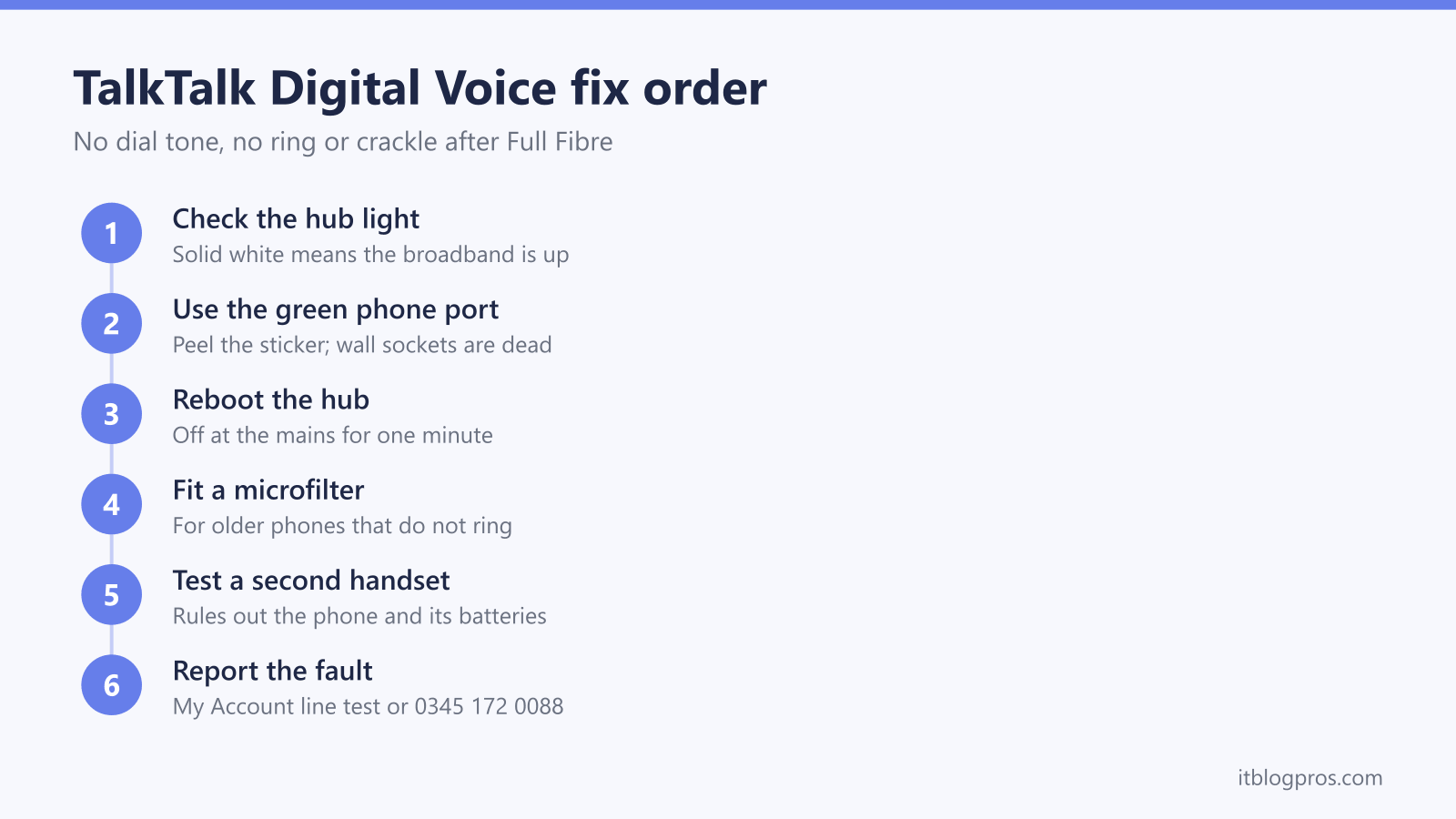
A TalkTalk home phone that goes quiet after the move to Full Fibre is nearly always a wiring or registration problem rather than a broken line. Digital Voice carries calls over the broadband connection through the green phone port on the Wi-Fi Hub, or through a small Digital Voice Adapter on eero setups, so dial tone now depends on the hub being online, the phone sitting in the right socket, and the handset coping with a digital ring signal. This guide runs the fixes in TalkTalk's own order: no dial tone, a phone that will not ring, a crackly line, the adapter reset, the app as a fallback, what happens in a power cut, and the point at which the fault needs reporting.
A TalkTalk Digital Voice phone runs through the green Phone port on the Wi-Fi Hub, not the wall socket. Check the hub light is solid white, push the phone lead into the green port, then power the hub off for one minute and back on. Older phones that stay silent need a microfilter between hub and phone. A second dead handset after the reboot means a fault report.
Key Takeaways
- Digital Voice only exists on TalkTalk Full Fibre, and the phone plugs into the green Phone port on the Wi-Fi Hub 2 or Wi-Fi Hub 3, so a phone left in a wall socket goes silent by design rather than by fault.
- No dial tone is fixed in order: a solid white hub light, the phone lead seated in the green port, the hub off at the mains for one minute, then a second handset to rule out the phone and its batteries.
- A phone that stays silent on incoming calls is usually an older handset, and TalkTalk's fix is a microfilter plugged into the green port with the phone plugged into the filter.
- eero customers get a Grandstream Digital Voice Adapter instead of a hub phone port; a pin in its Reset hole for up to 20 seconds, followed by a 15-minute wait, restarts an adapter that will not register.
- The line stops in a power cut and 999 needs a mobile, care alarms that need an analogue line are not supported, and a fault that survives every step goes to the line test in My Account or 0345 172 0088.
The phone now runs through the hub, not the wall socket
TalkTalk Digital Voice is the home phone service that comes with Full Fibre. Calls travel over the broadband connection instead of the old copper line, the same change every UK provider is making before the analogue network closes on 31 January 2027; the landline switch-off guide covers the national picture. In practice it means the phone plugs into the router. On the Wi-Fi Hub 2 the socket is the green Phone port on the back, and TalkTalk ships some hubs with a sticker over it, so peel the sticker off if the port looks blanked. The Wi-Fi Hub 3 has the same green port, labelled VOIP on TalkTalk's own diagram. Nothing needs switching on for it: TalkTalk provisions the voice service remotely, and the TalkTalk router login guide covers the Wi-Fi and password settings that the admin page does control.
The master socket and every extension socket in the house carry nothing once Full Fibre goes live, so a phone still sitting in a wall socket is silent by design rather than faulty. The phone socket not working after fibre guide explains the wiring side, and the connect a phone to your router guide covers cordless bases and adapters across every UK hub. TalkTalk customers who took an eero mesh package have no phone port on the eero at all; they get a separate Digital Voice Adapter, which has its own section further down.
One consequence of the change shapes every fix on this page: dial tone now depends on the hub being online. When the broadband is down, the phone is down with it, and the TalkTalk WiFi not working guide is the place to fix the broadband first.
No dial tone: the fixes in order
Work through these in sequence, because each step rules out the one before it.
- Read the hub light. Solid white on the Wi-Fi Hub 2 or Wi-Fi Hub 3 means the broadband is up. Blinking amber is the hub starting, amber and white together is the hub connecting, and solid amber that stays put means the broadband itself has failed; no phone fix helps until that clears. TalkTalk's Wi-Fi Hub 2 guide also lists one pattern that belongs to the phone alone: solid white for around 30 seconds, then amber flashing for about three seconds, repeating. That pattern means the hub's voice service has failed to register with TalkTalk. A reboot usually clears it, and a pattern that keeps coming back needs TalkTalk's help.
- Check the lead and the port. Pull the phone lead out of the green port and push it back until it clicks. TalkTalk's own advice is to check the wire is secure and in good condition, then to try a different phone cable, because a lead that worked in a wall socket for twenty years can still be the fault.
- Reboot the hub. Switch it off at the mains, wait a full minute, switch it on and leave it alone until the light settles to solid white. Give the voice service another minute or two after that, since it registers after the broadband comes back.
- Test a second handset. A corded phone is ideal. If the second phone gets dial tone, the original handset or its base is the fault. On a cordless phone, confirm the base has power and the handset batteries are charged, because a flat DECT battery looks exactly like a dead line.
- Allow for the switch itself. If the line has only just moved to Full Fibre, the number transfer can finish after the broadband does. The complete digital voice fix guide covers those activation and porting delays, which look like faults and are not.
A solid white hub light, two dead handsets and a reboot that changes nothing put the fault at TalkTalk's end. The hub's own Digital Voice page, covered further down, shows whether the voice service ever reached the hub, and the reporting section at the bottom explains the fastest route.
A phone that does not ring usually needs a microfilter
This is the most common Digital Voice complaint after the move to Full Fibre. Outgoing calls work and dial tone is fine, yet incoming calls drop straight into voicemail or the caller hears ringing while the house stays quiet. TalkTalk's fix is specific: plug a microfilter into the green phone port on the Wi-Fi Hub 2, then plug the phone into the microfilter. The cause is age. Older phones, which TalkTalk puts at roughly 25 years old or more, were built for the ring signal of a copper exchange line and often stay silent on a hub's phone port, and the filter sitting between the hub and the phone is what gets the ringer responding. TalkTalk gives the same advice for the Wi-Fi Hub 3 and for the Digital Voice Adapter on eero setups.
Microfilters are the small white splitters that came with every ADSL and fibre-to-the-cabinet install, so most homes have one in a drawer. The filter's own plug goes into the hub, and the phone goes into the socket on the filter marked Phone; the socket marked DSL or ADSL stays empty.
Before fitting one, spend thirty seconds on the ordinary causes. Turn the ringer volume up on the handset, clear any do-not-disturb or night mode on a cordless base, and ring the landline from a mobile while standing next to the phone. A modern phone that rings when an old one stays silent confirms the microfilter is the answer. Silence from every phone, filter fitted or not, belongs in the reporting section.
A crackly or distorted line clears with a reboot and a handset swap
Crackle, a distorted dial tone or a faint, hollow line on a freshly installed Digital Voice service has a short fix list, because there is no copper pair left to corrode. TalkTalk's guidance for a distorted or crackly line after setup is to reboot the equipment, meaning the hub and the Digital Voice Adapter as well if there is one, then to test with another handset. Do the reboot properly: off at the mains, one minute, back on, then wait for solid white.
Next, swap the handset for a corded phone if the crackly one is cordless. Tired batteries or a cordless base parked right beside the hub can produce hiss and dropouts that have nothing to do with the line, so move the base a metre or two away and try again. Swap the phone lead too, since a crushed or kinked cable behaves exactly like a noisy line. The copper-era advice about opening the master socket and testing in the test socket no longer applies; on Full Fibre the master socket carries nothing, so there is nothing to test there. Crackle that only affects calls to one number is the far end's problem, which is the first check in TalkTalk's own noisy line guide.
Persistent crackle or one-way audio on every call after all of that usually means the broadband itself is losing packets. The hub light and a speed test through My Account will show it, and the line checks in the TalkTalk WiFi not working guide apply directly, because a phone that breaks up is reporting the same fault a stuttering video call would.
eero customers troubleshoot the Digital Voice Adapter instead
TalkTalk's eero packages use Amazon eero mesh units, and no eero has a phone socket. TalkTalk supplies a Digital Voice Adapter instead: a small Grandstream box that customers and TalkTalk's community staff identify as the Grandstream HT801, though TalkTalk's own setup guide only ever calls it the Digital Voice Adapter. It has three connections. The phone lead goes into the green phone port, an Ethernet cable runs from the adapter's blue port straight into a port on the eero, and the power lead goes to a wall socket.
Its three lights tell the story. A blinking Power light means the adapter is starting up and solid means it is on. The Internet light is solid when the adapter is on the network and blinks while data moves. The Phone light is the one to watch: off means the adapter is unregistered with TalkTalk, rapid blinking means the phone is off the hook or busy, and slow blinking means voicemail is waiting.
TalkTalk's troubleshooting for the adapter is a fixed sequence. Check all three lights are lit. If they are not, or the phone is dead with all three lit, switch off both the adapter and the eero, then switch both back on and let the eero settle before expecting the adapter to register. An adapter that has stopped working altogether gets a reset: push a pin or straightened paper clip into the hole labelled Reset and hold it for up to 20 seconds, or until every light apart from Power goes out. The factory reset then takes a full 15 minutes while the adapter pulls its TalkTalk configuration back down, so leave it alone for the whole period before testing.
Two honest caveats. The adapter pulls its settings from TalkTalk and locks them, so there is nothing to configure by hand. And TalkTalk supports it on its own hubs or the eero; community threads about running it behind an ASUS or other third-party router are mostly stories of registration failures, so that setup is best treated as unsupported. Older phones that do not ring on the adapter get the same microfilter fix as on the hub, with the filter between the adapter's green port and the phone.
The Digital Voice App works as a fallback for registered users
TalkTalk's Digital Voice App puts the landline number on a mobile. Registered users make and take calls on their TalkTalk landline number from an Android or iPhone handset over Wi-Fi or mobile data, at home or abroad, with calls charged at standard TalkTalk rates and covered by any calling boost on the account, and one login works on up to five devices. That makes it a useful stopgap while a hub or adapter fault is being fixed, since the app talks to TalkTalk directly rather than through the home phone port.
The catch is availability. TalkTalk's help page states that new registrations are not possible at this time, for new or existing customers, so the app only helps households that registered before the door closed. Anyone already registered activates it from My Account by choosing TalkTalk Digital Voice App and sending the activation email, then setting a password from the link and logging in. If the app itself stops working, TalkTalk's fixes are the usual three: confirm the mobile has internet, close and reopen the app, then uninstall and reinstall it to get the current version. It needs Android 6.0 or iOS 13.0 and above.
Two limits matter. The app cannot dial 999; an emergency number typed into it hands over to the phone's normal dialler, which needs mobile coverage. And TalkTalk states the app is not suitable for anyone with a hard-wired care alarm or a medical device that depends on the landline.
Power cuts, 999 calls and care alarms
Digital Voice runs over the internet, and TalkTalk is plain about the consequence: when the power goes out, the phone stops, and 999 cannot be dialled from it. TalkTalk's advice is to keep a mobile handy for emergencies, and a mobile with coverage can call 999 even with no credit. For homes where a mobile is not a realistic backup, TalkTalk offers a battery backup unit that keeps the Wi-Fi Hub 2 and the fibre connection box running for about an hour, long enough to reach the emergency services. TalkTalk mentions it specifically for areas with no mobile signal, and anyone who depends on the phone for health or safety reasons should ask for one when ordering Full Fibre or by contacting TalkTalk. The digital landline power cut rules guide explains Ofcom's one-hour requirement, who qualifies for free backup at each provider, and the DIY UPS route for everyone else.
Care alarms are a separate matter. TalkTalk states that Digital Voice does not support care alarms such as Lifeline units that connect through a phone line, and that the service is not suitable for anyone relying on a hard-wired care alarm or a medical device on the landline. Those devices were built for an analogue line, and TalkTalk says many have not been tested on its network. Its current position is that the time is not right to move those customers to Full Fibre, and it asks anyone with a care alarm to register it by live chat or on 0345 172 0088 so the account is flagged before any change, and to speak to the alarm provider about a digital-ready alternative. A care alarm that has already gone silent after a Full Fibre install is a call to the alarm provider first and TalkTalk second, not something to fix with a microfilter.
The hub's own Digital Voice page shows where the fault sits
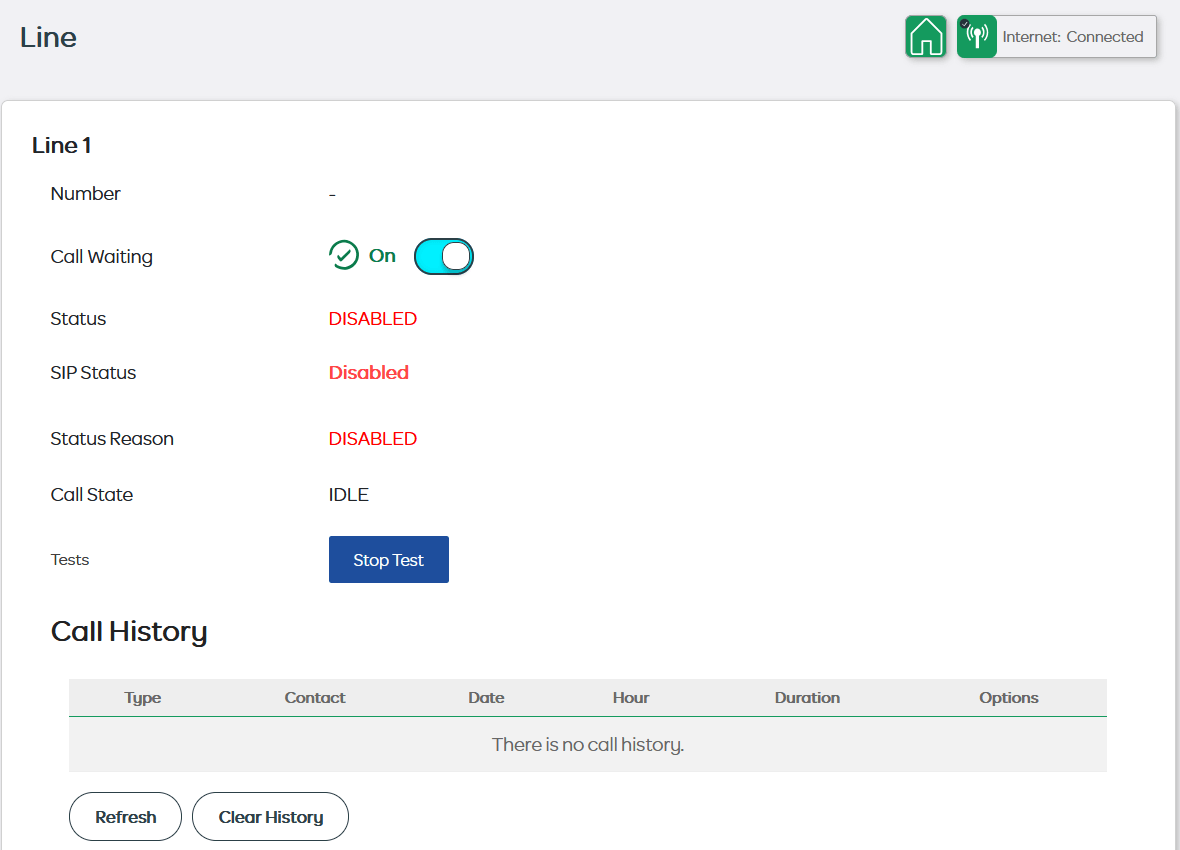
Signing in to the hub at 192.168.1.1, as the TalkTalk router login guide explains, shows more than the light on the front does. On a reader's replacement Wi-Fi Hub 3, shown in the screens below with the reader's permission, the Dashboard menu has a Digital Voice entry with a Connection Status, which read Offline, and a more detailed Line 1 page lists the phone number, Status, SIP Status and Status Reason. SIP is the IETF's call signalling standard, and the hub uses it to register the line with TalkTalk, so those fields describe the voice service itself rather than the handset or the wiring.
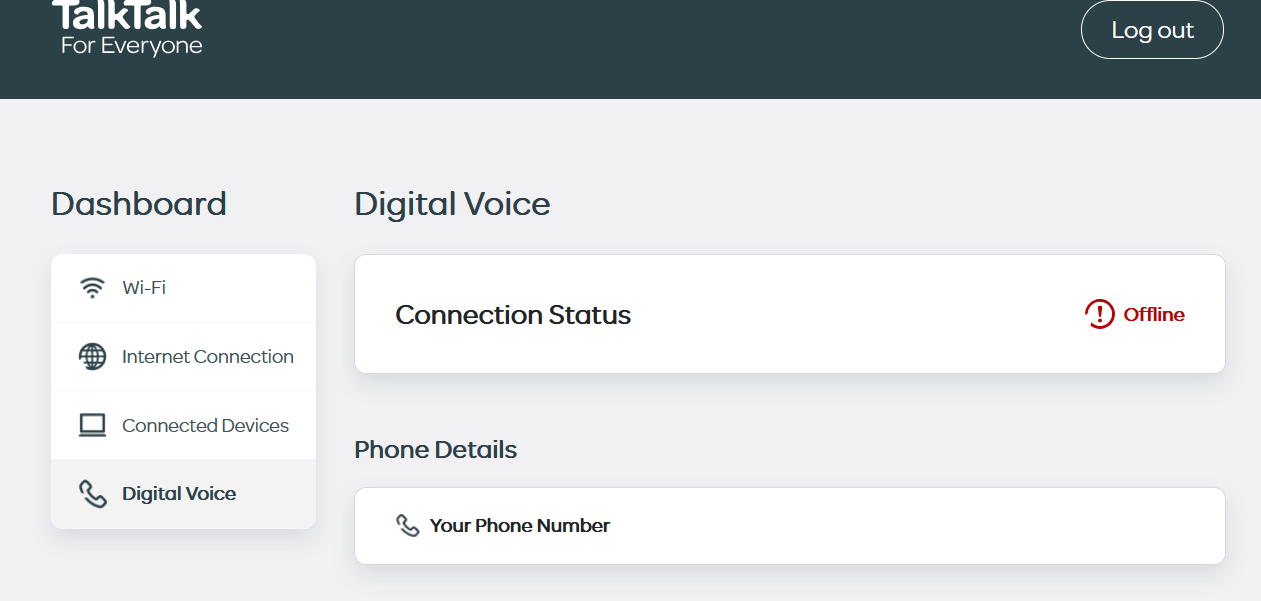
On that reader's hub the page showed Internet: Connected in the corner while Line 1 had no number, with Status, SIP Status and Status Reason all reading Disabled, and a separate Telephone panel read Not registered. Broadband that works alongside a line with no number loaded points at the voice settings, which TalkTalk sends to the hub remotely, rather than at the phone, the cable or the line. Swapping the handset changes none of those fields, because the hub registers with TalkTalk whether a phone is plugged in or not.

The same hub's event log recorded "TR-069 connectivity to (acs.talktalk.co.uk) has failed". TR-069 is the Broadband Forum standard that lets a provider's auto-configuration server, or ACS, set up customer routers remotely, and acs.talktalk.co.uk is the TalkTalk server the hub was trying to reach. One failed entry proves little on its own, but next to a Disabled line it fits a hub that never received its phone settings.

The pattern is most likely after a hub swap. That reader's old hub had been carrying the calls over Digital Voice until it failed, and TalkTalk said the replacement would work once plugged in where the old one sat. By the reader's account the phone then stayed silent on two different handsets and through three engineer visits, the third by an engineer who had been given no details and treated the job as a new installation. Openreach engineers repair the line, not TalkTalk's voice settings. A replacement hub showing Internet: Connected with a Disabled line needs TalkTalk to link the new hub to the account and send the Digital Voice settings to it. Quote the Line 1 fields when reporting it by the routes in the next section, and leave a factory reset until TalkTalk asks for one, because a reset returns the Wi-Fi name and password to the values on the hub's label.
When only TalkTalk can fix it, and how to report the fault
Some faults cannot be fixed from the living room: a voice service that never registered after the switch, a number that has not moved across, an adapter that refuses to register after a factory reset, or a line that is dead on two handsets under a solid white hub light. TalkTalk's fastest route is the live connection test in My Account. Sign in, open My Connection in the Service Centre, and run the test; it checks the line, shows any outage or planned maintenance in the area, and lets the fault be logged with progress updates in the same place. Live chat runs from the My Account dashboard seven days a week and sends updates by email.
The phone route is 0345 172 0088, which is free from a TalkTalk home phone, of limited use when that phone is the thing that is broken, so call from a mobile. Customer service and tech support are open 9am to 7pm on weekdays and 9am to 6pm on Saturdays, and Text Relay users dial 18001 0345 172 0088. Whichever route, say the words Digital Voice or no dial tone on Full Fibre, state whether the hub light is solid white, and list the steps already done, including the second handset and the reboot, because that moves the case past the scripted checks.
Households where someone depends on the phone for health, safety or mobility reasons, such as home dialysis, a ventilator, or being unable to leave home unaided, qualify for TalkTalk's free Priority Fault Repair, which puts the repair at the front of the queue once it is registered on the account. TalkTalk's own equipment is the only supported way to run its phone service, and the hub and adapter both come from TalkTalk with the Full Fibre order, so a replacement for a dead one is a request to TalkTalk rather than a shopping trip. The provider-by-provider view of the same faults lives in the complete digital voice fix guide.