
A landline that worked for decades goes silent, and the temptation is to assume the phone has died. In almost every case the phone is fine. The UK is part-way through switching every home phone line from the old analogue copper network to a digital service that runs over broadband, and the switch changes where the phone physically plugs in, how the line gets its dial tone, and what a fault actually looks like. BT calls the new service Digital Voice, EE calls it Digital Home Phone, Sky calls it Internet Calls, Virgin Media routes calls through its Hub with a supplied adapter, and Vodafone runs a digital landline through its own routers. The names differ but the faults, and the fixes, are nearly identical. This guide runs the universal fix ladder first, then the provider-specific checks, then the awkward cases: one-way audio, dropped calls, missing caller ID and porting delays.
A digital landline stops working for one of three reasons: the phone is still plugged into the dead wall socket instead of the router's phone port, the hub needs a mains reboot, or activation has not finished. Move the phone to the hub's phone port, or Virgin Media's supplied adaptor in the top grey port labelled 1, restart the hub, and report it if the switchover date has already passed.
Key Takeaways
- After the digital switchover the phone must plug into the router's phone port, or Virgin Media's supplied adapter, because the old telephone wall socket no longer carries a dial tone.
- A mains reboot of the hub reloads the voice service and clears most no dial tone, one-way audio and dropped call faults on every provider.
- Nothing works before the provider's confirmed switchover date, and a line still silent after that date and a hub restart is an activation only the provider can push through.
- Every UK provider runs its own version of the same service: BT Digital Voice, EE Digital Home Phone, Sky Internet Calls, Virgin Media's hub-based phone and Vodafone's digital landline.
- Openreach's big switch off page says all traditional phone lines go digital on 31 January 2027, and a digital landline needs mains power, so battery backup matters for anyone dependent on the phone.
The Digital Switchover Explains the Silent Landline
The UK is retiring the analogue phone network that carried calls for over a century. Openreach's big switch off page says that on 31 January 2027 all traditional phone lines will be going digital, and that a service not switched by then may be limited. Every provider is moving customers to a phone service that travels over broadband instead. Ofcom oversees the migration and reports millions of lines have already moved.
The practical change is physical. Once a line goes digital, the copper pair feeding the telephone wall socket carries nothing, so a phone left plugged into the old socket goes completely dead even though no equipment has failed. That single misunderstanding causes more digital voice complaints than every genuine fault combined. The full story of the dead socket, including when extensions can be rewired, is covered in the guide to a phone socket that stopped working after fibre.
The Universal Fix Ladder Restores Most Lines
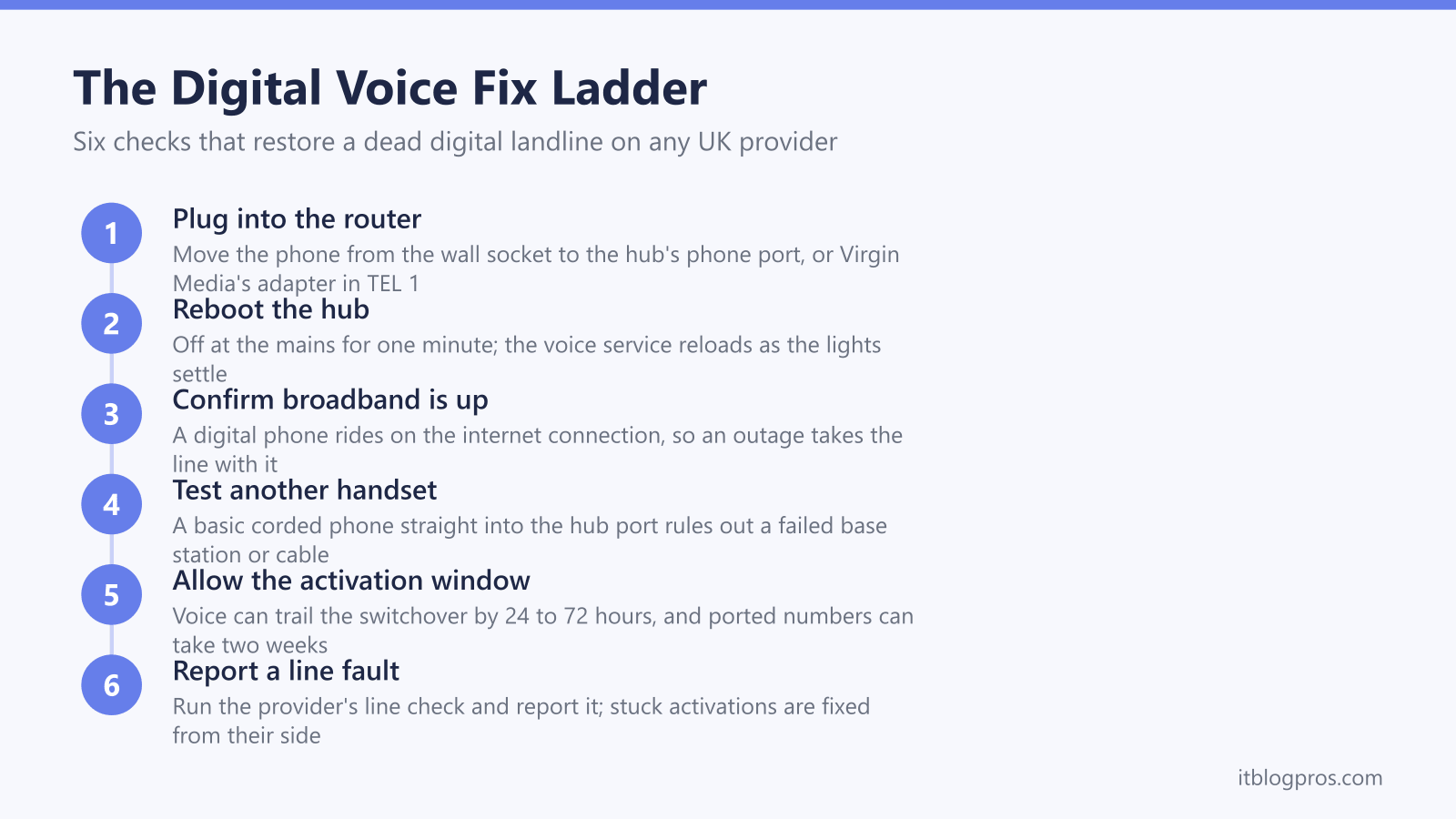
The same six checks fix a dead digital landline on any provider, in this order.
First, plug the phone, or the base station of a cordless set, into the phone port on the broadband hub rather than the wall socket. Virgin Media's setup page says to plug the supplied adaptor into the top grey port labelled 1 on the Hub, and the phone's cable into the adaptor.
Second, reboot the hub at the mains: switch it off, wait one minute, switch it back on and let the lights settle. The voice service loads as part of the hub's boot sequence, and providers list this as the first fix for a dead or half-working line.
Third, confirm broadband is actually up. A digital phone cannot work without a live internet connection, so a broadband outage takes the landline with it.
Fourth, test with a different handset, ideally a basic corded phone straight into the hub's phone port, to rule out a failed base station, flat handset batteries or a damaged cable. Sky's setup guides say to use the cable that came with the phone, so try the phone's own lead rather than a substitute.
Fifth, check the switchover date and activation as described in the next section.
Sixth, run the provider's online line check or service status page and report a fault. The wiring detail for every hub sits in the guide to connecting a phone to the router.
The Phone Belongs in the Router, Not the Wall
BT's and EE's setup pages name a green phone port on the back of the hub, Sky's setup guides name the port marked UK, Vodafone's Digital Voice page says the phone plugs into the router without naming the port, and Virgin Media's setup page says its supplied adaptor goes into the top grey port labelled 1. That port is now the only live phone connection in the house.
Extension sockets around the home stop working the moment the line goes digital, unless an engineer has specifically rewired them to feed from the hub. The clean fix for phones in other rooms is a cordless multi-handset set: the base station plugs into the hub's phone port, and the additional handsets only need a mains socket wherever they sit. EE also offers a Digital Home Phone Adapter that links a base station to the hub wirelessly, so the phone does not have to live next to the router.
Check the free routes before buying handsets. BT's adapter help page says a free EE Digital Voice Adapter can be ordered online or by texting ADAPTER to 61998, and Virgin Media's switchover page says homes with separate base stations wired back to the phone socket need an engineer appointment. Vodafone's Digital Voice page is blunter: extra telephone sockets stop working, and every phone must plug into the back of the router or be a wireless phone that works with Digital Voice. Where corded extension phones have to be replaced, a two handset DECT set such as the VTech EA5051, which VTech's Amazon listing describes as a 2-handset pack, puts the base at the hub and the second handset in the room that lost its socket.
Older equipment mostly survives the move. Standard corded and cordless phones work fine plugged into the hub or adapter. Telecare pendants, burglar alarm diallers and fax machines are the exceptions, and anyone relying on them should confirm compatibility with their provider before the switchover rather than after the line goes quiet.
Activation and Porting Delays Masquerade as Faults
Plugging the phone into the hub before the provider's stated switchover date does nothing. EE says outright that a phone connected to the hub ahead of the switchover date will not work, and the same logic applies everywhere: the voice service only exists on the hub once the provider activates it.
On the day itself, voice can trail broadband. Sky's phone troubleshooting has a step for exactly that: for a line moved to Internet Calls in the last 30 days that cannot make or receive any calls, Sky says to switch the hub and the ONT off at the mains for 1 hour, then switch both back on. BT's Digital Voice common fixes page gives the restart as off, wait 2 minutes, then back on, and says it refreshes the connection and updates the Digital Voice service. None of the provider help pages gives a waiting time, so a hub restart is worth one attempt, but repeated factory resets do not speed up provisioning.
Moving providers adds number porting on top. A ported landline number completes alongside the broadband switch, and while it is in progress outgoing calls may present a temporary number while incoming calls still chase the old line. If the line stays dead after the switchover date and a hub restart, or a port passes the date the provider gave, only the provider can fix it, so report it rather than continuing to swap cables.
BT Digital Voice Checks
BT's service runs through the green phone port on the back of the Smart Hub 2 and the newer hubs BT supplies for full fibre; BT swaps incompatible older hubs as part of the upgrade. BT's unable to make or receive calls page says the hub should show a steady blue light, and that anything else can indicate a problem with the broadband service, which is the precondition for the phone working. The standard fix is the mains reboot, and BT's own pages give the wait as 1 minute on that page and 2 minutes on its common fixes page, then let the lights settle back to steady blue.
BT also sells dedicated Digital Voice handsets that pair wirelessly with the hub rather than plugging into it. If one of those goes quiet, re-register it to the hub or test the physical phone port with an ordinary handset to separate a pairing fault from a line fault.
If there is still no dial tone after a restart and a handset test, the next step is BT's own tools: BT's Digital Voice fix a problem pages point to an online Digital Voice troubleshooter that BT says tests the connection, reports a network fault and offers an engineer appointment where the problem cannot be fixed online. The dedicated walkthrough, including handset pairing and the Hybrid Connect backup, is in the BT Digital Voice not working guide.
EE Digital Home Phone Checks
EE's service needs a hub with a green phone port on the back, and EE supplies one during the switchover if the existing hub lacks it. Households moved across from BT sometimes see the Digital Voice name on EE paperwork; it is the same hub-based service.
The checks are the port, the power and the date. The phone or base station goes in the green phone port, the base station needs its own mains power, and the service only works from the switchover date EE confirms in advance. If calls fail with a message or silence, EE's published fix is the mains reboot: off for one minute, then back on.
EE's Digital Home Phone Adapter adds a wrinkle worth checking: it must be paired with the hub, and an unpaired or unpowered adapter looks exactly like a dead line. Plugging the phone directly into the hub's green port for a test call separates an adapter fault from a service fault. The full walkthrough is in the EE Digital Home Phone not working guide.
Sky Internet Calls Checks
Sky's Internet Calls setup guides say the phone plugs into the port marked UK on the back of the Sky Broadband Hub or Sky Max Hub, using the cable that came with the phone. Sky's phone troubleshooting asks for the voice light colour on the Sky Broadband Hub (SR203), where Sky says an amber or unlit voice light is the cue to reset the hub and to get in touch if it stays that way. For the Max Hub, Sky's phone help sends owners who cannot make or receive calls straight to contact.
Sky's first-line fix is a power cycle: Sky says to switch the hub off at the mains for a few seconds, switch it back on and wait a few minutes for the lights to return to normal. Two Sky-specific points are worth knowing. Sky's phone help sends Max Hub owners who cannot make or receive calls straight to contact, so a persistent dead port on a Max Hub is worth reporting rather than fighting. And Sky's setup guides say to use the cable that came with the phone, so try that lead rather than a substitute before blaming the hub. The dedicated page is the Sky Internet Calls not working guide.
Virgin Media Phone Checks
Virgin Media's switchover moves the phone from the wall socket to the Hub, using a supplied adaptor that Virgin Media's setup page says goes into the top grey port labelled 1; the phone then plugs into the adaptor. Virgin writes to customers before the switchover and the adaptor only goes live when Virgin confirms the switch, so connecting early produces silence that is not a fault.
Two Virgin-specific rules matter. The Hub must stay powered for the phone to work. And because the service rides on the cable broadband connection, any broadband outage in the area takes the phone down with it, so Virgin Media's service status tool, which its WiFi not working page points to for area outages, is worth a look before troubleshooting hardware.
If the adaptor is seated in the grey port labelled 1, the Hub has rebooted and the switchover date has passed with no dial tone, report it on 150 from a Virgin line or 0345 454 1111. The full walkthrough, including replacement adapters, is in the Virgin Media phone not working after switchover guide.
Vodafone Digital Landline Checks
Vodafone's Digital Voice page says the phone cable plugs into the router instead of the wall, and that Vodafone sends an adapter to plug the phone into the router. That page does not name the port, so follow the instructions Vodafone sends with the equipment. The base station of a cordless phone, or a corded phone, connects there rather than to the wall, and it is worth reseating the cable at both ends before assuming a fault.
Vodafone's fix ladder matches everyone else's: restart the router at the mains, wait for the lights to settle, then test again. If there is still no dial tone, check the account online to confirm the landline service shows as active on the broadband package, since lines occasionally complete the broadband switch with the voice element still pending.
Extension sockets do not work with Vodafone's digital service, so phones elsewhere in the house need cordless handsets linked to a base station at the router. A line that stays dead after the reboot and an account check needs Vodafone support, who can run a line test and, where needed, send a replacement router or an engineer.
TalkTalk Digital Voice Checks
TalkTalk customers have a separate guide that takes the fixes in TalkTalk's own order, covering no dial tone, a phone that does not ring and a crackly line: TalkTalk Digital Voice not working.
One-Way Audio and Dropped Calls Trace Back to Broadband
One-way audio, where the phone rings and connects but one side hears silence, is the most reported oddity on digital landlines. The hub reboot clears the majority of cases, because it rebuilds the connection the audio travels through. If it recurs, test a different handset on the hub's phone port to rule out the phone, and then report it: providers have fixed persistent one-way audio with hub firmware updates, so a stubborn case is usually theirs to solve, not yours.
Dropped and robotic calls point at the broadband underneath. A digital call is just data, so a congested or unstable connection produces choppy audio and mid-call drops. If the broadband itself is dropping, fix that first, because no amount of phone-side fiddling helps. Where a voice adapter or base station supports it, a wired Ethernet link to the hub is steadier than a wireless one. Calls that only misbehave at busy times, with the household streaming and gaming simultaneously, are a bandwidth problem wearing a phone costume.
Missing Caller ID Is an Account Setting, Not a Wiring Fault
Caller display on a digital landline is a line feature the provider switches on, so a phone that rings without showing numbers usually needs an account change rather than a new cable. Where the feature shows as active but nothing displays, providers have fixed it by deactivating and reactivating caller display, with the service returning within 24 hours.
The handset has its own share of the job. Caller display must be enabled in the phone's settings, and names rather than numbers only appear when the caller is saved in the handset's own phonebook.
Outgoing identity follows the same logic. Dialling 141 before a number withholds it for that call, and a line set to withhold permanently shows as withheld to everyone until the provider removes the block; dialling 1470 before a number reveals it for a single call. The 1471 service still reads back the last caller's number on digital lines, and a 1471 that never captures numbers points to a line-side fault the provider needs to investigate.
Power Cuts Stop a Digital Landline Without Backup
Old analogue phones drew power from the exchange, so a corded handset kept working through a blackout. A digital landline does not: the hub, and any adapter or base station, need mains power, so a power cut silences the phone for its duration. A dead line during or just after a power cut is expected behaviour, and normal service returns once the hub reboots, occasionally needing the usual mains restart to reload the voice service.
Ofcom's power cut guidance says providers should protect people who depend on the landline. It says providers should have at least one solution giving access to the emergency services for at least one hour in a power cut, offered free to customers who depend on their landline, such as a battery backup unit for the hub or a mobile-based fallback. Anyone in that position should tell their provider before the switchover rather than after. The entitlements, per-provider battery options and how to claim them are covered in the digital landline power cut rules guide. Households that do not qualify and still want the phone to outlast a cut can put their own battery behind the hub, remembering that on full fibre the fibre box needs power as well, and BT's Battery Back Up help page describes its Plus unit powering both the fibre modem and the hub. The battery backup guide for a router and ONT sets out the voltage, plug and runtime checks to make before buying one.