
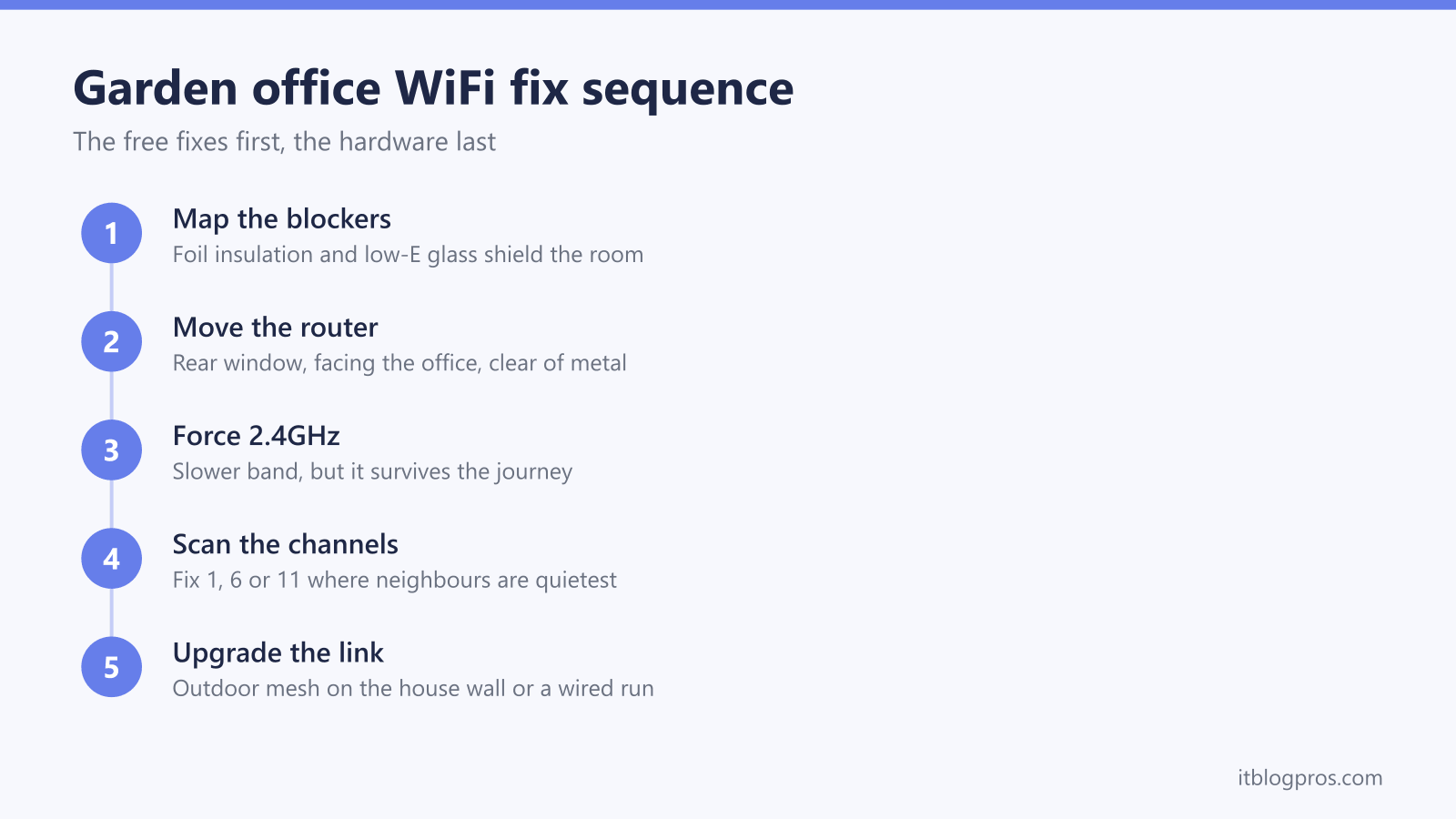
WiFi that works on the patio but dies at the garden office desk is not a broadband fault, a router fault or bad luck. It is physics. Modern garden rooms are built from foil-backed insulated panels and fitted with low-emissivity double glazing, and both materials are genuinely good at reflecting radio waves. The result is a well-insulated box that behaves like a partial Faraday cage. This guide decodes exactly what is blocking the signal, then works through the fixes in the order that costs nothing first and hardware last.
Garden office WiFi usually fails because foil-backed insulation and low-E glazing shield the room like a Faraday cage while distance drains what little remains. Move the router or a mesh node to a rear window facing the office, connect the office device to 2.4GHz for a steadier link, scan for a quieter channel, and upgrade to an outdoor mesh unit or a wired run when WiFi alone cannot reach.
Key Takeaways
- Foil-backed SIPs panels and multifoil insulation reflect WiFi like a Faraday cage, so even a strong router signal collapses the moment the garden office door closes.
- Low-E double glazing such as Pilkington K Glass carries a metallic oxide coating that can strip roughly 25dB from a WiFi signal, a bigger loss than several brick walls combined.
- The 2.4GHz band penetrates obstacles far better than 5GHz, so forcing the office device onto 2.4GHz often trades headline speed for a connection that stops dropping.
- Repositioning the house router or a mesh node to a rear window facing the office, then fixing a quiet channel, resolves a large share of cases without spending anything.
- An extender placed inside a weak-signal office only repeats a bad signal, so the realistic upgrades are an outdoor mesh unit on the house wall or a wired run to the office.
The garden room itself is the biggest WiFi blocker
The signal usually reaches the garden fine. Stand outside the office with a phone and the speed test looks healthy; step inside and shut the door and it collapses. That pattern points straight at the building fabric.
Most insulated garden rooms are built from SIPs (structural insulated panels) or timber frames lined with foil-faced PIR boards or multifoil quilt insulation. The foil layer exists to reflect heat back into the room, but aluminium foil reflects radio waves just as effectively as infrared. Builders tape the panel joints with foil tape for airtightness, which turns individual reflective panels into a near-continuous conductive shell around the walls, floor and roof. Building science sources document foil-faced insulation attenuating exactly the frequency ranges WiFi uses, and owners of foil-wrapped extensions routinely report WiFi and mobile signal stopping dead at the threshold.
The honest conclusion up front: a heavily insulated garden room is a partial Faraday cage, and no amount of router rebooting changes that. The signal gets in through the apertures, meaning the windows and the door, or it does not get in at all. Every fix in this guide is really about one of two things: pushing a stronger signal at those apertures, or bypassing the shell entirely.
Low-E glazing attenuates the signal harder than the walls
The window looks like the obvious way in for the signal, and in an older shed with plain glass it is. Modern garden rooms are different. Building regulations push suppliers towards low-emissivity double glazing, and in the UK that frequently means Pilkington K Glass or an equivalent, which carries a microscopically thin coating of fluorine-doped tin oxide on one internal surface. The coating is designed to pass visible light while reflecting infrared heat back into the room.
That metallic oxide coating conducts electricity, and a conductive film reflects radio waves. Industry measurements put the WiFi loss through low-E glazing at roughly 10 to 25dB depending on the coating, with a double-glazed unit carrying a single low-E coating measuring around 25dB. Decibels are logarithmic, so 25dB of attenuation means less than half of one percent of the signal power gets through. For comparison, a single leaf of brick costs a 2.4GHz signal only about 6dB.
The practical upshot is counterintuitive: the glazing that makes the office comfortable in January can block WiFi harder than the walls of the house do. It also explains why pressing a phone against the office window barely improves the reading, and why the door being open or closed visibly changes the connection.
Distance and two exterior walls stack the losses
Before the signal ever meets the garden room it has already paid twice. It leaves the router, crosses the house, and exits through the rear exterior wall, which is typically the most heavily built wall in the path. Measured figures for brick and masonry run from about 6dB for a single brick leaf at 2.4GHz up to 18dB for thicker or damp construction. A house with foil-backed plasterboard, foil-faced cavity insulation or solid stone at the rear can lose far more; the mesh guide for thick-walled houses covers that scenario in depth.
Then comes the garden. Open air is the easy part of the journey, but signal strength still falls with distance, and every metre matters when the budget is already spent. A router two rooms deep inside the house, firing through an exterior wall, across 15 metres of garden and into a foil-lined room, is being asked to do something no consumer router is specified to do.
The losses stack. None of the individual obstacles is fatal on its own; the combination is. That is why the fix sequence below starts by removing the cheapest obstacles first: the interior walls and the distance inside the house.
The 2.4GHz band survives where 5GHz dies
WiFi routers transmit on two bands, and they age very differently over this journey. The 2.4GHz band has a wavelength of roughly 12.5cm; 5GHz sits near 6cm. Longer wavelengths diffract around obstacles better and lose less energy passing through them, which is why a single interior wall can cost a 5GHz signal 10 to 15dB while 2.4GHz shrugs off the same wall with a fraction of the loss. Across two exterior walls, a garden and coated glazing, 5GHz frequently arrives unusable while 2.4GHz still holds a workable link.
Most ISP hubs broadcast both bands under one network name and steer devices automatically, and at the edge of coverage that steering causes drops as the device hops between a dying 5GHz link and a weak 2.4GHz one. Pinning the office laptop to 2.4GHz often stabilises everything at a lower headline speed.
Where the router allows separate names per band, rename them and join the office device to the 2.4GHz name. BT's help pages disagree on the Smart Hub 2: BT's split help page says it does not have that capability because it is designed for use with Complete Wi-Fi, while BT's dual-band troubleshooting page includes it in steps that set Sync with 2.4GHz to No on the 5GHz page. To check one hub, open 192.168.1.254, select Advanced Settings, then Wireless, and look in the 5GHz section for that setting. BT documents no separate 5GHz on and off control for the Smart Hub 2, since its page on turning Wi-Fi on and off gives settings for each band only on the Home Hub 4 and Hub 5. A steady 2.4GHz link carries a video call comfortably, since calls need only a few Mbps; the dropping video calls guide covers that specific fix path.
Repositioning the router earns the first free win
Every interior wall between the router and the rear of the house is a loss that costs nothing to remove. The single highest-value free fix is moving the router, or one node of an existing mesh, to a rear window facing the garden office.
A window placement matters for two reasons. First, it removes the house's rear exterior wall from the path if the signal exits through the glass, and ordinary uncoated house glazing is a far smaller obstacle than brick. Second, it shortens the indoor leg of the journey, so the signal starts its garden crossing at close to full strength. Place the router at desk height or above, clear of radiators, metal shelving, fish tanks and large appliances, with its front face towards the office.
Households on full-fibre installs often cannot move the router far because the fibre terminal is fixed near the front door. In that case a mesh node or access point at the rear window achieves the same geometry, and the mesh versus extender versus new router decider walks through which of those fits an existing setup.
After any move, retest inside the office at the desk, not at the window, and test at the time of day the office is actually used.
Neighbour congestion crowds the band on dense streets
Forcing 2.4GHz solves penetration but inherits a different problem: everyone else's WiFi. On a terraced street or a modern estate, dozens of networks share the 2.4GHz band, and the UK allows channels 1 to 13, of which only three non-overlapping 20MHz choices exist in the common scheme: 1, 6 and 11. Routers left on automatic channel selection frequently pile onto the same channels as the neighbours, or sit on an overlapping channel such as 3 or 9, which interferes with two channel groups at once.
A weak signal on a congested channel is the worst combination, because the office device hears the neighbours' traffic almost as loudly as its own router. The fix takes ten minutes. Run a free WiFi analyser app on a phone inside the office, note which channels the strongest neighbouring networks occupy, then log in to the router and set the 2.4GHz channel manually to whichever of 1, 6 or 11 is quietest, keeping the width at 20MHz. Avoid the temptation of channel 13; it is legal in the UK but some imported devices cannot see it.
Smart channel selection features on ISP hubs re-scan periodically, and the hub maker's own position is worth checking before overriding them. BT's channel help page says BT does not recommend manually changing wireless channels on its hubs, because that disables Smart Wireless, which BT says chooses the channel with the least interference and switches if the connection becomes congested. BT's separate page on fixing the 2.4GHz channel on the Smart Hub 3 does note that some older 2.4GHz devices can struggle to stay connected when the hub switches channels, and still recommends leaving the hub to choose in most cases. So where a router does allow a manual choice, treat a fixed quiet channel as a test rather than a certainty: set it, retest at the office desk, and put the router back to automatic if nothing improves.
Extender placement decides whether an extender helps at all
The instinctive purchase for a garden office is a plug-in WiFi extender, installed in the office itself. That placement fails, and it fails for a reason worth understanding before spending money: an extender rebroadcasts whatever it receives. Placed inside the foil-lined, low-E-glazed office where the signal is already broken, it repeats a broken signal. TP-Link and Netgear placement guidance says the same thing in politer language: the extender must sit roughly halfway, at a spot where the incoming signal is still strong, not inside the dead zone.
For a garden office the workable extender position is usually a rear window inside the house, catching a strong signal from the router and firing a fresh one across the garden at the office window. That geometry only wins when the original problem was distance and interior walls. When the office shell itself is the blocker, the extender's stronger signal still meets the same foil and coated glass, and the improvement inside stays marginal.
An extender already bought and underperforming is worth checking against the booster and extender troubleshooting guide before being condemned, because placement, band settings and stale pairing account for most disappointments.

Replacing beats fixing when the shield always wins
The honest limits first. A heavily foil-insulated office with low-E glazing on a long garden may never hold reliable WiFi thrown from inside the house, whatever router is doing the throwing. Repositioning, 2.4GHz and a quiet channel claw back real margin, but physics sets the ceiling, and the definitive fix for a permanent workspace remains an armoured ethernet run or powerline trial, compared properly in the powerline versus mesh guide.
Where digging or drilling is off the table, two upgrades match this problem shape.
An outdoor mesh unit mounted on the rear wall of the house changes the geometry instead of shouting louder. The TP-Link Deco X50-Outdoor is an IP65 weatherproof WiFi 6 unit that mounts on a wall or pole, takes power over ethernet or a standard adapter, and meshes with indoor Deco units. Positioned outside, it removes the house's rear wall from the path entirely and delivers a strong, clean signal at the office window, which is the aperture the room depends on.
Where the failure is distance rather than the office shell, the TP-Link RE705X is a WiFi 6 extender for the rear-window halfway position, with a gigabit ethernet port that can also feed a small access point in the office if a cable ever reaches it. It must sit where the house signal is still strong.
The full garden office comparison, including wired options and what each route costs, is in the best way to get WiFi in a garden office guide.
