
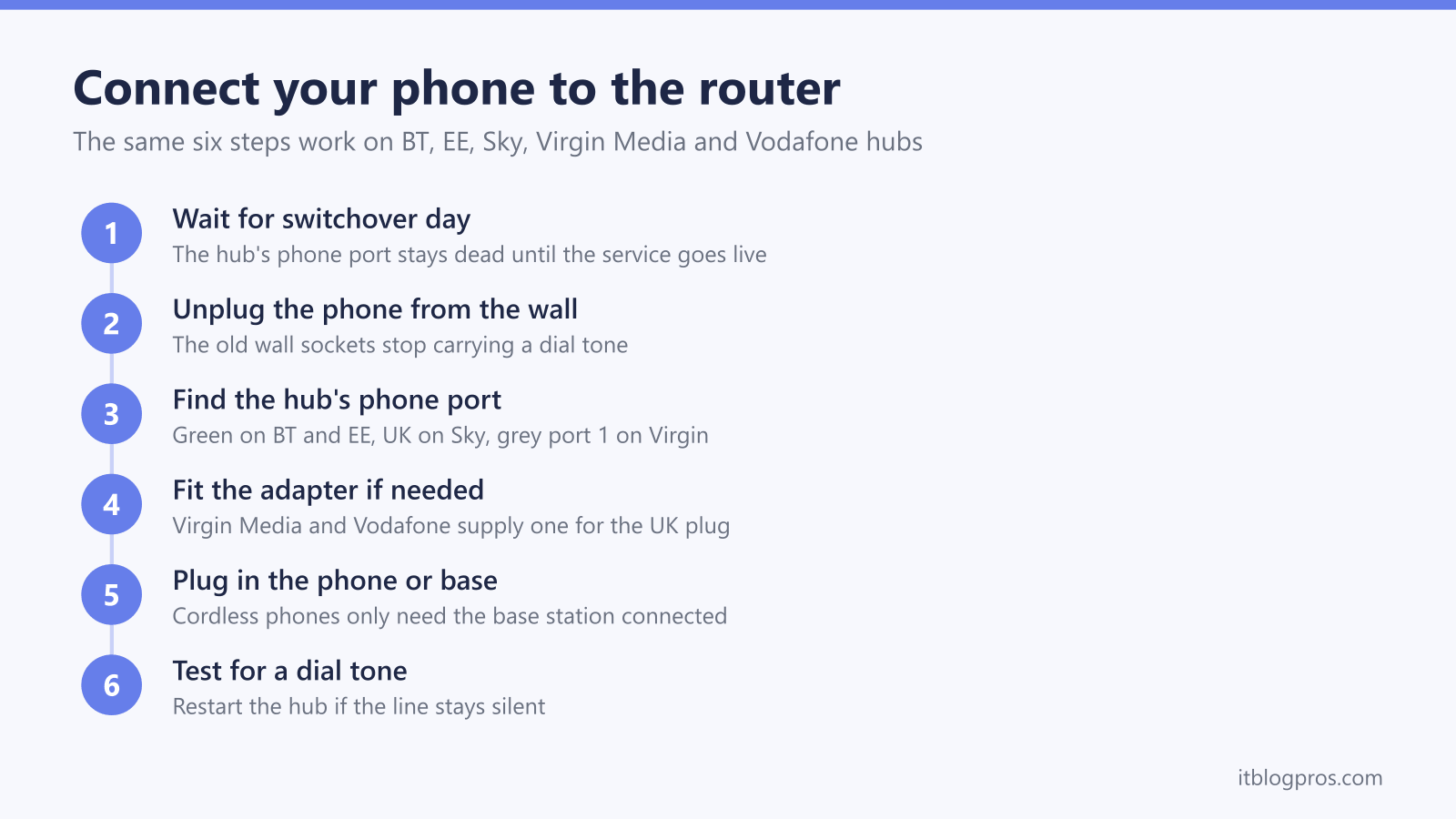
The phone socket on the wall retires when a digital phone service arrives, and the landline moves into the back of the broadband hub instead. Every major UK provider handles the same job slightly differently. BT and EE put a green phone port on the hub, Sky's setup guides use a port marked UK for the phone's own cable, Virgin Media posts out an adaptor for the top grey port labelled 1, and Vodafone says it sends an adapter to plug the phone into the router. This guide names the port each provider's own instructions give, explains why the phone's plug and the hub's port are worth checking before switchover day, covers cordless base stations and DECT pairing, and finishes with the reasons a correctly connected phone can still stay silent.
Unplug the phone from the wall socket and plug it into the phone port on the back of the hub. BT and EE hubs use a green port, Sky's guides name the UK port, Virgin Media supplies an adaptor for the grey port labelled 1, and Vodafone says it sends an adapter for the router. Cordless phones only need the base station connected, and the line goes live on switchover day.
Key Takeaways
- BT's and EE's setup pages both say to plug the handset's phone cable into the green phone port on the back of the hub, which is the port the BT Smart Hub 2 and EE Smart Hub Plus carry.
- Sky's setup guides for the Sky Broadband Hub and the Sky Max Hub say to plug the home phone into the port marked UK using the cable that came with the phone, and list no adapter.
- Virgin Media's setup page says to plug its supplied adaptor into the top grey port labelled 1, and Vodafone's Digital Voice page says Vodafone sends an adapter to plug the phone into the router.
- Cordless phones only need the base station plugged into the hub, and every paired handset around the house keeps working through it.
- Nothing works before the provider's switchover date, so check that date first when a correctly connected phone stays silent, then restart the hub and report it if the line stays dead.
The phone now plugs into the hub rather than the wall
The UK's analogue phone network is being withdrawn, and calls now travel over broadband instead of the old copper line. BT calls its replacement Digital Voice, EE calls it Digital Home Phone, Sky calls it Internet Calls, and Virgin Media and Vodafone simply describe a phone that plugs into the hub. Whatever the name, the practical change is identical. The wall sockets around the house stop carrying a dial tone, and the phone connects to a port on the back of the router.
Two rules apply to every provider. First, the hub port stays dead until the switchover date the provider confirms by letter, email or text, so plugging in early proves nothing. EE states plainly that a phone connected before the switchover date will not work, and the same applies across BT, Sky, Virgin Media and Vodafone. Second, the hub needs mains power for calls, so the phone dies with the electricity, which is covered at the end of this guide. When the phone is connected correctly and the date has passed but calls still fail, the Digital Voice not working guide works through the faults in order.
Hub phone ports and the old BS6312 wall plug
The wide, flat plug on a phone made for a British wall socket comes from British Standard BS 6312, which BSI lists as covering connectors for analogue telecommunication interfaces, including sockets for BS 6312 plugs fixed in permanent wiring. None of the BT, EE, Virgin Media or Vodafone help pages names the socket type on the hub's phone port, so whether the phone's plug fits is worth checking before switchover day.
There are three ways round it. Virgin Media's setup page says to plug the adaptor it sends into the Hub and then plug the cable that came out of the wall socket into the adaptor, and Vodafone's Digital Voice page says Vodafone sends an adapter to plug the phone into the router. Virgin Media's home phone install page also describes plugging the phone cable Virgin supplies from the Hub into the phone, with the supplied converter for a phone whose own cable cannot be removed. Sky's setup guides say to plug the home phone into the UK port using the cable that came with the phone. BT's and EE's setup pages both say to plug the handset's phone cable directly into the green phone port, but neither names the socket type, so check that the phone's plug fits the green port before switchover day and ask BT or EE if it does not.
Two honest caveats before buying anything. BT's setup page says phones bought before 2015 may not ring while connected to a Digital Voice Adapter and that BT supplies a free microfilter that enables them to ring, and EE's setup page gives the same warning for its adapter, so ask the provider before buying a plug adapter sold with a ring capacitor for a phone that dials out but never rings. BT's and EE's adapter pages both say it is tone dialling phones that work, so a pulse dialling rotary phone is not covered by either statement.
Virgin Media's setup page says it sends an adaptor ahead of the switchover, and Vodafone's Digital Voice page says the equipment it sends includes an adapter to plug the phone into the router, so on those two providers a bought adapter only earns its place when the supplied one has gone missing or been damaged, and asking the provider for a replacement comes first. On any hub, a bought adapter helps only if the phone's plug does not fit the phone port. Where the port takes the small RJ11 plug and the phone has a BT style plug, the part to look for has an RJ11 plug on one end and a BT socket on the other, the layout rhinocables describes as being for connecting phones with a BT style plug into an RJ11 connector, as on its RJ11 to BT socket adapter. The rhinocables description does not mention a ring capacitor, so it is not the part for a phone that dials out but never rings, which the caveats above cover.
BT Smart Hub 2 takes the phone in its green port
BT's Digital Voice runs through the Smart Hub 2, which has a green phone port on the back. From switchover day, BT's setup page says to unplug the phone's cable from the wall socket and push it into the green port. A cordless phone only needs its base station connected, and the handsets keep working around the house as before.
BT's own Digital Voice handsets skip the port completely and pair to the hub wirelessly, and BT's common fixes page registers a handset by selecting Register this handset to the hub and then pressing the WPS button on the hub. For a phone that has to live in another room, BT supplies a Digital Voice Adapter that plugs into any mains socket and behaves like a wireless extension of the green port. BT's adapter help page says any tone dialling phone can be used with Digital Voice, whether connected to the hub or an adapter, but that older bell-wire phones do not work with the BT Digital Voice Adapter, and it offers a free EE Digital Voice Adapter, which does work with them, online or by texting ADAPTER to 61998. BT's setup page adds that phones bought before 2015 may not ring on the adapter, and BT supplies a free microfilter that enables them to ring. When the port is connected and the date has passed but the line stays dead, the BT Digital Voice not working guide covers the fixes.
EE Smart Hub Plus uses the same green phone port
EE's Digital Home Phone works with EE and BT smart hubs that have a green phone port on the back, and the current EE Smart Hub Plus fits that description. The connection is identical to BT's. Move the phone's cable, or the cordless base station's cable, from the wall socket to the green port on the hub, and if the line stays silent, EE's Digital Home Phone quick fixes page says to turn the hub off, wait 2 minutes and turn it back on.
EE's own digital handsets pair wirelessly instead, by pressing and holding the WPS button on the hub for two seconds during handset setup. For other rooms, the EE Digital Home Phone Adapter syncs to the hub and acts as an extension socket wherever there is a mains plug, though EE warns that phones bought before 2015 may not ring while connected through the adapter. As with BT, connecting before the confirmed switchover date does nothing. Persistent silence after the date is covered in the EE Digital Home Phone not working guide.
Sky hubs take the phone's own cable in the UK port
Sky is the easy one. Sky's Internet Calls setup guides for the Sky Broadband Hub and the newer Sky Max Hub all say to plug the home phone into the UK port using the cable that came with the phone, and none of them lists an adapter or a phone lead in the box.
The hub contains the analogue telephone adapter that turns the phone's signal into Internet Calls, which is why the phone must be in the hub and not the wall. Sky's guide is explicit that a phone left connected to a phone socket will not work once Internet Calls is active. Cordless phones follow the usual rule, base station into the UK port, handsets paired to the base as normal. A line that stays silent after full fibre goes live needs the switchover date and a hub restart checked first, and the Sky Internet Calls not working guide runs through Sky's own sequence.
Virgin Media hubs need the supplied adapter in grey port 1
Virgin Media's setup page says it sends an adaptor to connect the landline to the WiFi Hub ahead of the switchover, and says to plug it into the top grey port, labelled 1, on the back of the Hub. The page does not say how many grey ports the Hub has, so look for the grey port marked 1.
On switchover day, Virgin Media's setup page says to plug the adapter into grey port 1, unplug the phone's line cable from the wall socket, and push that cable into the adapter, then wait a couple of minutes for the dial tone and make a test call. Virgin Media's switchover page adds that a cordless system only needs the base station connected to the Hub, and that a separate call blocking box moves across the same way, its cable into the Hub using the adaptor rather than the wall.
Virgin Media's help pages do not describe how to replace a lost adapter, so contact Virgin Media about a missing one, on 150 from a Virgin Media landline or 0345 454 1111 from any other phone, the numbers its setup page lists. Virgin Media's pages do not name the socket type on the Hub's grey port, so ask Virgin Media before buying a third party adapter. Once the adapter is seated and the wait has passed, remaining faults belong to the Virgin Media phone not working guide.
Vodafone sends an adapter to plug the phone into the router
Vodafone's Digital Voice page says that with Digital Voice the phone cable plugs into the router instead of the wall, and that Vodafone sends any new equipment needed, including an adapter to plug the phone into the router and a new router for customers with one of its older models. That page does not name the router's phone port or its socket type, so follow the instructions Vodafone sends with the equipment, and set it up on the date Vodafone gives, as the page asks.
After the switch, only the hub carries the line. Vodafone is clear that any extra telephone wall sockets in the home stop working, so extension phones either move next to the hub, join a cordless base station plugged into it, or wait for a DECT multi handset setup. Vodafone also notes that devices wired to the old copper line, such as some older alarms, may not work on the digital service. A dead line after connection and activation is picked apart in the complete digital voice fix guide, which covers Vodafone alongside every other provider.
DECT bases pair once and cover the whole house
Cordless phones make digital landlines far simpler than they first appear, because only the base station touches the hub. Plug the base into the hub's phone port, keep it on mains power, and every handset already paired to that base keeps ringing wherever it charges. Nothing about the switchover breaks the pairing between a DECT base and its handsets.
Provider handsets are the exception to the cable rule. BT Digital Voice handsets and EE's digital handsets pair wirelessly to the hub itself using the WPS button, with no cable at all. That wireless pairing is documented only for the providers' own handsets, so the dependable route for any other cordless phone remains the base station into the phone port.
Range planning matters more than before, since the base or the hub now anchors the phone system. BT's and EE's setup pages offer their adapters as wireless extensions for distant rooms. Virgin Media's and Vodafone's Digital Voice help pages do not document an equivalent: Virgin Media asks customers whose hub and phone are in different rooms to let it know so an engineer can move them closer together for free, and Vodafone says to plug all phones into the router or use wireless phones that work with Digital Voice. A multi handset DECT pack with the base at the hub is the tidy answer for phones upstairs on any provider.
Three cordless sets, from a twin pack with an answering machine to a single simple handset, plus the plug adapter from earlier in this guide:
| Product | Best for | Key specs | Price | |
|---|---|---|---|---|
 | VTech EA5051 Answering machine | A handset by the hub and a second upstairs | 2 handsets, answering machine, call blocker | Check price → |
 | BT Premium Phone, twin pack Call blocking | Screening nuisance calls on a busy landline | 2 handsets, answer machine, call block button | Check price → |
 | Gigaset A170 Single handset | One simple phone beside the hub | 1 handset, 50-contact phonebook | Check price → |
 | rhinocables RJ11 to BT socket adapter Adapter | A BT-style phone plug on a port that takes RJ11 | RJ11 plug to UK phone socket | Check price → |
What to check when a connected phone stays silent
When the phone sits in the right port and the line stays dead, run the checks in this order. Confirm the switchover date has actually arrived, since the port carries no dial tone before it. Restart the hub with the phone still connected: BT's Digital Voice common fixes page says to turn the hub off, wait 2 minutes and turn it back on, and that this refreshes the connection and updates the Digital Voice service. Reseat both ends of the cable and any adapter, and confirm the correct port, green on BT and EE, UK on Sky, grey port 1 on Virgin Media, and the port in Vodafone's own instructions on Vodafone. Test with a plain corded phone if one is available, which separates a line problem from a dead handset, and remember that BT and EE both say a phone bought before 2015 may not ring on their wireless adapters, and BT's setup page offers a free microfilter that enables such a phone to ring.
One permanent change deserves planning rather than troubleshooting. A digital landline needs the hub powered, so calls, including 999, stop in a power cut. Ofcom's guidance says providers should protect landline dependent customers, and the digital landline power cut rules guide explains the one hour rule, free battery back up units and how to qualify.