
A blinking orange (amber) light on an Xfinity router has two very different meanings, and telling them apart is the whole game. In the harmless case, the gateway is restarting or applying a firmware update pushed by Comcast, and the light clears itself within roughly 10 to 15 minutes. In the other case, the gateway cannot lock a downstream or upstream signal from the Comcast network, so the orange light keeps blinking and there is no internet.
This guide explains how to read the difference using nothing more than a clock and the Xfinity outage page, then walks the fix ladder from "wait and watch" up to escalation. It also flags the orange-light scam calls that target Comcast customers, so a genuine connection fault never becomes a stolen bank login.
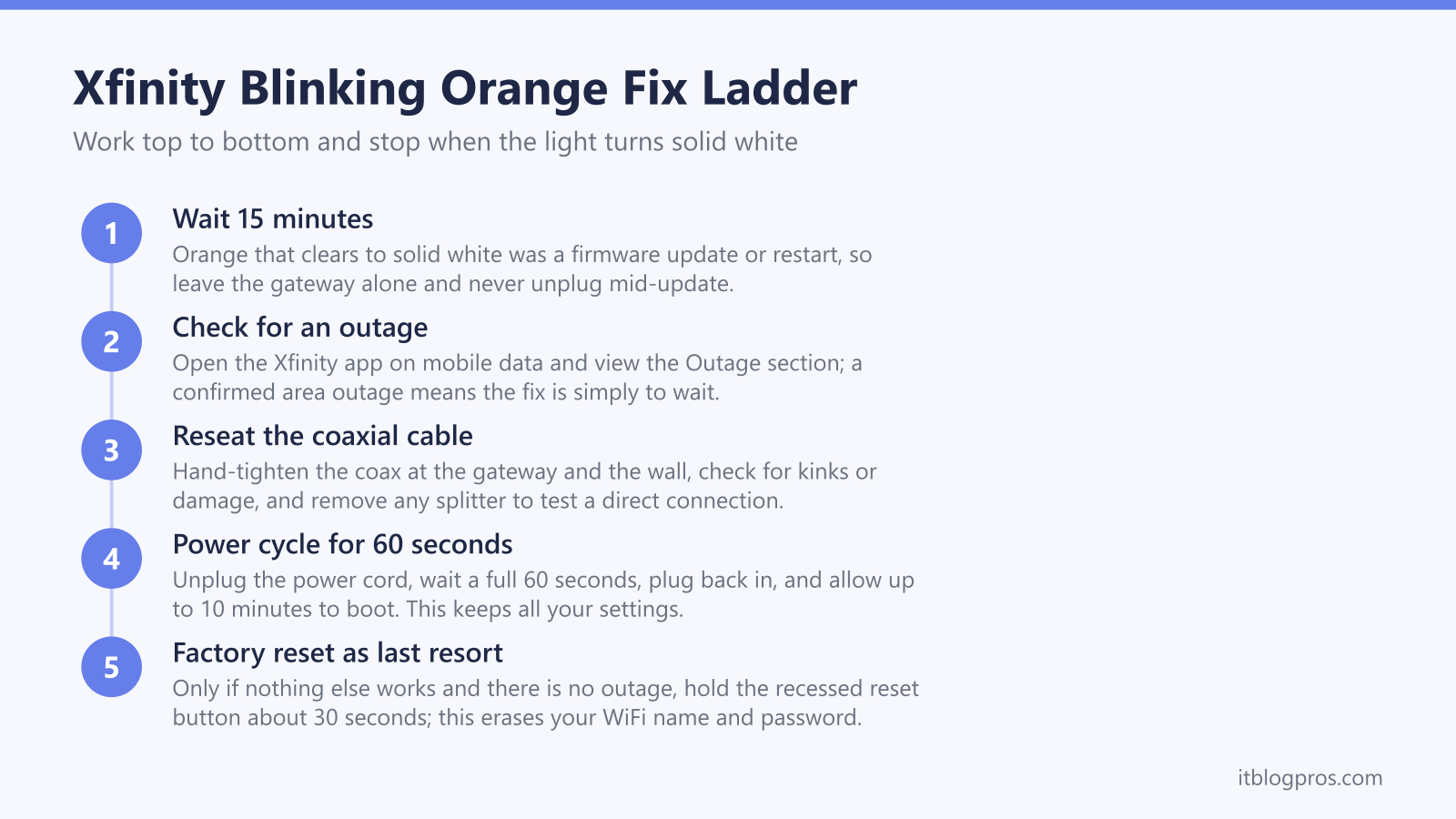
A blinking orange light on an Xfinity gateway means one of two things: a firmware update or restart is in progress, which clears itself within about 15 minutes, or the gateway cannot lock a signal from Comcast, leaving you with no internet. Wait 15 minutes first; if it keeps blinking, check for an outage, reseat the coaxial cable, then power cycle the gateway.
Key Takeaways
- A blinking orange Xfinity light is ambiguous: it is either a firmware update or restart in progress, or the gateway failing to lock a downstream or upstream signal from Comcast.
- Time is the deciding clue. Orange that clears within roughly 10 to 15 minutes was a firmware update, so leave it alone; orange that persists past 15 minutes points to a connection fault that needs the fix ladder.
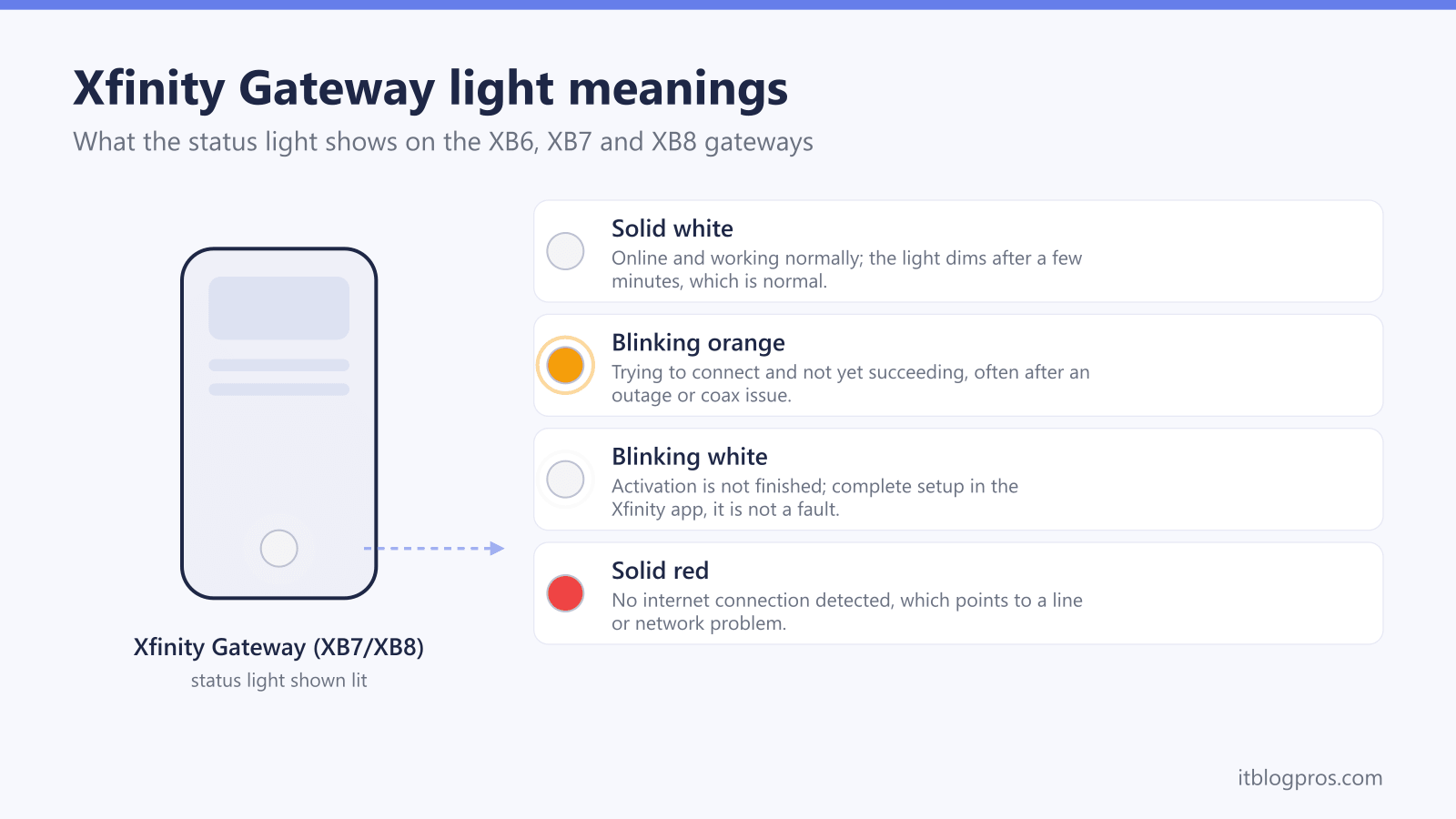
- Solid white is the healthy online state on XB6, XB7 and XB8 gateways, while solid red means no internet and blinking white means activation is not finished.
- The fix order is check for a Comcast outage, reseat the coaxial cable and remove any splitter, power cycle for 60 seconds, then factory reset only as a last resort.
- Comcast never calls or texts unsolicited to say your modem is compromised or to issue a refund, so treat any orange-light support number you did not dial as a scam.
What a Blinking Orange Light Means on an Xfinity Gateway
Xfinity xFi gateways (the XB6, XB7 and XB8 models) use a single multi-colour LED on the front to report status. A blinking orange or amber light is the one state that genuinely carries two meanings, and the official-leaning guidance and field reports disagree on which is more common, so it is fair to treat both as live possibilities until you have watched the clock.
- Firmware update or restart in progress (harmless): Comcast periodically pushes firmware to gateways without warning. While the update installs, or while the gateway reboots, the LED can blink orange. This is normal, it should resolve on its own within roughly 10 to 15 minutes, and you must not unplug the gateway mid-update because that can corrupt the firmware and brick the device.
- No downstream or upstream signal (connection fault): The gateway is trying to connect to the Comcast network and cannot lock a signal, sometimes called ranging or syncing. A loose or damaged coaxial cable, a signal-sapping splitter, or an area outage will all leave the gateway stuck blinking orange with no internet.
For reference, the other gateway colours are far less ambiguous: solid white means the gateway is online and healthy, blinking white means activation is not finished, blinking blue means WPS pairing is running, and solid red means no internet connection. If you are decoding a different colour, the cross-ISP router lights guide and the pillar guide to router and gateway lights by ISP map every state.
How to Tell a Firmware Update From a Connection Fault
Two free checks settle which version of orange you are looking at before you touch a single cable.
Check one, the clock. Note the time and leave the gateway completely alone. A firmware update or restart almost always finishes within 10 to 15 minutes, after which the light returns to solid white. If the orange light is still blinking after 15 minutes, a firmware update is no longer the likely cause and you are dealing with a connection fault.
Check two, the outage page. Open the Xfinity app on mobile data (not the WiFi that is currently down) and look at the Outage or Status section, or sign in at xfinity.com/support from a phone. A confirmed area outage means the fix is simply to wait, because no amount of resetting will restore a signal Comcast is not sending.
| Symptom | Most likely cause | What to do |
|---|---|---|
| Orange clears to solid white within 15 minutes | Firmware update or restart | Nothing, it is normal |
| Orange persists past 15 minutes, outage confirmed | Comcast area outage | Wait, monitor the outage page |
| Orange persists, no outage reported | Cable, splitter or signal fault | Work the fix ladder below |
| Light is orange then drops to solid red | Connection lost entirely | See the Spectrum red light guide for the equivalent red-light logic, and run the fix ladder |
The Fix Ladder for a Persistent Orange Light
If the light has blinked orange for more than 15 minutes and there is no reported outage, work these steps in order and stop as soon as the LED returns to solid white. Each step is more disruptive than the last, so there is no need to jump ahead.
- Confirm no outage. Re-check the Xfinity app outage section as above. This is the single most common cause and needs no action beyond waiting.
- Reseat the coaxial cable. Hand-tighten the coax connector at both the gateway and the wall plate. A finger-loose connector is enough to drop the downstream signal. Look for kinks, crushed sections or corrosion on the cable.
- Remove any coaxial splitter. Splitters degrade upstream and downstream power levels, and a marginal signal can leave the gateway offline with an orange LED. Connect the gateway directly to the wall outlet to test.
- Power cycle the gateway. Unplug the power cord, wait a full 60 seconds, then plug it back in and wait up to 10 minutes for the boot sequence to finish on solid white. A power cycle keeps all your settings and WiFi name and password.
- Restart from the Xfinity app. If you prefer, the app offers a guided restart under WiFi then Troubleshoot, which performs the same reboot remotely.
If the light reaches solid white but devices still say connected with no internet, the fault has moved past the gateway. The WiFi says no internet guide and the note on double NAT cover what to check next.
When and How to Factory Reset the Gateway
A factory reset is the last resort, not a routine step, because it erases every customisation. Only use it if the orange light persists after the full fix ladder and there is no outage.
A power cycle and a factory reset are not the same thing. A power cycle (unplugging for 60 seconds) keeps your WiFi name, password and all settings. A factory reset wipes the gateway back to defaults, so your custom WiFi name and password, port-forwarding rules and any other settings are lost and must be set up again from scratch.
To factory reset an Xfinity gateway, check which control the model in front of you actually has, because it changes across the three generations this guide covers and pressing the wrong one achieves nothing. Xfinity's only reset article is titled Factory reset an Xfinity Gateway (XB2 or XB3), and its instruction to hold a paperclip in the pinhole for 30 seconds belongs to those two older models. Xfinity publishes nothing equivalent for the newer gateways. The best source that exists is a Comcast employee answering on Xfinity's own forum, who describes the XB6 as resetting through its pinhole and the XB7 as resetting from the WPS button held 15 seconds or more. On the XB8, forum answers describe the unit as having no reset hole at all, which leaves that same WPS button as the only thing to press. Treat that forum answer as what it is rather than as documentation, hold until the lights cycle off instead of counting to a number, then wait several minutes for the gateway to rebuild and come back up on solid white. After a reset you will reconnect every device with the default credentials printed on the gateway label, then optionally rename the network in the Xfinity app.
For the XB6 specifically, the four fast things to try before calling support walks the same ground with model-specific notes.
Watch for the Orange-Light Scam Calls
A gateway problem is exactly the moment scammers prey on, because a stressed customer searching for help is easy to redirect. Search results for Xfinity faults are seeded with fake support numbers, and a separate wave of unsolicited calls and texts claims your modem has been compromised.
- Comcast does not call or text unsolicited to say your modem is hacked, that dozens of strangers are connected to it, or that you are owed a refund that requires your bank details. These are scripts designed to create panic.
- Caller ID can be spoofed, so an incoming call showing a Comcast-style 800 number proves nothing. If in doubt, hang up and dial the number on your bill or at xfinity.com yourself.
- No legitimate fix ever involves a gift card, a prepaid card, Zelle, a wire transfer, or installing remote-access software so an agent can connect to your computer.
- When you need a support number, type xfinity.com directly rather than calling a number that appears in a search snippet or a pop-up.
A blinking orange light is a network status indicator, never a security alert. Treat any message that frames it as a hacking emergency as fraud.
When a Persistent Orange Light Means the Gateway Itself Is the Problem
If the orange light keeps returning across multiple power cycles, the coax tests clean and there is no outage, the rented gateway may be failing or the line into your home may need an Xfinity technician. At that point it is worth a longer-term decision rather than another reset.
Renting the Xfinity gateway costs roughly $15 a month, and a rented unit that throws repeated faults is one you cannot swap on your own schedule. Buying your own Xfinity-approved DOCSIS 3.1 modem removes that rental line from the bill and puts hardware replacement in your hands, which sidesteps the all-in-one gateway faults that produce mystery orange lights. The stop renting your Xfinity gateway guide covers the approved modem list and the real savings, and the XB6 versus XB7 comparison helps if you are weighing a newer rented unit instead.
If your gateway is more often blinking white than orange, that is a different fault entirely; see Xfinity router blinking white with no internet.