
A blinking white light on an Xfinity gateway is one of the most misread status signals on the entire device, and almost every page online lumps two completely different situations together. On an XB7, XB8 or XB10, blinking white most often means the gateway is in the middle of activating or booting, which is normal and temporary. The same light can also mean the gateway is stuck trying to reach Comcast and cannot finish, which needs action.
This guide separates those two states clearly, because that single distinction is what fixes the problem fastest. You will learn exactly what blinking white means on each model, how to tell a normal boot from a genuine fault using the clock, and a step by step fix ladder that ends your no internet problem without a support call.
A blinking white light on an Xfinity XB7, XB8 or XB10 gateway means it is trying to connect and is in a limited state, usually because activation or a reboot is still in progress. If it clears within about 10 to 15 minutes you are fine. If it keeps blinking white with no internet, the gateway is stuck, so finish activation in the Xfinity app or power cycle and reset it.
Key Takeaways
- Blinking white is not always a fault. It normally appears while the gateway activates or reboots and turns solid white once it is online, so the timing matters more than the colour.
- Treat a brand new gateway differently. A device that has never been set up blinks white because activation is incomplete, and the cure is finishing setup in the Xfinity app, not a reset.
- Use the clock to judge it. Allow up to 15 minutes after a reboot and up to 30 minutes on first activation. Blinking white that persists past that window with no internet is a genuine stuck state.
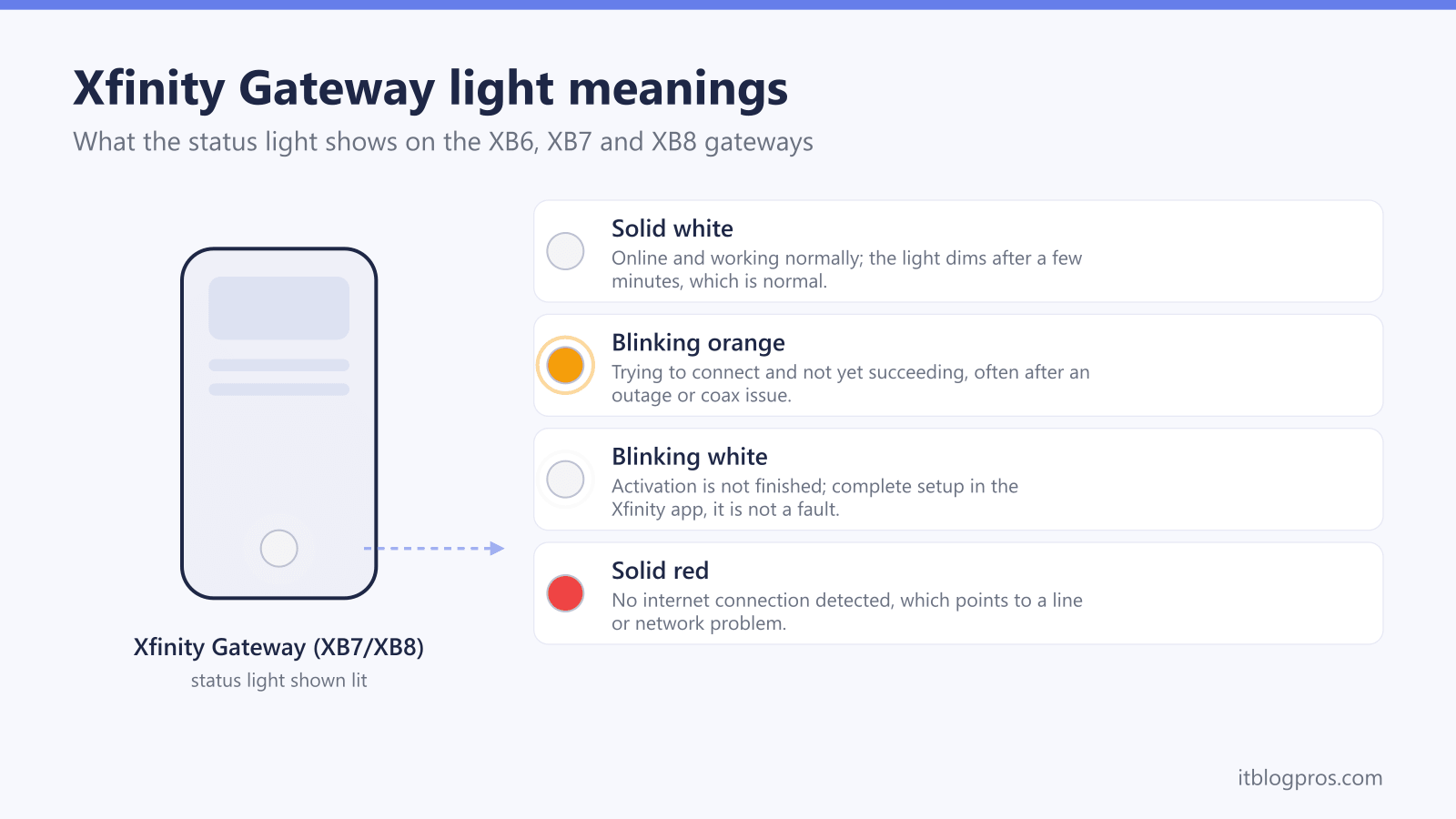
- Solid white is healthy, solid red means no internet, and blinking blue is WPS pairing. Confusing blinking white with these other states sends people down the wrong fix path.
- Xfinity will never call or text asking you to grant remote access or click a link to fix a modem. Treat any such message as a scam and use only the official Xfinity app or website.
What a Blinking White Light Actually Means on an Xfinity Gateway
A blinking white light tells you the gateway is powered on but has not yet reached a fully operational state. In Comcast's own terms, the device is trying to establish a connection to the service and is running in a limited capacity until it succeeds. This applies across the modern xFi gateways, including the XB7, XB8 and XB10.
The critical point that most pages miss is that blinking white covers two very different situations:
- Activation or boot in progress (normal). When a gateway is first set up, restarted or recovering from a firmware update, it blinks white while it registers with the network and pulls a signal. This is expected and clears on its own.
- Stuck trying to connect (fault). If the gateway cannot complete activation or cannot lock onto the Comcast signal, it keeps blinking white and never settles into solid white. That is when you have a real no internet problem.
The colour alone does not tell you which one you are facing. The deciding factor is how long it has been blinking and whether the gateway has ever been activated, which the next sections cover.
How to Tell Normal Activation From a Genuine Fault
This is the distinction that fixes the problem, and it is poorly explained almost everywhere. Use the situation and the clock rather than the colour.
| Situation | What blinking white means | Roughly how long is normal |
|---|---|---|
| Brand new gateway, never set up | Activation not finished | Up to about 30 minutes during first setup |
| Just unplugged and plugged back in | Normal boot and re registration | Up to about 10 to 15 minutes |
| Just finished a firmware update | Returning to service after update | Up to about 15 minutes |
| Online and working yesterday, now blinking with no internet | Stuck reaching Comcast, or a line or outage issue | More than 15 minutes is a fault |
A useful rule of thumb from troubleshooting practice is that blinking white lasting more than a couple of minutes after a clean reboot, and certainly more than 15 minutes, points to a connection problem rather than a normal start up. A gateway that has never been activated will sit on blinking white indefinitely until setup is completed, no matter how long you wait.
If the light has turned solid white, the gateway is online and healthy, and any remaining no internet symptom is on the WiFi or device side rather than the gateway status.
Xfinity Gateway Light Colours You Might See Instead
Before you start fixing, confirm the light is actually blinking white and not a different state that points to a different cause. Misreading the colour sends people down the wrong path.
| Light state | Meaning |
|---|---|
| Solid white | Online and working normally, the healthy state after activation |
| Blinking white | Trying to connect, activation or boot in progress, or stuck |
| Solid red | No internet, the gateway cannot reach the service |
| Blinking blue | WPS pairing mode, the gateway is trying to connect a new device |
| Blinking orange or amber | Firmware updating or searching for a downstream signal, usually clears within 15 minutes |
| Blinking green | Connected to the network but unable to retrieve the downstream signal |
| No light at all | No power, check the adapter and outlet |
If your gateway is showing orange rather than white, the cause and fix differ, and our Xfinity router blinking orange light fix guide covers that signal in full. For the cross provider overview of what every colour means, the universal router lights guide is the wider reference.
The Fix Ladder for Blinking White With No Internet
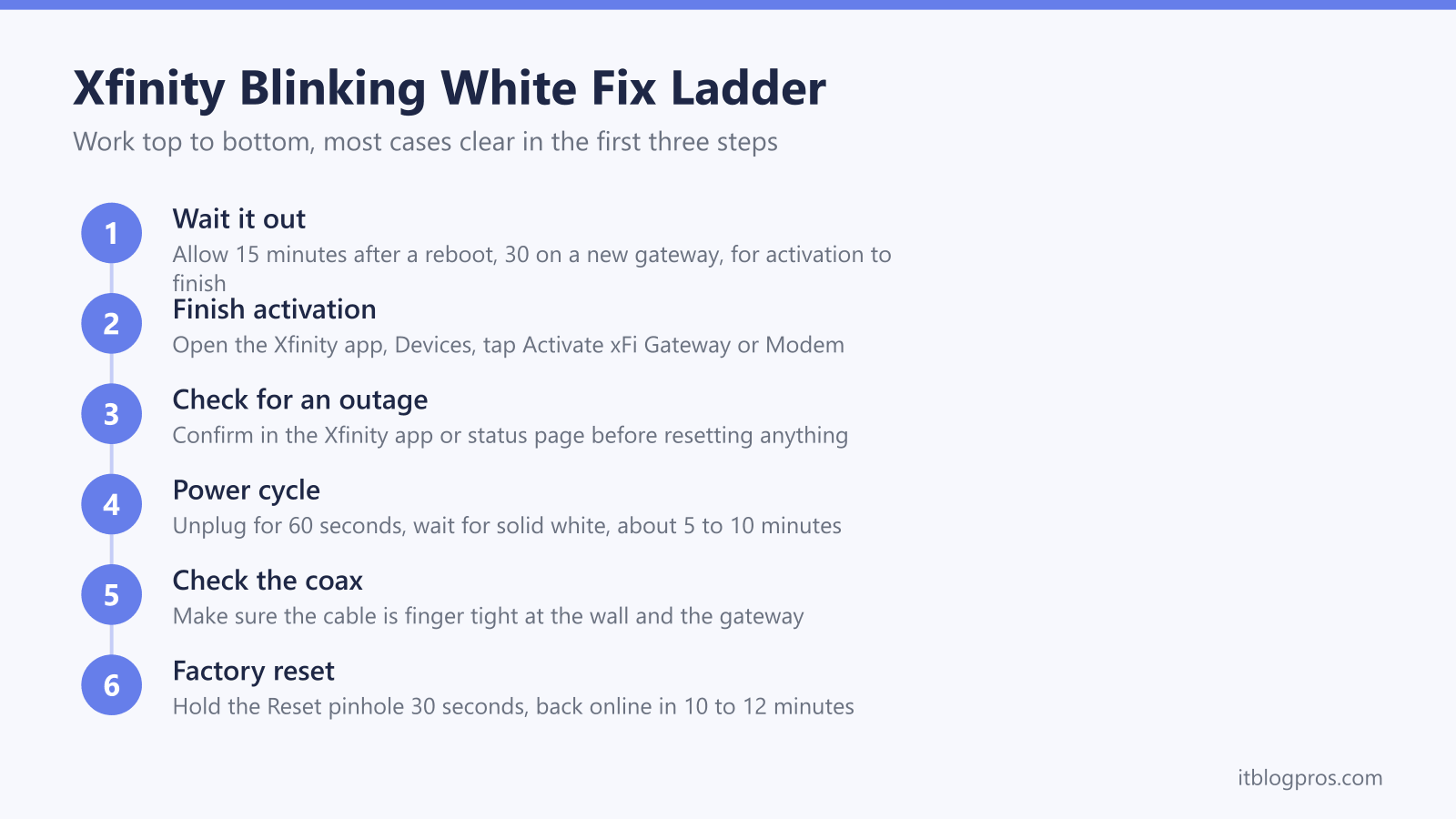
Work through these in order. Each step is quick, and most blinking white cases are resolved by the first three.
- Give it time first. If you just reset, rebooted or set up the gateway, wait the full 15 minutes (30 on a brand new device) before doing anything. Many people interrupt a normal activation and restart the clock.
- Finish activation in the Xfinity app. If the gateway is new or recently swapped, open the Xfinity app, go to the Devices section and tap Activate xFi Gateway or Modem, then follow the prompts. A device that never completed activation will blink white forever until this is done.
- Check for an outage. Sign in to the Xfinity app or the status page to confirm there is no local outage. A blinking white gateway during an area outage is waiting for service it cannot get, and no reset will help until the outage clears.
- Power cycle the gateway. Unplug the power for 60 seconds, plug it back in, and wait for it to return to solid white. This clears most temporary glitches and takes about 5 to 10 minutes.
- Check the cables. Make sure the coax cable is finger tight at both the wall and the gateway, and that no splitter is degrading the signal. A loose or damaged coax line is a very common cause of a gateway that cannot lock on.
- Factory reset as a last resort. If the gateway still blinks white after the steps above, look at the back of the unit before pressing anything, because the control differs by model and pressing the wrong one does nothing at all. Xfinity's own article, Factory reset an Xfinity Gateway (XB2 or XB3), gives the pinhole and 30 seconds, and those are the only two models it covers. On the XB7 and XB8 the control is the WPS button rather than a pinhole. For the XB7, a Comcast employee on Xfinity's forum says to hold that button for 15 seconds or more; for the XB8, forum answers describe the unit as having no reset hole at all, which leaves WPS as the only thing to press. Xfinity publishes neither instruction, so hold until the lights go off rather than counting to a number. The gateway then reboots and typically returns online in 10 to 12 minutes. Note that this erases any custom WiFi name and password.
If none of this restores a solid white light, the issue is likely on the line or the gateway hardware, and that is the point to contact Comcast for a signal check or replacement. The dedicated 4 fast things to try before calling Xfinity support guide is worth a read before you do.
When the Gateway Is Solid White but There Is Still No Internet
Sometimes the gateway settles on solid white, which means it is online, yet devices still report no internet. In that case the gateway status is fine and the problem sits between the gateway and your devices.
Common culprits include a WiFi band or channel issue, a device that grabbed a bad IP address, or a routing conflict if you have added your own router behind the Xfinity gateway. That last case can create a double NAT situation that breaks some connections even though the gateway shows healthy. Restarting the affected device and toggling its WiFi off and on usually clears the simpler cases.
For a structured walkthrough of the online but no internet pattern across any router, the why your WiFi says no internet guide covers the full diagnostic sequence.
Avoid the Fake Xfinity Modem Compromised Scam
Blinking white lights and internet trouble are exactly when scammers strike, because frustrated people search for help and become easy targets. A common scam involves a call or text that appears to come from Xfinity, claiming your modem or firewall is compromised, your WiFi security has been breached, or your equipment needs an urgent upgrade. The caller then tries to get you to grant remote access to your computer, install software, click a link, or call a support number that is not Comcast.
The rule is simple. Xfinity will not contact you out of the blue to fix a modem by asking you to install software, hand over remote access, or click a link in a text. Caller ID can be spoofed to show the Xfinity name, so do not trust the display alone. Fix gateway problems only through the official Xfinity app or the official website, and if a search result shows a phone number promising instant Xfinity help, treat it with suspicion rather than calling it. When in doubt, hang up and reach Comcast through the app you already have installed.
Which Xfinity Gateway You Have and Why It Matters
The blinking white behaviour is consistent across the XB7, XB8 and XB10, but knowing your model helps when you call for support or decide whether to upgrade.
- XB7 is the previous generation xFi gateway, widely deployed and DOCSIS 3.1 capable.
- XB8 is the newer high end gateway with WiFi 6E and stronger handling of gigabit plans.
- XB10 is the latest gateway with WiFi 7 on the top tiers.
If you are weighing the older against the newer hardware, the XB6 vs XB7 comparison explains the practical differences. And if recurring light errors and rental fees are wearing you down, many households save roughly 15 dollars a month by replacing the rented gateway with their own modem, which our guide on how to stop renting your Xfinity gateway and buy your own modem breaks down in full.
For the complete picture of what every gateway light means across all the major US ISPs, the router and gateway lights by ISP pillar is the hub this guide sits under.