
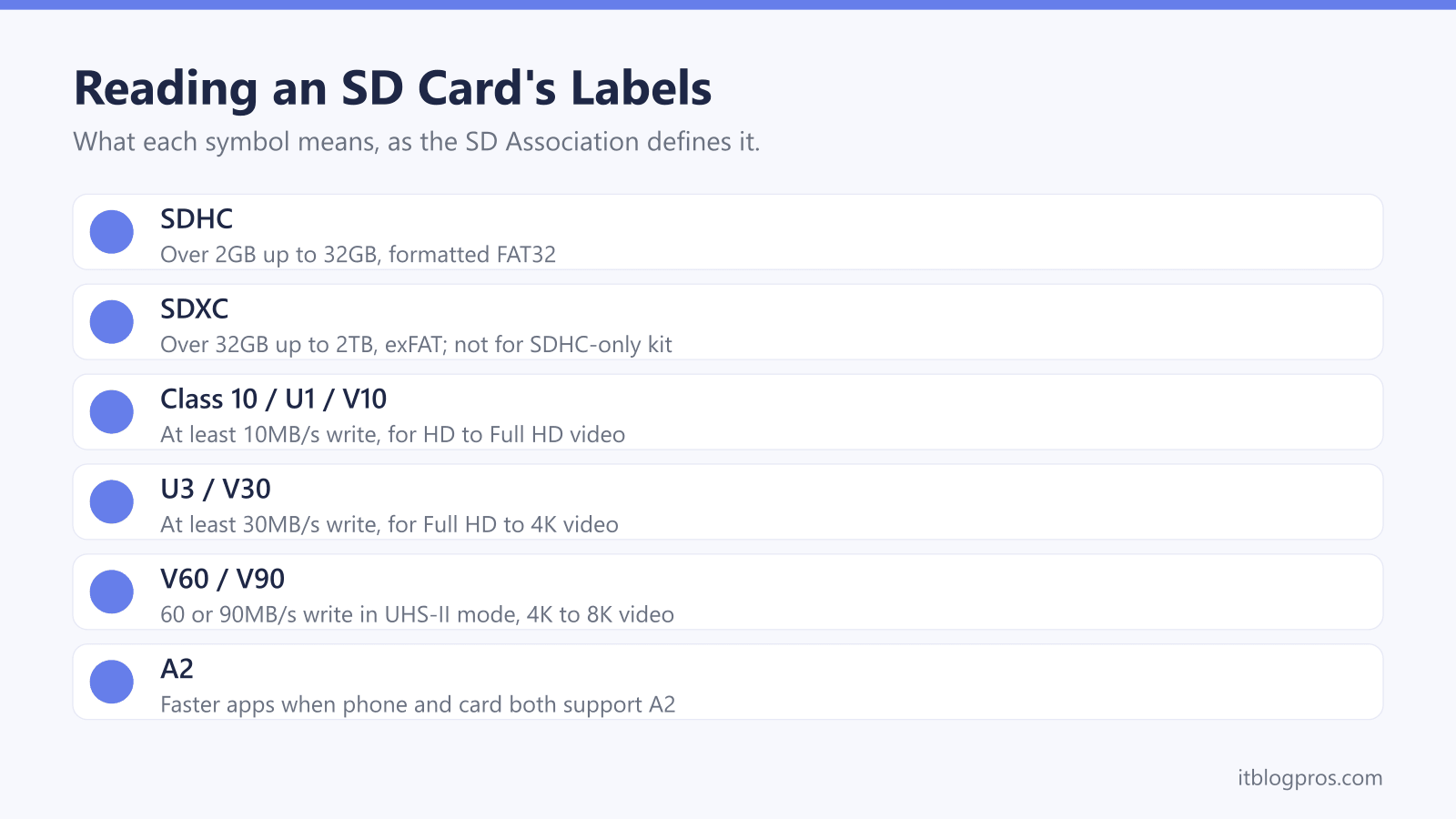
SD and microSD cards look much the same from one brand to the next, but the small symbols printed on them decide whether a camera records 4K without dropping frames, a dash cam keeps looping footage for years, or a Nintendo Switch 2 accepts the card at all. This guide decodes those symbols using the SD Association's own definitions, sets out what each device maker asks for, matches a card reader to the card and shows how to format a card without losing anything worth keeping.
For most phones, action cameras and the original Nintendo Switch, a microSDXC card rated U3, V30 and A2 is the safe buy, and a full-size U3, V30 SD card suits most cameras recording 4K. Dash cams need an endurance card, and Nintendo says the Switch 2 only takes microSD Express cards. Format a new card in the device or with the SD Association's SD Memory Card Formatter, and remember that formatting erases it.
Key Takeaways
- The SD Association defines SDHC as over 2GB up to 32GB, SDXC as over 32GB up to 2TB and SDUC as over 2TB up to 128TB, and its FAQ says older SDHC devices cannot use SDXC cards.
- The number on a speed symbol is a minimum write speed: the SD Association gives 10MB/s for Class 10 and U1, 30MB/s for U3 and V30, and 60MB/s and 90MB/s for V60 and V90.
- Nintendo says the Switch 2 only works with microSD Express cards, while the original Switch takes microSDXC cards and Nintendo recommends UHS-I cards with transfer speeds of 60 to 95MB/sec.
- SanDisk's consumer warranty excludes dash cam use for its ordinary cards, with its High Endurance cards the exception, and the SD Association advises replacing a dash cam card every one or two years.
- Formatting erases the card: Microsoft says formatting a volume destroys the data on it, and the SD Association strongly recommends its own SD Memory Card Formatter over operating system tools.
SDHC, SDXC and SDUC Describe Capacity, Not Speed
The first label on any card is its capacity type, and the SD Association defines four of them. Its capacity page puts SD at up to 2GB, SDHC at over 2GB up to 32GB using FAT32, SDXC at over 32GB up to 2TB using exFAT, and SDUC at over 2TB up to 128TB, also on exFAT.
Compatibility only runs one way. The SD Association's FAQ says SD and SDHC cards work in SDXC devices, but older SD and SDHC devices are not compatible with SDXC cards, so a 64GB card can be useless in an old camera. SanDisk's Extreme PRO page carries the same warning, noting that not all devices support SDXC.
Phones vary as well. Samsung's UK support page says the maximum capacity a phone accepts depends on the model, listing up to 1TB for the Galaxy S20 range and no external memory at all for the Galaxy S21 range. A microSD card in a full-size slot is fine with an adapter: the SD Association's FAQ says the logic and electronics of microSD and SD cards are identical.
Speed Class Symbols Promise a Minimum Write Speed
The SD Association's FAQ says speed classes exist because varying speeds make video hard to record reliably. Its dash cam article gives the minimums: Class 10 and U1 guarantee 10MB/s, U3 guarantees 30MB/s, and V60 and V90 guarantee 60MB/s and 90MB/s in UHS-II mode or faster. For Video Speed Classes, the Association says the number after the V is the minimum sustained speed, so V30 means 30MB/s.
The same FAQ matches classes to video: Class 10, U1 or V10 for HD to Full HD, U3 or V30 for Full HD to 4K, V60 for 4K to 8K and V90 for 8K. Its Speed Class page adds a catch: choose the same or a higher symbol than the device asks for, from the same family, because a Class 10 device with a U1 card is not guaranteed the expected speed.
A1 and A2 cover running apps. The SD Association says A2 only works when both phone and card support it, and SanDisk's footnotes put A2 at 4000 read and 2000 write IOPS, against 1500 and 500 for A1.
Cameras and Dash Cams Need the Card Their Maker Lists
The device's manual beats any general rule. Canon's manual for the EOS R50 lists SD, SDHC and SDXC cards with UHS-I support, and its specifications ask for UHS Speed Class 3 or higher for 4K UHD in the standard IPB format, while Full HD at 25 frames per second needs only SD Speed Class 6.
Dash cams add wear. The SD Association's dash cam article notes that these cameras overwrite old footage once the card is full and that every card has limited endurance, and recommends replacing the card every one or two years, or at once if the camera reports a read or write error. Garmin's manual for the Dash Cam Mini 3 asks for a microSDHC or microSDXC card from 8 to 512GB, Class 10 or higher, while its manual for the older Dash Cam 45, 55 and 65W caps the card at 64GB.
Warranty matters too. SanDisk's consumer warranty excludes dash cams and other looping recorders for its ordinary cards, with its High Endurance cards the exception. The best dash cam guide covers the cameras themselves.
The Nintendo Switch 2 Only Takes microSD Express Cards
Nintendo's two consoles want different cards, and buying the wrong one is an easy mistake. Nintendo's UK support page says the Switch 2 is only compatible with microSD Express cards, supports them up to 2TB and needs a system update over the internet the first time one goes in. A card used in the original Switch cannot save or load digital games on the Switch 2, although Nintendo says screenshots and videos can still be imported from it.
The original Switch is more relaxed. Nintendo's microSD card FAQ lists microSD, microSDHC and microSDXC cards, says microSDXC needs a system update first, and recommends a UHS-I card with a transfer speed of 60 to 95MB/sec. A microSD Express card does work in the older console, but Nintendo says it reads and writes at ordinary microSD speed there.
Neither console keeps game saves on the card. Nintendo says save data stays in the console's system memory, so the card holds downloaded games, updates, screenshots and videos rather than progress.
A Card Reader Can Cap the Speed of the Card
A computer reads a card through a built-in slot or a USB reader, and either can be the bottleneck. The SD Association's bus speed page puts UHS-I at up to 104MB/s on one row of pins, while UHS-II and the faster interfaces add a second row, with UHS-II reaching up to 312MB/s. SanDisk's footnotes say the 128GB Extreme microSD's 190MB/s read speed goes beyond UHS-I's 104MB/s only in compatible devices, and that its microSD Express card runs at UHS-I speeds in UHS-I and UHS-II devices.
The plug matters as much as the slot. UGREEN's 50706 reader has both a USB-C and a USB 3.0 plug, SD and microSD slots that read at the same time, and support for UHS-I cards up to 2TB. For UHS-II cards, Kingston's MobileLite Plus SD Reader uses a USB-A plug and USB 3.2 Gen 1, while SanDisk's QuickFlow SD reader uses USB-C, supports UHS-I and UHS-II cards and works in Type-C 2.0 and 3.0 ports. A laptop with only USB-C ports needs a USB-C reader or a dock, which the laptop docking station guide covers.
Formatting a Card Erases Everything on It
Copy anything worth keeping off the card before formatting it. Microsoft's Disk Management guide says formatting a volume will destroy any data on the partition, and Samsung's UK support page says formatting an SD card permanently wipes the data stored on it.
The SD Association strongly recommends its SD Memory Card Formatter for SD, SDHC, SDXC and SDUC cards, saying operating system tools may not be optimised for them and may result in lower performance. Its download page lists Windows 10 and 11 and macOS 11 to 15, needs administrator rights and works through a built-in slot or a USB reader.
Windows can do the job as well. Microsoft's guide says to right-click the Start button, select Disk Management, right-click the volume and choose Format, and notes that a quick format writes a new file table without fully erasing the card. Canon's manual says to format a new card in the camera itself. If Windows does not show the card at all, the external hard drive not showing up guide has the next steps.
Fake Cards Misreport Their Size, So Buy From Known Sellers
An SD Association article by SD-3C, the standard's licensing body, says counterfeiters are under no obligation to meet the card standards and can make a small card appear much larger to a computer. It advises buying from licensees listed on the SD-3C website, and warns that shopping sites often do not police third-party sellers. SanDisk's UK warranty covers only original SanDisk products and reserves the right to decline support for goods not imported through authorised channels.
So every card below is sold by Amazon itself, not a third-party seller, and the reader by UGREEN's own store. No SDXC card works in an SDHC-only camera, and no memory card replaces a laptop's main drive, which the SSD upgrade guide covers.
The SanDisk Extreme microSD is the all-rounder for phones, action cameras and the original Switch. The 32GB SanDisk High Endurance card suits dash cams, and SanDisk says this size also works in microSDHC-only devices. The Extreme PRO SD card covers 4K cameras, the microSD Express card is for the Switch 2, and the UGREEN 50706 reader takes both plug types.
| Product | Best for | Key specs | Price | |
|---|---|---|---|---|
 | SanDisk Extreme microSDXC 128GB Our pick | Phones, action cameras and the original Switch | U3, V30, A2, up to 190MB/s read, 90MB/s write | Check price → |
 | SanDisk High Endurance microSDHC 32GB Dash cams | Dash cams, including older microSDHC-only models | Up to 2,500 hours Full HD, 100MB/s read, 40MB/s write | Check price → |
 | SanDisk Extreme PRO SDXC 128GB Cameras | Cameras recording 4K video to a full-size SD slot | U3, V30, UHS-I, up to 200MB/s read, 90MB/s write | Check price → |
 | SanDisk microSD Express 256GB Switch 2 | Nintendo Switch 2, which only takes microSD Express | PCIe Gen 3, up to 880MB/s read, 650MB/s write | Check price → |
 | UGREEN 50706 SD Card Reader Card reader | Laptops with USB-C ports, USB-A ports or both | USB-C and USB 3.0 plugs, SD and microSD slots, 5Gbps | Check price → |