
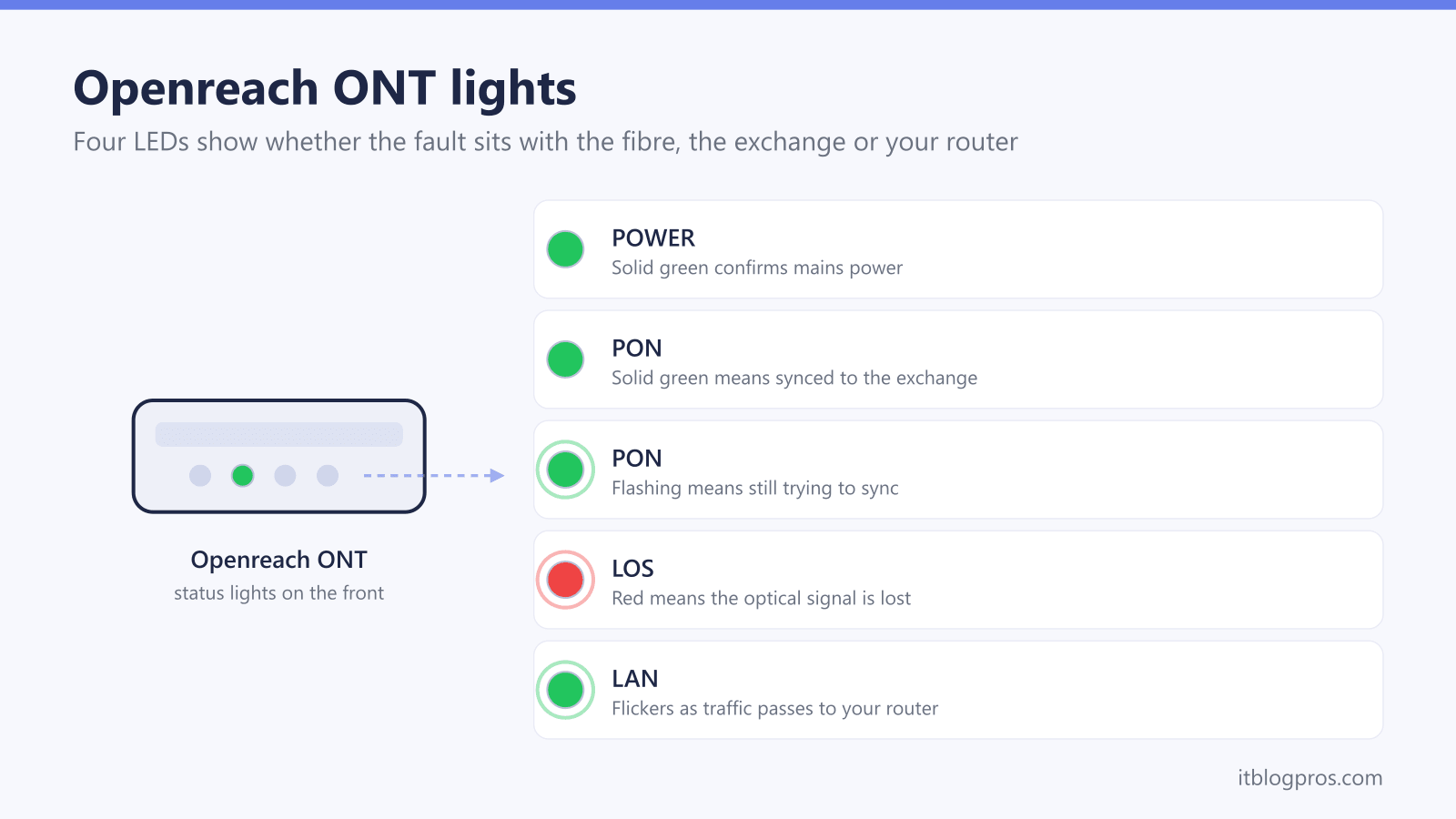
The small white Openreach box on your wall, the optical network terminal or ONT, is where the full fibre network ends and your home network begins. Its lights tell you in seconds whether a broadband outage sits in the fibre outside, the exchange, your router or a loose cable. This guide decodes every POWER, PON, LOS and LAN state across the Huawei, ECI, Nokia and ADTRAN units Openreach has fitted, and explains exactly when a reboot helps and when only an engineer can.
A healthy Openreach ONT shows solid green POWER and PON lights, an unlit LOS light and a flickering LAN light. A red LOS light means the optical signal is lost: check the fibre lead for kinks without unplugging it, reboot once, then report the fault to your broadband provider. A flashing PON light means the ONT is still syncing with the exchange, so give it ten minutes before worrying.
Key Takeaways
- A healthy Openreach ONT shows solid green POWER and PON lights, an unlit LOS light and a LAN light that flickers with traffic.
- A red LOS light means the optical signal is lost, and if one reboot does not clear it the fault must be reported to your broadband provider.
- A flashing PON light means the ONT is still trying to sync with the exchange and normally settles within ten minutes of powering up.
- The green fibre connector must stay plugged in because dust on the ferrule and the invisible laser inside make DIY handling a bad idea.
- Openreach takes no fault reports from the public, so every ONT problem goes through the ISP that bills you, and only that ISP can book an engineer.
Openreach ONT light states with meanings and fixes
| Light | What it means | What to do |
|---|---|---|
| POWER solid green | The ONT has mains power and has finished booting. | Nothing needed. This is the normal state. |
| POWER off | No power is reaching the ONT, or its power supply has failed. | Check the wall switch, the socket and the DC plug, plus any battery backup unit leads. A dead ONT on a proven socket needs an engineer booked via your ISP. |
| PON solid green | The ONT has ranged and authenticated with the exchange, and the optical link is fully up. | Nothing needed. If broadband is still down, look at the router and Ethernet cable instead. |
| PON flashing green | The ONT sees light on the fibre but is still trying to sync or authenticate with the exchange. | Wait ten minutes. If it never goes solid, your ISP has a provisioning or authorisation issue to fix, and repeated reboots will not help. |
| PON off | No optical link is established, usually alongside a red LOS light. | Treat it as a loss of signal: check the fibre lead for kinks without unplugging it, reboot once, then report it to your ISP. |
| LOS off | Normal. The ONT is receiving optical signal from the exchange, and this light should stay dark at all times. | Nothing needed. |
| LOS red, solid or flashing | Loss of optical signal: the fibre is unplugged, bent too tightly, cut outside, or Openreach has a network fault. | Check the fibre lead is seated and not trapped, without unplugging it. Reboot once. If LOS stays red, report the exact words red LOS to your ISP so it reaches Openreach. |
| LAN solid or flickering green | The Ethernet link to your router is up, and flickering shows traffic passing. | Nothing needed. |
| LAN off | No Ethernet link between the ONT and the router. | Reseat the Ethernet cable at both ends, try a spare cable, and confirm the router WAN port is configured. The ONT itself is usually fine. |
| ALARM red (ADTRAN units) | An internal fault on ADTRAN 621 and 622 series ONTs, commonly a failed software update. | Reboot once. If the red ALARM light returns, report it to your ISP. |
The healthy light pattern on every Openreach ONT
Every Openreach ONT, whichever firm built it, follows the same logic: POWER confirms electricity, the optical status lights (PON and LOS) report the fibre link back to the exchange, and LAN reports the Ethernet link to your router. The healthy pattern is a solid green POWER light, a solid green PON light, an LOS light that stays completely dark, and a LAN light that is solid or flickering as traffic passes.
That layout makes the ONT a free diagnostic tool. If PON is solid and LOS is off, the Openreach network is delivering signal to your wall, and a broadband outage almost certainly sits in the router or the cable between the two boxes. If LOS is lit or PON will not go solid, no amount of router rebooting will help, because the problem is on the fibre side. Knowing which side is failing also stops you buying kit you do not need; a red LOS light has never once been fixed by a new router, as the guide to connecting your own router to an Openreach ONT explains.
Openreach ONT models and their light differences
Openreach has fitted several ONT families since full fibre began rolling out, and the labels differ slightly between them.
Huawei EchoLife units appeared on early installs: the single-port HG8110H and a four-port variant that adds TEL lights for phone lines. Both use the standard POWER, PON, LOS and LAN set. ECI units, including the C-Series, are also early-install kit and label the fibre status light Optical rather than PON; solid green still means connected. Nokia units are the most common sight today: the single-port G-010G-P (originally an Alcatel-Lucent design) was the default fit for years, and the G-010G-T with a 2.5Gbps port serves the faster 1.2Gbps and 1.8Gbps tiers. ADTRAN units turn up on newer installs: the 621 series covers broadband-only boxes, with the 622v adding a telephone port, and these carry an extra ALARM light that Huawei and Nokia units lack. Lines provisioned for 10Gbps-capable XGS-PON use newer kit again, such as the Nokia XS-010X series and the ADTRAN SDX631.
Whichever unit the engineer fitted on full fibre install day, the POWER, optical status, LOS and LAN logic below applies.
A red LOS light means the optical signal is lost
LOS stands for loss of signal, and it is the single most searched Openreach ONT fault for good reason: when it glows red, steady or flashing, the ONT is receiving no usable light down the fibre. Broadband is fully down and will stay down until the optical path is restored.
The causes run from trivial to serious. Inside the home, the thin fibre lead may have been pulled partly out of the ONT, crushed under furniture, or bent around a corner far too tightly; fibre tolerates gentle curves only. Outside, the splice inside the small grey junction box on your outer wall can fail, a contractor can cut the fibre in the street, or Openreach can have a wider network fault affecting the whole area.
The fix path is short. Trace any visible fibre and free it from kinks or pinch points without unplugging anything. Reboot the ONT once to rule out a false alarm. Ask a neighbour on the same network or check your provider's status page for a known outage. If the LOS light is still red after that, report the exact words red LOS light to your broadband provider. A physical break needs an Openreach engineer with a fusion splicer, and nothing sold to consumers can substitute for one.
A flashing PON light means the ONT is trying to sync
PON stands for passive optical network, and this light reports the logical link to the exchange rather than the raw signal. Solid green means the ONT has ranged and authenticated with the exchange equipment and the connection is fully up. Flashing green means the ONT can see light on the fibre but is still working through that sync process.
A flashing PON light is completely normal for several minutes after a power cut, a reboot or a brand new installation, so the first fix is patience: give it ten minutes. If it keeps flashing indefinitely while LOS stays dark, the fibre itself is usually fine and the problem is administrative. Common culprits are an order that has not fully activated, a migration between providers that has stalled, or the ONT serial number not being matched to an active service in the provider's systems. On ADTRAN units a flashing PON light specifically points at a box that is connected but not yet authorised.
That distinction matters because it changes who fixes it. A stuck flashing PON light rarely needs an engineer in your home; it needs your provider to correct provisioning at their end, so report it rather than rebooting on a loop.
The green fibre connector stays plugged in
The temptation when lights go red is to unplug the green optical connector and reseat it, the way you would an HDMI lead. Resist it, for three verified reasons.
First, contamination. The glass core carrying the signal is thinner than a hair, and a single speck of dust on the exposed ferrule can degrade or kill the connection. Engineers clean these connectors with dedicated tools before every insertion, and a connector reseated without cleaning can turn a five-minute fault into a longer one. Second, safety. The fibre carries invisible infrared laser light. It is low powered, but looking into an unplugged connector or fibre end can cause permanent eye damage, and the beam gives no warning because you cannot see it. Third, ownership. The ONT is Openreach property, a fixture recorded against your address by serial number. It stays on the wall when you move house, and dismantling or unscrewing it can complicate fault reports and future orders.
Checking the lead for kinks, confirming it is seated, and rebooting via the power switch are all fair game. Pulling the green connector is where DIY should stop.
Lights that a reboot fixes and lights that need an engineer
One clean reboot is a legitimate diagnostic step: switch the ONT off at the mains or its power switch, wait a minute, power it back on and allow up to ten minutes for PON to settle. That can clear a PON light stuck flashing after a power blip, a LAN handshake that failed when the router restarted, and the rare frozen ONT.
Some states a reboot will never fix. A red LOS light that returns after the restart means a physical signal loss that only your provider and Openreach can resolve. A dead POWER light with the socket proven against another appliance means a failed power supply or a failed ONT, both engineer jobs. A red ALARM light on an ADTRAN unit that keeps coming back indicates an internal fault, commonly a failed software update, and again the fix sits with the provider.
LAN problems are the exception where your own kit is usually to blame. If LAN is dark, reseat the Ethernet cable at both ends, try a spare cable, and check the router is set for a WAN connection over that port. Long runs between boxes deserve decent cable, and the guide to placing a router far from the ONT covers the options.
Your ISP handles every ONT fault, never Openreach directly
Openreach builds and repairs the network but has no consumer fault desk, and its own support pages direct households to contact the company they buy broadband from. That rule holds even though the ONT has Openreach printed on it: BT, Sky, TalkTalk, Vodafone, Zen and every other provider using the Openreach network owns the customer relationship, runs the diagnostics, and raises the engineer visit.
Reporting well speeds everything up. Tell the provider exactly which lights are lit, their colours, whether they are solid or flashing, what one reboot changed, and when the fault started. The phrase red LOS light on the ONT is particularly useful because it tells a first-line agent immediately that the optical path is down and router-focused scripts are pointless.
One honest caveat before an engineer is booked: if the visit finds the fault in your own equipment rather than the Openreach network, for example a faulty third-party router or damaged internal cabling you installed, many providers reserve the right to charge for the appointment. Ruling out your router and Ethernet cable first is worth five minutes of anyone's time.
A dead ONT takes the landline down with it
Full fibre homes increasingly carry the landline as a digital voice service that runs through the broadband connection, either from a phone port on the router or, on some Huawei and ADTRAN units, a TEL port on the ONT itself. The consequence is blunt: when the ONT loses power or shows a red LOS light, the phone dies with the broadband. A handset that has gone silent alongside bad ONT lights is not a separate fault, and the digital voice troubleshooting guide covers the phone side in detail.
That dependency is why power resilience matters. Several ONT models carry a BBU port for a battery backup unit, and providers must offer solutions to customers who depend on the landline, for example those with health pendants or no mobile signal. For everyone else, a modest uninterruptible power supply keeps the ONT and router alive through short cuts; the battery backup guide for routers and ONTs covers suitable UK options. Keep a charged mobile available regardless, because the fault report itself needs a working line.