
Three 5G broadband solves the getting-online part brilliantly and then hands you a hub whose WiFi struggles past two brick walls. The obvious next thought is to put the hub into modem or bridge mode and let a proper router take over, exactly as you would with a Virgin hub. That is where Three is different, and most guides gloss over it. None of the Three-branded 5G hubs offers a clean, supported bridge mode, and Three's network sits behind carrier-grade NAT, which quietly changes what a bridge would even buy you. This guide gives the honest per-model picture for every hub Three has shipped, explains the CGNAT wall, and then walks through the two setups that genuinely work: a mesh or router in access-point mode behind the hub, or full router mode with the hub DMZ. For the wider landscape across every provider, see how to use your own router with any UK ISP.
Your own router or mesh works with Three 5G broadband, but not by replacing the hub. No Three-branded 5G hub offers a clean, supported bridge mode, and Three's CGNAT blocks inbound connections anyway. The reliable setup is a mesh or router in access-point mode behind the hub with the hub WiFi turned off, or full router mode with the hub DMZ if you want router features and accept double NAT.
Key Takeaways
- No Three 5G hub has a clean, supported bridge mode: the Zyxel hubs hide an unofficial IP Passthrough, a forced firmware update broke the ZTE MC801A bridge, and Three's Huawei hubs removed the option entirely.
- Three home broadband sits behind CGNAT, so port forwarding and inbound connections fail whatever you change on the hub, which makes bridge mode worth far less than it is on a fixed line.
- The setup that works for almost everyone is a mesh or router in access-point mode cabled to the hub with the hub WiFi switched off, which gives whole-home coverage with no double NAT.
- People who want QoS, a VPN client and gaming features can run their own router in router mode behind the hub, place its WAN address in the hub DMZ and knowingly accept double NAT.
- Three advertises average 5G speeds around 150Mbps with peaks up to 1Gbps, so mid-range kit such as the TP-Link Deco X50 or eero 6+ covers the line with headroom, and the TP-Link Archer BE550 is the router-features pick.
The Three 5G hub is the modem, so the plan is what runs behind it
Start with the fact that reframes everything. On fibre you can often unplug the ISP hub and cable your own router straight to the ONT. On Three 5G broadband the hub is the modem: it holds the 5G radio and the SIM, so a normal router or mesh cannot replace it. The realistic goal is not removing the hub, it is making the hub as invisible as possible while your own kit does the WiFi.
Which hub you have decides how far you can push that, so identify it first. The current Three 5G Hub is the Zyxel NR5103E V2, which followed the near-identical Zyxel NR5103E. Before the Zyxels, Three shipped the ZTE MC888, the ZTE MC801A, and at 5G launch the Huawei 5G CPE Pro (H112-372) and CPE Pro 2 (H122-373). The model name is printed on the label on the base of the unit.
The label also carries the admin login you will need for every setup on this page. The Zyxel hubs use http://192.168.1.1 with the username and password from the label. The ZTE hubs use http://192.168.0.1 with the password from the sticker on the base. Log in from any device connected to the hub by WiFi or Ethernet.
Bridge mode on Three hubs: the honest per-model reality
Here is the per-model truth, verified against Three's own community threads and owner reports, because this is where most advice online is wrong or out of date.
Zyxel NR5103E and NR5103E V2 (current hubs). Zyxel firmware does contain a bridge equivalent called Cellular IP Passthrough, tucked into the Broadband section of the admin UI near the Cellular APN tab. The community recipe involves setting the APN manually, forcing IPv4, rebooting, then enabling IP Passthrough so the hub hands its WAN address to one device behind it. It can work, but it is unofficial, firmware updates change its behaviour, owners report contradictory results with the NAT toggle, and Three support does not walk you through it. Treat it as a tinkerer's option, not a plan.
ZTE MC888. A bridge option exists in the settings and, when it behaves, it passes the Three-assigned WAN address to your router's WAN port. Owner reports are mixed: some find the hub WiFi stays active in bridge mode, and some routers never pull an address from the handoff at all.
ZTE MC801A. This hub shipped with a working bridge toggle, and then Three's forced B12 firmware update broke it. Since that update the hub hands connected routers a 192.168.0.x LAN address instead of the WAN address, which is not a bridge at all. On this hub the practical answer is router mode plus DMZ.
Huawei 5G CPE Pro and CPE Pro 2. The Three-branded firmware removes bridge mode entirely. The same hardware bought unbranded shows the option, which tells you it was a carrier decision. No amount of menu digging brings it back.
The pattern is clear: whatever bridge or passthrough exists is hidden, hobbled or removed. Build your setup on the assumption the hub keeps routing, and count anything more as a bonus.
CGNAT makes bridge mode worth less than people expect
Even a perfect bridge mode would not deliver what most people want it for, and that is down to how Three runs its network rather than the hub. Three home broadband sits behind carrier-grade NAT, meaning your hub shares a public IPv4 address with many other customers. Inbound connections from the internet cannot reach you, so port forwarding rules on the hub do nothing useful, hosting a game server or reaching security cameras from outside fails, and a VPN server at home is unreachable, whether or not the hub is bridged.
A long-standing community workaround changes the APN to 3internet with IPv4 only, which has historically returned a dynamic address outside CGNAT. It is unofficial, unsupported, increasingly reported as CGNAT'd too, and Three sells no static IP option for home broadband, so nothing on this line should depend on inbound access. People who genuinely need it typically rent a small VPS and run an outbound WireGuard tunnel from a router behind the hub, which works because outbound connections pass through CGNAT happily.
This is the honest reframe: on Three 5G, bridge mode is not the prize it is on Virgin cable. The wins available are better WiFi coverage and a single tidy network, and both of the setups below deliver them without touching bridge mode. For the background on why stacking two routers causes trouble and who actually notices, see what double NAT is and how to fix it.
Access-point mode behind the hub is the setup that just works
For almost everyone, this is the answer. The hub keeps doing what Three's firmware wants it to do, which is route, and your mesh or router handles all the WiFi in access-point mode. There is no double NAT because only the hub is routing, no fights with hidden passthrough menus, and no behaviour changes when Three pushes a firmware update.
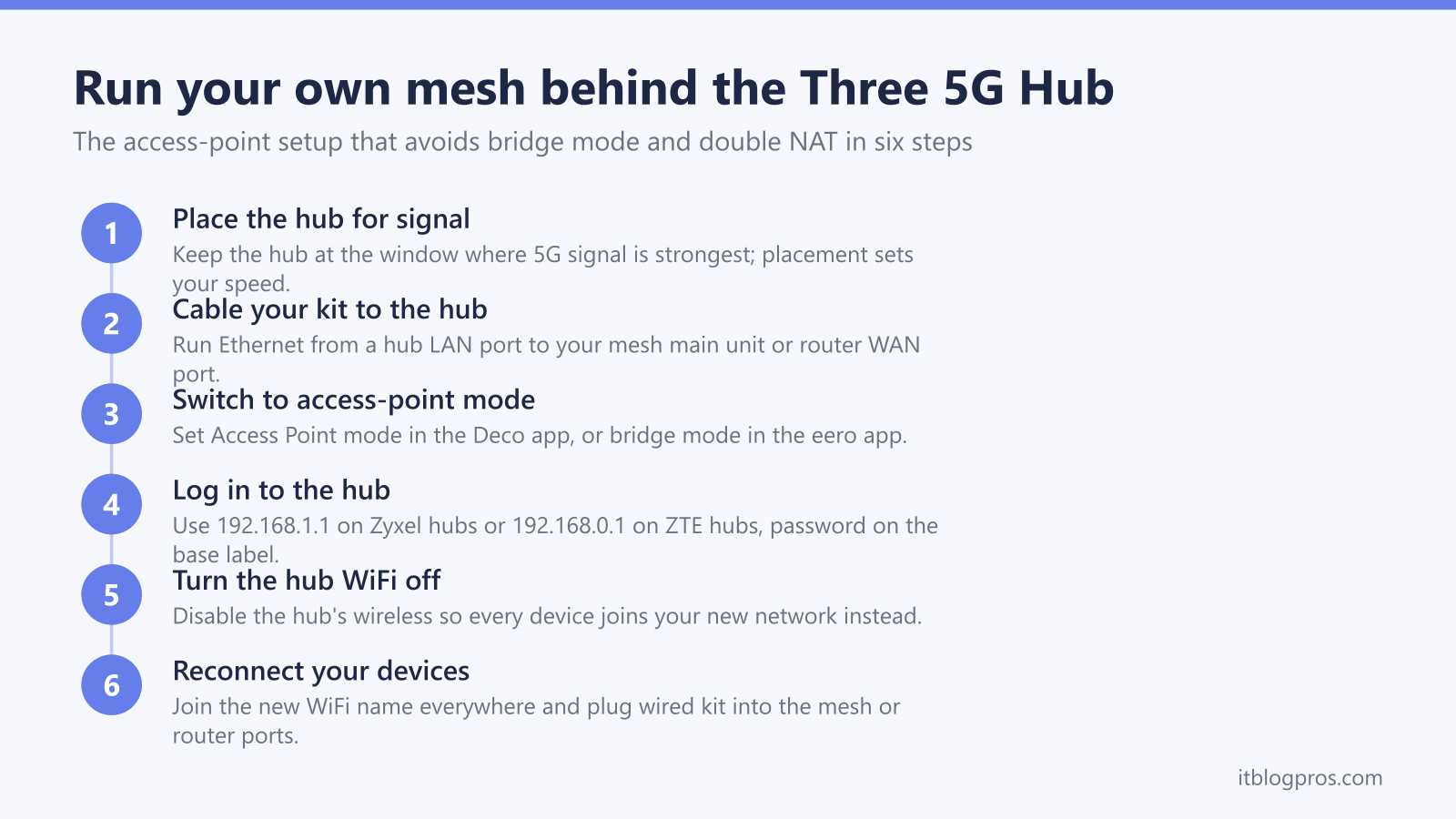
The setup takes fifteen minutes. Leave the hub wherever 5G signal is strongest, usually a window on the side of the house facing the mast, because hub placement sets your line speed and no router changes that. Run an Ethernet cable from a hub LAN port to your mesh's main unit or your router's WAN port. In the mesh app, switch the system to access-point mode: TP-Link Deco calls it Access Point mode in the Deco app under Advanced, and eero calls the same thing bridge mode in the eero app's network settings. Then log in to the hub, 192.168.1.1 on the Zyxel hubs or 192.168.0.1 on the ZTE hubs, and switch the hub WiFi off so every device joins the new network rather than clinging to the old one.
The trade-off is real but small: in access-point mode your mesh gives up its own routing features, so parental profiles, QoS and similar extras are reduced or off, and the hub's basic firewall does that job instead. Most households never miss them. If your coverage problem is one room rather than the whole house, weigh whether an extender or a mesh fixes dead zones before buying a multi-pack.
Router mode plus the hub DMZ suits people who want router features
The second setup accepts double NAT on purpose and manages it. Your router runs in normal router mode behind the hub, making its own network, and you point the hub's DMZ at the router so every unsolicited packet the hub receives gets handed straight through. Both the Zyxel and ZTE hubs include a DMZ setting in their NAT or firewall menus.
Do it in this order. Connect your router's WAN port to a hub LAN port and let it get an address. In the hub admin pages, reserve that address for the router if the hub offers DHCP reservation, so the DMZ rule never goes stale, then set the DMZ host to the router's WAN address. Switch off the hub WiFi. From here the hub is effectively a dumb 5G modem with one cable out, and your router's UPnP, QoS, VPN client and gaming features all work normally on your side of the chain.
Be honest with yourself about the limits. The DMZ fixes the local NAT layer, but CGNAT still sits upstream, so a console can keep reporting moderate or strict NAT and inbound port forwarding from the internet still fails. What this setup buys is control: proper QoS under load, a VPN client on the router (including the outbound WireGuard tunnel trick for CGNAT), custom DNS, and one strong WiFi network from hardware you chose. Choose it when those features matter; choose access-point mode when they do not.
The mesh and routers worth buying for a Three 5G line
Three advertises average 5G download speeds of around 150Mbps with peaks up to 1Gbps in strong coverage, so the line rarely justifies flagship kit. Spend on coverage and stability, not headline WiFi numbers.
TP-Link Deco X50 (best all-round mesh). A dual-band WiFi 6 AX3000 system with three gigabit ports on every node and an official Access Point mode in the Deco app, which is exactly the switch this setup needs. A two-pack covers most UK homes, the three-pack suits larger or solid-walled houses, and wired backhaul works out of the box if you can run a cable between nodes.
Amazon eero 6+ (simplest mesh). Dual-band WiFi 6 with the friendliest app in the business, and its bridge mode is precisely the access-point behaviour required behind a Three hub. Some eero app extras are reduced in bridge mode, which is normal for this configuration. Any eero can join later as an extra node, so coverage grows one unit at a time.
TP-Link Archer BE550 (router-features pick). The choice for the DMZ setup. TP-Link lists QoS by Device, which lets a console or a work laptop be prioritised by device, and OpenVPN, PPTP, L2TP and WireGuard VPN clients, so the router itself can run the WireGuard side of the VPS workaround for CGNAT. As a tri-band WiFi 7 router with, by TP-Link's listing, a dedicated 2.5 Gbps WAN port and four 2.5 Gbps LAN ports, it is more router than a 150Mbps line strictly needs, which is rather the point for the people who want it.
TP-Link Archer AX73 (value router). A dual-band WiFi 6 AX5400 router that covers a mid-size home well in either router mode or access-point mode for noticeably less money.
TP-Link Archer BE3600 (cheap WiFi 7). The budget way into WiFi 7 with 2.5G ports, worth it mainly if the household already runs WiFi 7 phones and laptops; otherwise the AX73 does the job.
TP-Link RE705X (one dead zone only). A WiFi 6 extender with a gigabit port that also works as a small wired access point. Buy it when one room is the problem, not the whole house.
For more mesh options at each budget, see the best budget mesh WiFi for the UK and, if your house eats WiFi signals, the best mesh WiFi for thick walls.
Check the TP-Link Deco X50 mesh on Amazon UK →
Check the Amazon eero 6+ mesh price on Amazon UK →
Check the TP-Link Archer BE550 price on Amazon UK →
Check the TP-Link Archer AX73 price on Amazon UK →
The decision path from here
Identify your hub from the base label, because it sets your ceiling. On any Three hub, the access-point setup works and is the right default: hub by the window, one Ethernet cable, mesh in access-point mode, hub WiFi off. Pick the router-plus-DMZ setup instead when QoS, a VPN client or gaming controls are the reason you are here, and accept the double NAT knowingly. Attempt IP Passthrough on the Zyxel hubs or bridge mode on the MC888 only as an experiment you are prepared to undo after the next firmware update, and skip it entirely on the MC801A and the Huawei hubs.
Keep expectations straight: nothing on this page raises your 5G line speed, which lives and dies on hub placement and mast signal. What the right kit changes is how much of that speed reaches the far bedroom, and that is the fight worth winning. Still torn between adding kit and replacing it, the mesh, extender or new router decider settles it in five minutes.