
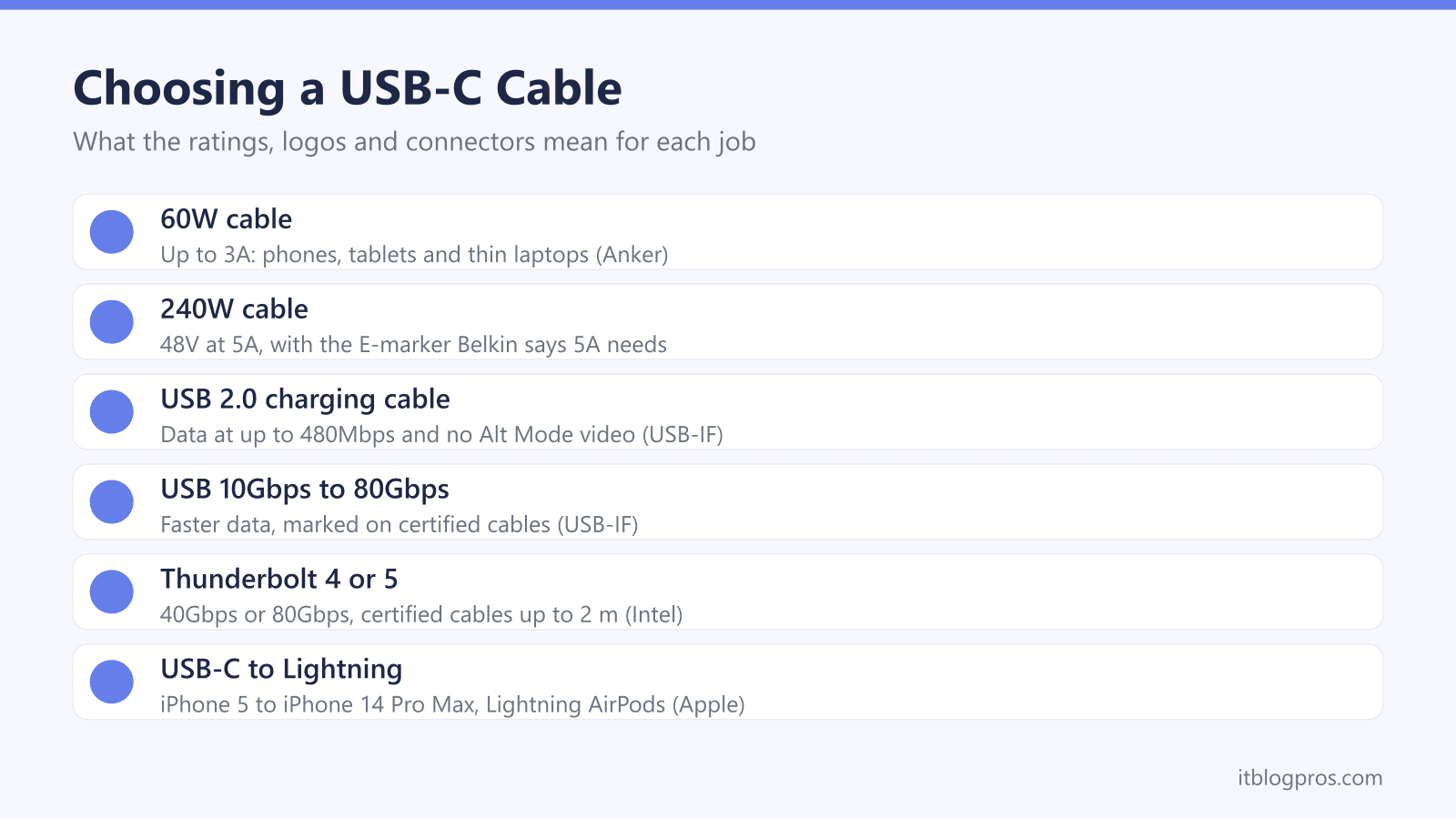
A USB-C cable looks the same whether it tops up a phone, charges a laptop at 240W or runs a monitor over Thunderbolt, and the plug gives almost nothing away. The differences sit inside: the current it is built to carry, the data wiring, and whether it passes video at all. This guide sets out what the USB Implementers Forum, Intel, Apple, Anker and Belkin say about each, covers Lightning and USB-A leads for older kit, and lists five cables worth shortlisting.
Match the cable to the job. The USB-IF labels certified USB-C to USB-C cables 60W or 240W, and many charging cables, Apple's and Belkin's included, move data at USB 2.0's 480Mbps with no video. Fast drives and monitors need a cable marked USB 10Gbps or faster, or Thunderbolt. The iPhone 14 and earlier still need USB-C to Lightning, and USB-A leads give up Power Delivery.
Key Takeaways
- The USB-IF says every certified USB-C to USB-C cable must be labelled 60W or 240W, and Belkin says an E-marker chip is required on all USB-C cables that support 5A.
- USB-IF guidelines say USB 2.0 Type-C cables carry data at up to 480Mbps without USB4 or Alt Mode video, and Apple's 60W and 240W cables transfer data at USB 2 rates.
- Intel's Thunderbolt 5 brief lists 40Gbps for Thunderbolt 4 and 80Gbps for Thunderbolt 5, universal cables up to 2 metres, and certification for every cable.
- Apple says iPhone 15 and later models have USB-C, and its USB-C to Lightning cable lists the iPhone 5 to the iPhone 14 Pro Max plus AirPods with Lightning cases.
- Anker says its USB-C to USB-A cable maxes out at 15W and 480Mbps without Power Delivery, and Belkin lists USB-A to USB-C cables at 15W.
Every Certified USB-C Cable Is Rated for 60W or 240W
Power is the first number to check. The USB Implementers Forum (USB-IF), the body behind the USB standards, says all certified USB-C to USB-C cables must be labelled with a power capability of 60W or 240W. Its cable logo guidelines say that logo goes on the cable itself, embossed or printed on the moulded plug.
The gap between the two is current. Anker's cable guide says up to 60W (3A) covers most phones, tablets and thin and light laptops, while 240W (48V at 5A), labelled EPR or PD 3.1, is for power-hungry laptops and monitors. The USB-IF's Power Delivery page says the standard was limited to 100W, at 20V over cables rated at 5A, until PD 3.1 added 28V, 36V and 48V levels for 140W, 180W and 240W.
Carrying 5A takes a chip. Belkin's USB-C guide says an E-marker is required on all USB-C cables that support 5A. A cable not rated for what the charger can supply makes both devices throttle down, Anker adds. The USB-C phone charger guide and the replacement laptop charger guide cover the plug end.
Many Charging Cables Move Data Only at USB 2.0 Speed
Watts say nothing about data. The USB-IF's cable logo guidelines say USB 2.0 cables rated 60W or 240W deliver data at up to 480Mbps, and that this speed is not shown in the charging logo. Apple's pages for its 60W and 240W USB-C Charge Cables say both transfer data at USB 2 rates, and Belkin says all its charging cables are USB 2.0 cables.
Faster cables carry a speed in their name. The USB-IF's data performance guidelines list five rates, sold as USB 5Gbps, USB 10Gbps, USB 20Gbps, USB 40Gbps and USB 80Gbps, and say terms such as USB 3.2 and SuperSpeed Plus are not meant for product names or packaging. Certified cables faster than USB 2.0 must be marked with their data rate, the USB-IF adds.
The slowest part sets the pace. The USB-IF says a USB 3.2 or USB4 device on a USB 2.0 cable runs at USB 2.0 speed. Apple says iPhone 15 Pro and later Pro models reach 10Gbps with an optional USB 3 cable, while the cable in the box supports USB 2 speeds.
Video Needs a Cable and a Port Built for It
A USB 2.0 cable will not run a monitor. The USB-IF's USB-C language guidelines say a USB 2.0 Type-C cable supports only USB 2.0 data and does not include USB 3.2, USB4 or Alt Mode. DisplayPort Alt Mode, Anker's video guide explains, passes native DisplayPort audio and video signals through dedicated pins, and Anker states plainly that not all USB-C cables support video.
Anker's advice is to check that the cable and the port both advertise DisplayPort Alt Mode or Thunderbolt support. Its page for its own Thunderbolt 4 cable says the devices' USB-C ports must support DisplayPort Alt Mode or Thunderbolt 3, 4 or 5 to show a picture. Phones take the same DisplayPort route: Apple lists most iPhone 15 and later models, though not the iPhone 16e or 17e, as connecting to USB-C displays at up to 4K and 60Hz, mirroring the iPhone's screen.
A TV usually means HDMI, which the USB-C to HDMI adapter guide covers, including which laptop ports carry video. For a desk screen on one cable, the monitor for laptop guide explains USB-C monitors.
Thunderbolt Cables Add Certified Speed, Video and Length
Thunderbolt uses the same USB-C plug with stricter rules. Intel's Thunderbolt 5 technology brief lists 40Gbps for Thunderbolt 4 and 80Gbps for Thunderbolt 5, with a Bandwidth Boost mode that lifts the sending speed to 120Gbps for demanding displays. The same brief lists universal cables up to 2 metres for both, mandatory certification for every computer, accessory and cable, and required USB4 compliance. For computers, Intel lists dual 4K screens under Thunderbolt 4 and dual 6K under Thunderbolt 5.
Charging is a separate question. Belkin's guide says Thunderbolt does not inherently support faster charging than regular USB-C, and Intel's brief says Thunderbolt 5 supports, but does not require, 240W Extended Power Range charging.
Compatibility runs both ways, Intel says: Thunderbolt devices work with computers that lack Thunderbolt, and the reverse. Apple says its Thunderbolt 4 (USB-C) Pro Cable is backwards compatible with USB 3 and DisplayPort. Anker lists 40Gbps, 240W charging and a single 8K or two 4K displays for its Prime Thunderbolt 4 cable. The docking station guide covers Thunderbolt and USB-C docks.
Older iPhones and AirPods Still Need USB-C to Lightning
Apple's USB-C support page says iPhone 15 and later models have a USB-C connector, which leaves the iPhone 14 and earlier on Lightning. Apple's own USB-C to Lightning Cable lists every iPhone from the iPhone 5 to the iPhone 14 Pro Max, plus AirPods (2nd and 3rd generation), AirPods Pro (1st generation) and the Lightning version of the AirPods Pro 2 MagSafe case. Apple says the cable to use depends on the AirPods charging case.
Older phones still fast charge. Apple says earlier iPhone models fast charge with a USB-C to Lightning cable and an Apple 18W or greater USB-C adapter, or a comparable third-party adapter that supports USB-PD. Its page for the cable warns that USB-C adapters not made by Apple might not charge an iOS device.
For third-party Lightning cables, Apple recommends the MFi badge on the packaging, and says counterfeit or uncertified ones may fail to sync or charge, get very hot, or damage the device. An iPhone 15 or later can also charge Lightning AirPods through this cable, at up to 4.5W, Apple adds.
USB-A Cables and Adapters Give Up Speed and Power
Plenty of plugs, cars and older laptops still have the rectangular USB-A port. Apple says a compliant USB-C to USB-A cable connects an iPhone to a car's USB-A port, and Google's Pixel help lists a USB-A to USB-C cable for use with a USB-A power adaptor.
The cost is speed and power. Anker says its own USB-C to USB-A cable maxes out at 15W and 480Mbps and does not do Power Delivery, fine for phones and tablets but not big laptops. Belkin's guide lists USB-A to USB-C cables at 15W with no Power Delivery, and Google says a USB-A adaptor charges a Pixel more slowly than USB-C at both ends.
An adapter solves the opposite problem: a USB-A flash drive or keyboard on a laptop with only USB-C ports. Apple says its USB-C to USB Adapter connects standard USB accessories such as flash drives and cameras to a USB-C Mac, iPad or iPhone, and Amazon lists its Amazon Basics adapter at 5Gbps with USB-IF certification. For several USB-A devices at once, the USB-C hub guide covers hubs with USB-A ports.
Length, Braiding and Logos Decide the Final Pick
Shorter is safer for speed. Anker's guide to cable length says USB 2.0 passive cables can typically reach 5 metres and 10Gbps cables around 1 metre, and that USB4 testing uses 0.8 metre passive cables and 2 metre active cables for 40Gbps. For charging, Anker says the loss over a well-made cable under about 2 metres is often small, while Belkin says longer cables may charge slightly slower.
Braiding is about wear, not speed. Anker says a braided sleeve won't make a cable faster but protects the wires inside. Belkin's page for its 2 metre 60W braided cable gives two bend figures: 30,000 in its marketing copy and more than 350,000 in its technical notes, which cite an internal test.
Logos are the better guide. The USB-IF reminds buyers to choose certified products from trusted sources that show its logos on the packaging or the cable, Intel requires certification for every Thunderbolt cable, and Apple points to the MFi badge for Lightning. The five below cover everyday charging, laptops, data and video, Lightning and USB-A.
| Product | Best for | Key specs | Price | |
|---|---|---|---|---|
 | Belkin BoostCharge Braided USB-C to USB-C Cable 60W, 2m (CAB004bt2MBK) Everyday | Phones, tablets and thin laptops up to 60W | 60W (20V 3A), USB 2.0 480Mbps, braided, 2 m | Check price → |
 | Apple 240W USB-C Charge Cable (2m) Laptops | Laptops and chargers above 60W | Up to 240W, woven design, USB 2 data rates, 2 m | Check price → |
 | Anker Prime Thunderbolt 4 Cable, 1m (A84N0) Data and video | Docks, fast drives and monitors | Thunderbolt 4, 40Gbps, 240W, one 8K or two 4K screens | Check price → |
 | Apple USB-C to Lightning Cable (1m) Older iPhones | iPhone 14 and earlier, and Lightning AirPods cases | USB-C to Lightning, charge and sync, 1 m | Check price → |
 | Amazon Basics USB-C to USB-A Adapter (L6LUC022-CS-R) USB-A kit | USB-A drives and accessories on a USB-C laptop | USB-C plug to USB-A socket, 5Gbps, USB-IF certified | Check price → |