
A soundbar is the simplest fix for thin TV sound, and the boxes all lead with the same claims: Dolby Atmos, eARC, a wireless subwoofer, clearer dialogue. Each one depends on the TV, the port and the room as much as on the bar itself. This guide takes the claims in turn, as the HDMI Licensing Administrator, Dolby, Sonos, Bose, Sony, Samsung and LG describe them, then covers sizing, wall mounting and five bars that suit the common jobs.
Plug the soundbar into the TV's HDMI eARC or ARC port, not optical or Bluetooth, where the TV has one. The HDMI Licensing Administrator says eARC carries Dolby Atmos, DTS:X and uncompressed 7.1, and Sony's format table shows ARC carries Atmos only in its Dolby Digital Plus form. Pick a bar close to the TV's width, add a subwoofer for bass and use a speech mode for dialogue.
Key Takeaways
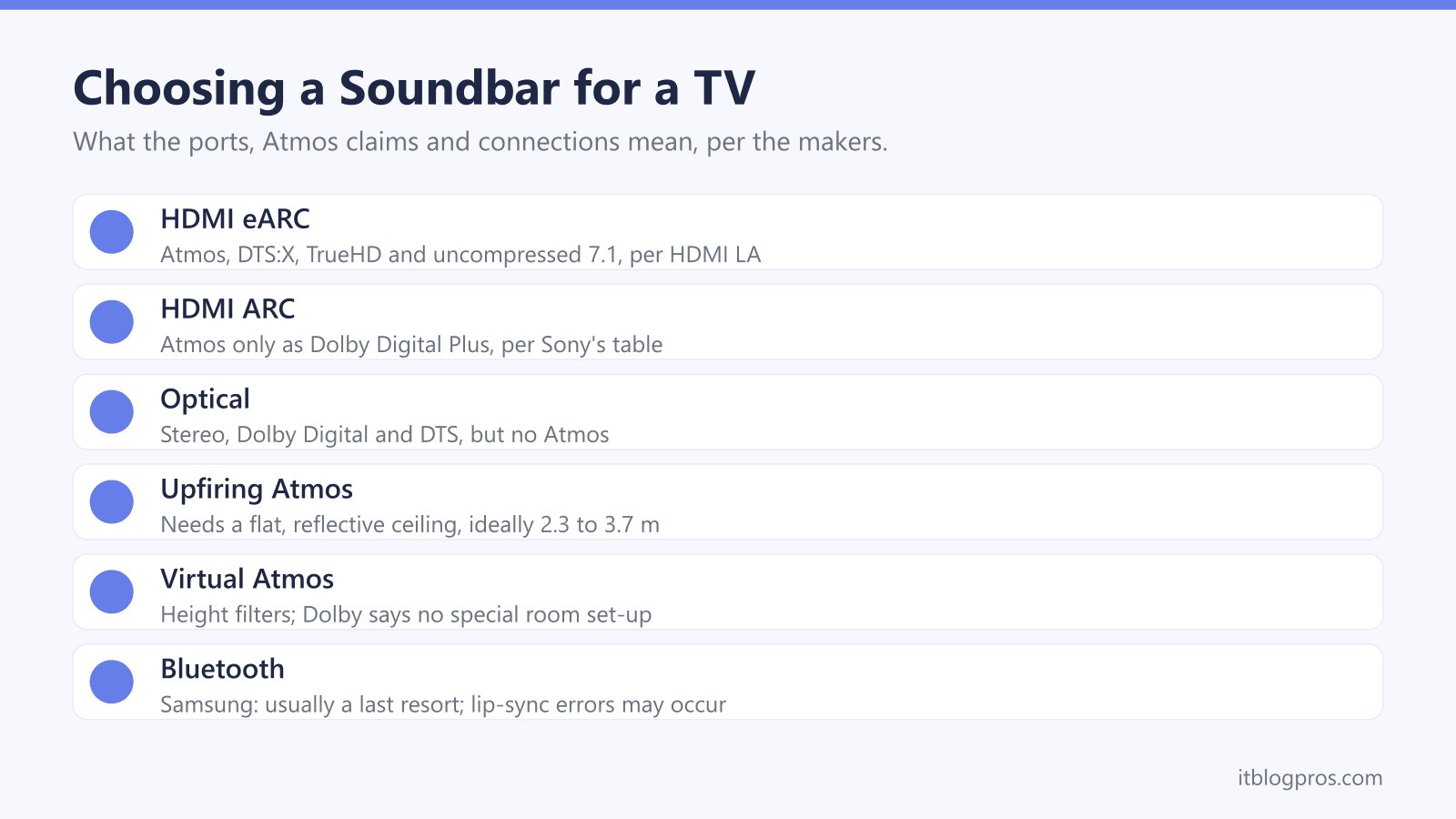
- The HDMI Licensing Administrator says eARC carries Dolby Atmos, DTS:X, Dolby TrueHD and uncompressed 5.1 and 7.1, while Sony's format table shows ARC carries Atmos only as Dolby Digital Plus and optical carries no Atmos at all.
- Dolby describes two kinds of Atmos soundbar: upward-firing drivers that bounce sound off a flat ceiling, ideally 2.3 to 3.7 metres high, and height virtualisation, which Dolby says needs no special room set-up.
- Samsung says Q-Symphony keeps its soundbar and the TV's own speakers playing together on selected Samsung TVs, and LG says WOW Orchestra does the same on supported LG TVs with eARC switched on.
- Samsung's sizing chart pairs a 55-inch TV with a 105 to 117 cm bar, while Sonos sells the 65 cm Beam (Gen 2) for TVs up to 65 inches, so width is partly a matter of looks.
- Samsung's support page calls Bluetooth audio usually a last resort for a TV and warns that lip-sync errors may occur, so an HDMI or optical cable comes first.
HDMI eARC Carries More Than ARC or Optical
Three wired connections can take TV sound to a soundbar, and they do not carry the same things. The HDMI Licensing Administrator's blog says ARC, the Audio Return Channel, arrived in 2009 so the TV could send its own sound back to a sound system over HDMI, and that eARC was built to remove ARC's bandwidth limits. HDMI LA's eARC page lists Dolby Atmos, DTS:X, Dolby TrueHD, DTS-HD Master Audio and uncompressed 5.1 and 7.1.
Sony's format table for the BRAVIA Theatre Bar 5 shows what that means at home. Over eARC, the bar takes every format on its list. Over ARC, it takes Atmos only in its Dolby Digital Plus form, which Dolby calls the preferred codec for streaming, and neither DTS:X nor TrueHD. Over optical, it takes stereo PCM, Dolby Digital and DTS, but no Atmos.
Samsung's UK set-up guide adds that optical cannot carry some high bitrate formats such as Dolby Digital Plus. Sonos agrees for its bars: Atmos needs HDMI ARC or eARC, and lossless TrueHD Atmos needs eARC.
The ARC Port and HDMI-CEC Make the Link, Not Bluetooth
The cable has to go into the right socket. Sonos says a bar plugged into a standard HDMI port produces no sound, and Sony's help guide says only the TV's eARC or ARC input passes TV sound to the bar. Samsung's UK steps are to connect the TV's HDMI IN (ARC) port to the soundbar's HDMI ARC or HDMI OUT port, set the soundbar to HDMI, then choose it under Settings, Sound, Sound Output.
Next comes HDMI-CEC, which each maker names differently. LG calls it SIMPLINK and says to switch it on, then set Sound Out to HDMI(ARC) Device. Sony says that without Control for HDMI switched on, the bar outputs no TV sound, and that eARC must also be enabled on the TV. Samsung asks for a cable labelled High Speed or High Speed with Ethernet, and the HDMI cable guide explains those labels.
Bluetooth is the fallback. Samsung's support page calls Bluetooth audio usually a last resort for a TV and warns that lip-sync errors may occur. The Bluetooth speaker guide covers the jobs Bluetooth suits.
Dolby Atmos Height Comes From Upfiring Drivers or Processing
Dolby Atmos adds a layer of sound overhead, and Dolby's guide to Atmos soundbars describes two ways to deliver it. Upward-firing drivers bounce sound off the ceiling. Dolby puts the ideal ceiling height at 2.3 to 3.7 metres, workable up to 4.3 metres, and wants it flat and reflective, like plaster, with acoustic tiles best avoided. Dolby also says not to tuck an upfiring bar into a cabinet or under a soffit.
The second way is height virtualisation. Dolby says it applies filters that mimic how the ear hears sound from overhead, mixes the result into forward-facing speakers and needs no special room set-up. Sonos's fact sheet for the Beam (Gen 2) lists a tweeter, four midwoofers and three passive radiators, none of them upward-firing, and credits phased speaker arrays for steering sound.
Either way, the film needs an Atmos soundtrack. Dolby says Atmos arrives in Dolby Digital Plus from streaming and Dolby TrueHD from Blu-ray, so the TV app or streaming stick must supply it; the Fire TV Stick guide covers the sticks.
A Subwoofer Adds Bass, and a Speech Mode Adds Clarity
The numbers on the box count the speakers. Dolby's guide says the first digit counts listener-level channels, the second counts subwoofers and the third counts overhead speakers, so a 3.1 bar has a subwoofer and a 5.1.2 system adds two height channels. Sony's help guide lists two front speakers and a centre speaker in the BRAVIA Theatre Bar 5, plus a separate wireless subwoofer with its own mains lead. Sonos says a Sub and rear speakers can be added to the Beam (Gen 2) or the Ray later.
Dialogue is a separate fix. Dolby's Dialogue Enhancer detects speech, lifts the middle to high frequencies that matter most for intelligibility and lowers competing sounds. Sonos says Speech Enhancement boosts voice frequencies and clarifies dialogue. Bose says Dialogue Mode helps make speech easier to hear, and gives the TV Speaker (2nd Gen) a centre tweeter dedicated to speech. Sony's Voice mode emphasises dialogue. For late viewing, Sony says Night mode keeps sound clear at low volume, and Sonos says Night Sound tames loud sounds and lifts quiet ones.
Samsung Q-Symphony and LG WOW Orchestra Need a Matching TV
Normally the TV's own speakers fall silent when a soundbar takes over. Samsung's Q-Symphony changes that: Samsung says its soundbars with Q-Symphony keep both the soundbar and the Samsung TV speakers active, sharing the sound between them. A footnote limits this to selected Samsung TVs, and Samsung's UK comparison lists Q-Symphony across the Q-series and S-series but, in the B-series, only on the B750F and B650F.
LG's WOW Orchestra works the same way. LG's US20A page says it lets the soundbar and TV speakers play at the same time, and lists compatible TVs from OLED ranges to certain QNED, NANO and UHD models, noting that compatibility varies by year. LG's help library adds that it switches on automatically, needs the TV's eARC function enabled and is available only on supported LG TVs and soundbars.
Sony's version is narrower. Its help guide says Voice Zoom, with a compatible Sony TV connected, adjusts only the volume of human voices. Each of these features stays within one brand, so the TV's maker is worth weighing when choosing the bar.
Size the Bar to the TV, Then Check the Wall Fixings
Samsung's UK buying guide says a soundbar should be the same length as the TV or just a bit shorter. Its chart pairs a 32-inch TV with a 62 to 70 cm bar, a 55-inch with 105 to 117 cm, and 65 inches and above with 123 to 148 cm. Sonos draws the line elsewhere, selling the 65 cm Beam (Gen 2) for TVs up to 65 inches. On a stand, Samsung adds, the bar should be narrower than the console.
Wall mounting differs by brand. Samsung says nearly all its soundbars include a wall-mount bracket and suggests fitting the bar slightly below a wall-hung TV. Sonos sells its Beam mount separately and says the bar can go above or below the TV, while Bose, which also sells its bracket separately, does not recommend mounting the TV Speaker above the TV. Sony supplies a paper template rather than a bracket for the Theatre Bar 5, leaves the screws to the buyer and wants the template's top line at least 70 mm below the TV.
Five Soundbars Cover the Lounge, the Bedroom and a Budget
First, the caveats. A soundbar cannot add eARC to a TV without it, so an ARC-only set limits Atmos to its Dolby Digital Plus form. A TV that keeps dropping off WiFi is a separate problem, covered in the smart TV WiFi guide. Bose's own page does not list Dolby Atmos for the TV Speaker (2nd Gen), so treat any listing that claims it with caution.
With that settled, the table covers the common jobs. The Sonos Beam (Gen 2) is the all-round pick, with HDMI eARC, Atmos, Speech Enhancement and voice control through Sonos Voice Control or Alexa. Sony's BRAVIA Theatre Bar 5 adds a wireless subwoofer and decodes Atmos and DTS:X over eARC. Bose's TV Speaker (2nd Gen) is the dialogue choice, with HDMI ARC, optical and Bluetooth. The Sonos Ray suits a bedroom TV with an optical output; Sonos says voice control needs a compatible device such as an Amazon Echo, covered in the Echo guide. LG's US20A is the budget bar, and its spec list shows HDMI ARC but no optical input.
| Product | Best for | Key specs | Price | |
|---|---|---|---|---|
 | Sonos Beam (Gen 2) Our pick | Living-room TVs up to 65 inches with HDMI eARC | HDMI eARC, Dolby Atmos, Speech Enhancement, 651 mm wide | Check price → |
 | Sony BRAVIA Theatre Bar 5 With subwoofer | Film nights that need deeper bass | Wireless subwoofer, Atmos and DTS:X over eARC, 900 mm | Check price → |
 | Bose TV Speaker (2nd Gen) Clear dialogue | Viewers who struggle to hear speech | HDMI ARC, optical, Bluetooth, Dialogue Mode | Check price → |
 | Sonos Ray Bedroom TV | Smaller TVs with an optical output | Optical only, 557 mm wide, Speech Enhancement, WiFi | Check price → |
 | LG US20A Budget | Small to medium TVs with HDMI ARC | 2.0 channel, HDMI ARC, Bluetooth 5.3, WOW Orchestra | Check price → |