
A Bluetooth speaker is the simplest way to get music into the garden, onto the beach or across a room, and the boxes all shout the same things: IP67, 20 hours, 40 metres, stereo pairing. Each of those numbers comes with conditions the makers spell out on their own pages. This guide takes the claims in turn, as JBL, Bose, Ultimate Ears, Soundcore and Sony describe them, then covers laptops and TVs and five speakers that suit the common jobs.
For outdoor use, pick IP67 or IP68. The IEC's first digit 6 means no dust gets in, and Sony's guide says IPX7 covers 1 metre of water for 30 minutes, while JBL says its IP68 Flip 7 survives 1.5 metres for 30 minutes. Treat battery and range figures as best cases, buy a second speaker from the same pairing system, and use a cable for TV sound where Samsung recommends one.
Key Takeaways
- The IEC's IP code grades dust from 0 to 6 and water from 0 to 9, and Sony's guide to IP ratings says IPX7 means immersion in up to 1 metre of water for 30 minutes.
- JBL says the IP68 Flip 7 can be submerged in up to 1.5 metres of water for 30 minutes, while Bose says the IP67 SoundLink Flex (2nd Gen) floats but is not designed for use in water.
- Battery figures are best cases: JBL's 16 hours for the Flip 7 includes 2 hours from Playtime Boost, and Ultimate Ears says high volume or bass boost drains the battery faster.
- Two speakers pair only within one maker's system, such as JBL Auracast, UE PartyUp or Bose Stereo Mode, and Ultimate Ears says PartyUp does not work with the WONDERBOOM.
- Samsung's support page calls Bluetooth audio usually a last resort for a TV, warns that lip-sync errors may occur and points to optical or HDMI ARC instead.
IP67 and IP68 Mean Dust-Tight and Submersible
The IP code on a speaker's box comes from the International Electrotechnical Commission. The IEC's explainer says the code has two numerals: the first rates protection against solid objects from 0 to 6, where 6 means no ingress of dust, and the second rates protection against liquids from 0 to 9. The full test conditions sit in the standard itself, IEC 60529.
Sony's guide to IP ratings fills in the water digits that matter for speakers. IPX4 means protection against splashing water, IPX5 against low-pressure jets and IPX7 against immersion in up to 3.29 feet, about 1 metre, of water for 30 minutes. IPX8 goes deeper, with the exact conditions set by each manufacturer.
So IP68 means whatever the maker says it means. JBL's support page says the Flip 7 can be submerged in up to 1.5 metres of water for up to 30 minutes. Bose rates the SoundLink Flex (2nd Gen) at IP67 and says it floats, though its FAQ adds that it is not designed to be used while in water.
Salt Water, Drops and Wet Charging Ports Sit Outside the Rating
An IP rating is a controlled test, and the makers' small print shows where it stops. Sony's help guide for the ULT FIELD 1 lists fresh, tap, pool and salt water as covered, but not soapy water, shampoo or hot spring water, and says the rating holds only with the cap fastened securely. Bose says to rinse the SoundLink Flex with fresh water after salt or chlorinated water and let it dry thoroughly.
Charging is the weak point. JBL's support page says to dry the charging port completely before plugging in power, and Sony says the USB connector itself is neither waterproof nor dustproof.
Drops are a separate claim again, because the IEC's code grades only dust and liquids. Ultimate Ears says the WONDERBOOM 4 is drop-tested from 1.5 metres. JBL calls the Flip 7 and Charge 6 drop-proof, but its spec pages give no height. Soundcore describes the Boom 3i as drop-proof and more saltwater resistant than other similar speakers, without naming them.
Battery and Range Figures Are Best Cases
Playtime figures are measured in kind conditions. JBL quotes up to 16 hours for the Flip 7, which is 14 hours on a charge plus 2 from Playtime Boost, and up to 28 hours for the Charge 6, which is 24 plus 4. Bose says battery performance on the SoundLink Flex (2nd Gen) varies with audio content, loudness and temperature. Ultimate Ears is blunter: high volume or bass boost can drain the battery faster.
Range works the same way. The Bluetooth SIG says reliable range runs from more than a kilometre down to less than a metre, depending on factors such as transmit power, antenna design and path loss, and that obstacles between the devices deteriorate the signal. Makers' figures vary widely as a result. Bose promises a strong connection within 9 metres, Ultimate Ears quotes 40 metres for the WONDERBOOM 4 and adds that real range varies with the setting and the number of connected devices, and JBL's spec pages give no range figure at all.
Charging Runs on USB-C, Often Without a Plug in the Box
Every speaker in this guide charges over USB-C, but the box may not hold everything needed. JBL leaves the cable out to cut e-waste and says any standard USB-C cable and a power adapter compliant with the USB-C standard will do. Its Flip 7 page marks a 7.5 to 15W charger as not included. Ultimate Ears says the WONDERBOOM 4 charges by a USB-C cable that is not included. Bose puts a USB-C to USB-A cable in the box but no plug, and says a full charge takes 4 hours from a 5V, 1.5A (7.5W) supply.
JBL lists 2.5 hours to charge the Flip 7 and 3 hours for the Charge 6, and Bose notes that times change when the recommended supply is not used.
Some speakers can work the other way round. JBL says the Charge 6 keeps a built-in powerbank to charge a phone while the music plays, a feature Bose's comparison table lists as absent on the SoundLink Flex. For a weekend away from the mains, the power bank guide covers keeping everything topped up.
Pairing Two Speakers Works Within One Maker's System
Two speakers can play the same music, but only through the maker's own system. JBL's pairing guide describes three methods, Auracast, PartyBoost and AirTouch, and JBL says the Flip 7 and Charge 6 use Auracast to stereo pair two of the same model or link several Auracast-enabled JBL speakers. Connect the phone to the first speaker, press its Auracast button, then press the button on each of the others. JBL notes that switching the first speaker off stops the music on all of them. Generations do not always mix: Harman's support page says PartyBoost speakers such as the Flip 5 will not connect with older Connect+ models like the Flip 4.
Ultimate Ears runs PartyUp through its BOOM app for BOOM, MEGABOOM and HYPERBOOM speakers, and says PartyUp does not work with the WONDERBOOM. The WONDERBOOM 4 pairs with a second WONDERBOOM 4 instead. Bose offers Stereo Mode or Party Mode with compatible Bose speakers, and Soundcore lists True Wireless Stereo pairing for two speakers.
A Laptop or TV Can Use a Bluetooth Speaker, With Caveats
A laptop pairs a speaker like any other Bluetooth device. Microsoft's Windows 11 steps are to put the speaker in pairing mode, select the network, sound or battery icon on the taskbar, open Manage Bluetooth devices and choose the speaker under New devices. The guide to connecting AirPods to a laptop walks through the same basics.
JBL adds a wired route: with the latest software, the Flip 7 and Charge 6 play lossless audio from a laptop or tablet over a USB-C cable, and JBL recommends one shorter than 1.2 metres. For moving between a phone and a laptop, Bose says the SoundLink Flex (2nd Gen) stays connected to two source devices at once, and Ultimate Ears lists the same for the WONDERBOOM 4.
TVs are trickier. Samsung's UK steps run through Settings, Sound, Sound Output and Bluetooth Speaker List, but Samsung's support page warns that lip-sync errors may occur and recommends optical or HDMI ARC where the TV has them.
Five Speakers Cover the Garden, the Beach and the Desk
First, the caveats. A new speaker will not cure TV lip-sync, a second speaker has to share the first one's pairing system, and JBL and Ultimate Ears leave the USB-C cable out of the box. None of these is a smart speaker either; an Amazon Echo is built around home WiFi and a voice assistant, and the Echo WiFi guide covers one that will not connect.
With that settled, the table covers the common jobs. The JBL Flip 7 is the all-round pick, with IP68, up to 16 hours and Auracast pairing. The JBL Charge 6 stretches playtime to up to 28 hours and adds a built-in powerbank. Bose's SoundLink Flex (2nd Gen) is IP67, floats and holds two devices at once, which suits a phone and a laptop. Soundcore's Boom 3i is IP68 and, by Soundcore's account, stays upright and playing even in waves, which makes it the pool and beach choice. The Soundcore Select 4 Go is the budget option, IP67 with up to 20 hours.
| Product | Best for | Key specs | Price | |
|---|---|---|---|---|
 | JBL Flip 7 Our pick | Gardens, beaches and days out | IP68, up to 16 hours with Playtime Boost, Auracast | Check price → |
 | JBL Charge 6 Longest battery | Long days out and topping up a phone | IP68, up to 28 hours, built-in powerbank, Auracast | Check price → |
 | Bose SoundLink Flex (2nd Gen) Two devices | Switching between a phone and a laptop | IP67, floats, up to 12 hours, multipoint, built-in mic | Check price → |
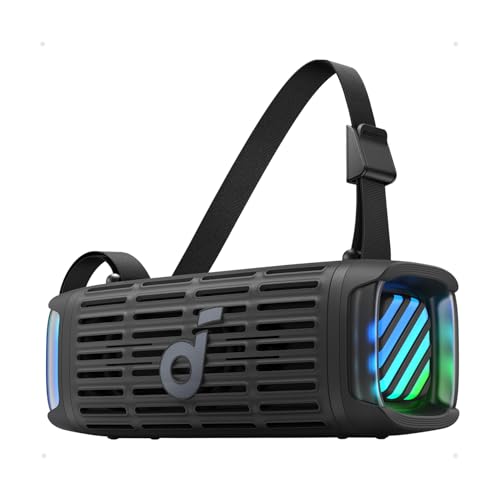 | Soundcore Boom 3i Pool and beach | Pools and beaches, where it may end up in the water | IP68, floats upright, 50W, 16 hours | Check price → |
 | Soundcore Select 4 Go Budget | A small first speaker for bags and bikes | IP67, floats, up to 20 hours, 5W, stereo pairing | Check price → |