
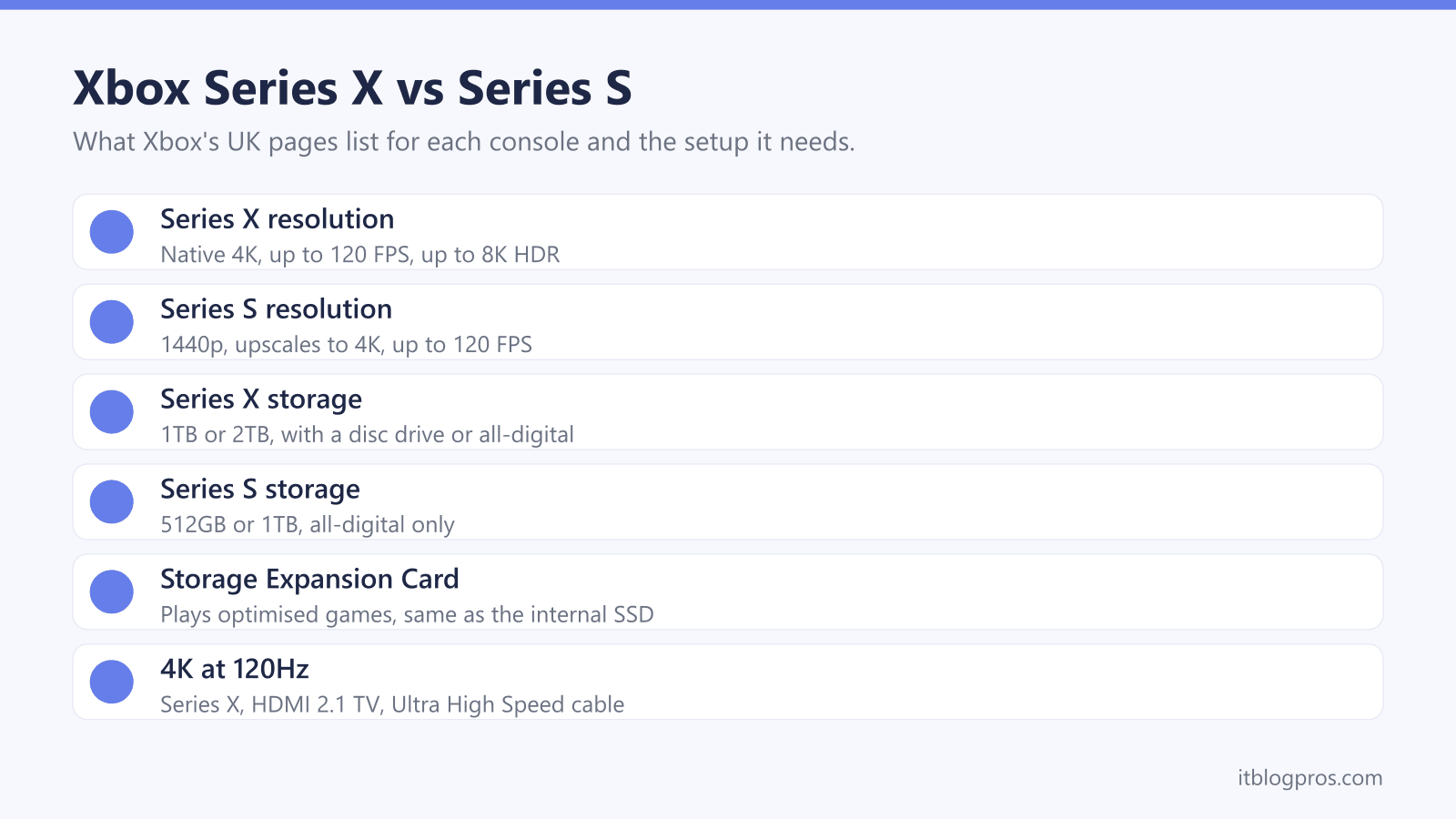
Microsoft sells two current Xbox consoles in the UK, and the gap between them is bigger than one letter suggests. The Xbox Series X aims at native 4K and comes with or without a disc drive; the Xbox Series S aims at 1440p and plays digital games only. This guide sets out every model on Xbox's own UK pages, what storage each one takes, how the Game Pass plans differ, and the TV, cable and network setup that gets the most from either.
Buy the Xbox Series X for a 4K TV: Xbox lists native 4K, up to 120 FPS and, on the Carbon Black and Galaxy Black models, a 4K UHD Blu-ray drive. Buy the Xbox Series S for a 1080p TV, a monitor or a tighter budget: Xbox lists 1440p with upscaling to 4K, the same up to 120 FPS target, and digital games only.
Key Takeaways
- Xbox's UK Series X page lists a 1TB Carbon Black model with a 4K UHD Blu-ray drive, a 1TB all-digital Digital Edition, a 2TB Galaxy Black Special Edition and a 1TB X25 Limited Edition.
- Xbox's own FAQ says the main difference is that the Series X displays games in native 4K, while the 512GB and 1TB Series S are designed for 1440p with the ability to upscale to 4K.
- Xbox Support says games optimised for Series X|S must be installed on the internal SSD or a Storage Expansion Card, while a USB 3.1 drive of at least 128 GB can store them and play older games.
- Xbox Support lists three things for 4K gaming at 120Hz: an Xbox Series X, an Ultra High Speed HDMI cable that supports HDMI 2.1, and a TV that supports HDMI 2.1.
- Microsoft's Game Pass page lists online console multiplayer in the Essential, Premium and Ultimate plans, and new games on day one only in Ultimate and the PC-only plan.
Microsoft Sells Four Series X Editions and Two Series S Sizes
Xbox's UK Series X page lists four versions. The 1TB Carbon Black model has a 4K UHD Blu-ray drive, and the 1TB Digital Edition in Robot White has no disc drive. The 2TB Galaxy Black Special Edition keeps the disc drive and is marked as a Microsoft Store exclusive, while the X25 Limited Edition is a 1TB disc model that Xbox says is engraved with an individual number. All four use what Xbox calls a custom NVMe SSD.
The Series S comes in two sizes. Xbox's Series S page lists a 512GB model and a 1TB model, and its FAQ says both are all-digital consoles that do not play game discs. The shop panel on that page shows both in Robot White, while the spec table lists the 1TB model in Carbon Black, so the colour is worth checking before paying.
Both console pages have buy buttons for Microsoft Store and links to certified refurbished consoles. Xbox's in-the-box support page lists a controller, two AA batteries, an HDMI cable and a mains lead with standard editions.
Series X Targets Native 4K While Series S Targets 1440p
Xbox's FAQ puts the main difference plainly: the Series X displays games in native 4K, while the Series S is designed for disc-free gaming at 1440p with the ability to upscale to 4K. Both list a performance target of up to 120 FPS, and Xbox's footnotes add that this requires supported content and display. The Series X page also lists up to 8K HDR.
The hardware explains the gap. Xbox's spec tables give both consoles the same eight-core 3.8 GHz Zen 2 processor, but the Series X has a 12 TFLOPS graphics chip and 16GB of GDDR6 memory, against 4 TFLOPS and 10GB on the Series S. Both list one HDMI 2.1 port with Auto Low Latency Mode, HDMI Variable Refresh Rate and AMD FreeSync, and the same FAQ says both keep Quick Resume.
A 4K TV is the real reason to pay for the Series X. On audio, its spec table lists Dolby TrueHD with Atmos and up to 7.1 L-PCM, which matters when pairing a soundbar.
Discs, Digital Licences and Older Games Shape the Choice
Only a Series X with a drive plays discs. Xbox's Series S FAQ says disc-based games are not compatible with either Series S, and Xbox's spec table lists no optical drive for the Series X Digital Edition. A shelf of Xbox One discs, or a habit of buying games second-hand, points to the Carbon Black, Galaxy Black or X25 model.
Xbox's Series X FAQ says the console is compatible with thousands of games across four generations of Xbox. The backward compatibility page lists FPS Boost, which aims to nearly double frame rates in supported older titles, plus Auto HDR and up to 4K resolution for selected games.
The disc rules read differently from one FAQ to the next. The Series X FAQ says a backward compatible disc game must stay in the drive to play, yet its disc to digital licensing FAQ says supported Xbox One and Series X discs can be claimed as a digital licence, so the disc is no longer needed. Xbox 360 and original Xbox discs are not supported for that.
Storage Expansion Cards Match the Internal SSD
The type of drive matters. Xbox Support says the Storage Expansion Card plugs into a slot on the back and performs identically to the internal SSD, and that games optimised for Series X|S must be installed on one or the other. The same page says a USB 3.1 drive of at least 128 GB can store any game and play Xbox One, Xbox 360 and original Xbox titles, but not optimised ones.
Capacities differ from page to page. Xbox Support lists 512 GB, 1 TB and 2 TB cards, and the Series S spec table mentions only 1 TB. Seagate's UK page offers 1TB, 2TB and 4TB with a three-year limited warranty. SanDisk, which now sells the former WD_BLACK C50 as the SANDISK Optimus GX C50, lists 512GB, 1TB and 2TB with a five-year limited warranty.
Xbox Support adds that the card works only with Series X|S. A USB hard drive such as WD's P10 for Xbox, which WD lists for playing Xbox One games and archiving Series X|S games, is the cheaper place to park games between plays.
Game Pass Tiers Decide Online Play and Day-One Games
Online play is where a subscription comes in. Xbox's backward compatibility page states that online console multiplayer requires Xbox Game Pass, and Microsoft's Game Pass page lists it in three plans: Essential, Premium and Ultimate.
Microsoft describes the tiers this way. Essential has 50+ games on console, PC and more devices, plus 5 hours a month of cloud playtime. Premium has 200+ games, adds new Xbox-published games within a year of launch, and gives 10 hours of cloud playtime. Ultimate has 400+ games, new games on day one, EA Play, Fortnite Crew and Ubisoft+ Classics, and 15 hours of cloud playtime. A fourth plan is for PC only, and Microsoft's page lists neither cloud gaming nor online console multiplayer for it.
Two footnotes are worth reading. Microsoft says its day-one games exclude Call of Duty titles, and that games, numbers and features vary over time, by region, plan and platform. Prices change too, so the Game Pass page itself is the place to check them before committing to a plan.
The TV, HDMI Cable and Router Set the Ceiling
Xbox Support lists three things for 4K gaming at 120Hz: an Xbox Series X, an Ultra High Speed HDMI cable that supports HDMI 2.1, and a TV that supports HDMI 2.1. Without HDMI 2.1, the same page says either console can still run 120Hz at a lower resolution. The Series S cable is a muddle. Xbox's in-the-box support page lists a High Speed HDMI cable with it, the Series S FAQ says Ultra High Speed, and the 120Hz page tells Series S owners wanting 4K at 120Hz to get a certified Ultra High Speed cable. The HDMI cable guide explains those labels.
Online play favours a cable as well. Both spec tables list 10/100/1000 Ethernet and 802.11ac dual-band WiFi, and Xbox Support's network settings page calls wireless interference the leading reason for latency and packet loss. Its slow downloads page says to wire the console to the router where possible, or else use the 5GHz band. The gaming router guide and the Cat6 versus Cat8 guide cover the kit.
Controllers and Headsets Carry Over or Add On
Controllers carry over. Xbox's console FAQs say Series X|S consoles are compatible with most Xbox One controllers and gaming accessories, and each console comes with one Xbox Wireless Controller. Xbox's controller page lists Xbox Wireless for consoles, Bluetooth for Windows 10/11 PCs, tablets, iOS and Android, a 3.5mm stereo headset jack and AA batteries for up to 40 hours, with a note that battery life varies significantly. The same pad works on a computer, as the controller to PC guide shows.
For chat, Xbox's Wireless Headset page lists direct pairing to the console, Bluetooth 5.3, up to 20 hours of battery life and Dolby Atmos support, and says it can pair to a phone and console at once. It also says some voice chat features on console may need Game Pass Essential, Premium or Ultimate. The gaming headset guide covers multi-platform options.
The table below covers an expansion card, a USB game drive, a spare controller and the Xbox headset. The consoles themselves are on sale through Microsoft Store from Xbox's own console pages.
The consoles themselves sell through Microsoft Store and other retailers, and Amazon UK's own console stock comes and goes, so this link runs a search of Amazon UK for Xbox Series X and Series S consoles rather than pointing at one listing. Check that the seller is Amazon or Microsoft and that the console is new before ordering.
| Product | Best for | Key specs | Price | |
|---|---|---|---|---|
 | SANDISK Optimus GX C50 Storage Expansion Card, 1TB Storage card | Playing optimised games from extra storage | 1TB, Xbox expansion slot, 5-year limited warranty | Check price → |
 | WD_BLACK P10 Game Drive for Xbox, 2TB Budget storage | Archiving games and playing Xbox One titles | 2TB HDD, USB 3.2 Gen 1, up to 130MB/s | Check price → |
 | Xbox Wireless Controller, Carbon Black Spare pad | A second player, or PC and phone gaming | Xbox Wireless and Bluetooth, AA batteries, 3.5mm jack | Check price → |
 | Xbox Wireless Headset Headset | Party chat on console with a phone paired too | Up to 20 hours, Bluetooth 5.3, Dolby Atmos | Check price → |