
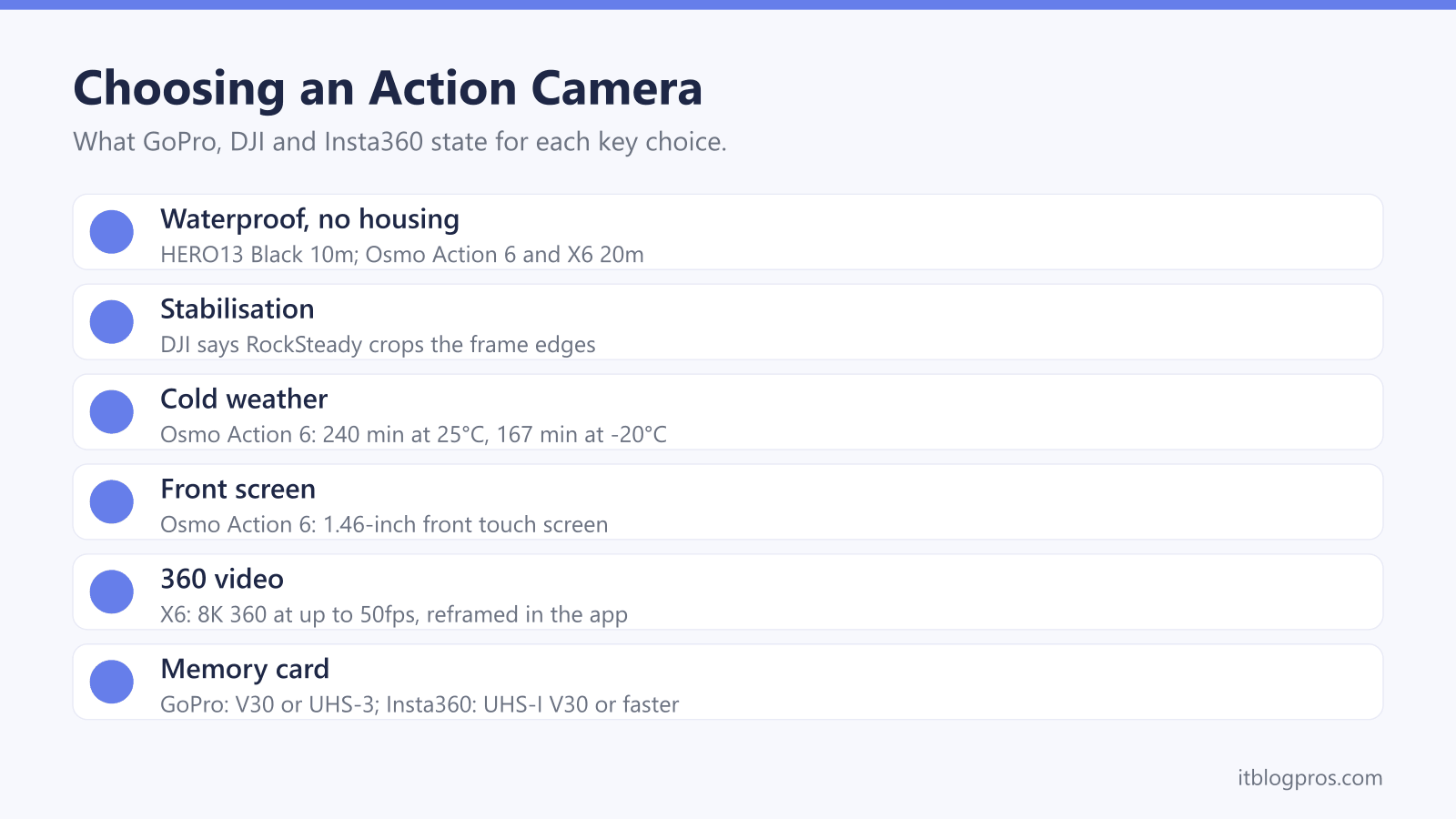
GoPro, DJI and Insta360 make most of the action cameras worth shortlisting in the UK, and on paper they look alike: small, tough, very wide and very smooth. The real differences sit in the details each maker publishes, from waterproof depth without a case to battery life in the cold and whether the camera films in 360. This guide sets those details out as GoPro, DJI and Insta360 state them, covers the GoPro Quik, DJI Mimo and Insta360 apps, then lists four cameras for different jobs.
For helmet and bike mounting, the GoPro HERO13 Black is the safe choice, with built-in mounting fingers that GoPro says work with any GoPro accessory. For vlogging, DJI's Osmo Action 6 has a 1.46-inch front touch screen and a 20m rating without a case. To film everything at once and pick the angle later, Insta360's X6 records 8K 360 video for reframing in its app.
Key Takeaways
- GoPro lists the HERO13 Black at 5.3K60 and 4K120, DJI lists 8K at up to 30fps on the Osmo Action 6, and Insta360 lists 8K 360 video at up to 50fps on the X6.
- DJI says RockSteady crops the frame edges, and Insta360 says FlowState for 360 footage is applied afterwards in its app or Insta360 Studio rather than in the camera.
- Without a housing, GoPro rates the HERO13 Black to 10m, DJI rates the Osmo Action 6 to 20m and Insta360 rates the X6 to 20m, while GoPro says its MAX2 is not suitable for underwater use.
- Cold shortens recording time: DJI gives the Osmo Action 6 up to 240 minutes at 25°C but 167 minutes at -20°C.
- GoPro says its Premium subscription adds unlimited full-quality cloud storage for GoPro footage and up to two camera exchanges a year for the same model, with fees.
Resolution and Frame Rate Set the Ceiling, and the Card Has to Keep Up
Resolution is the size of each frame, and frame rate is how many frames are recorded each second; high frame rates are what make smooth slow motion possible. GoPro's HERO13 Black page lists 5.3K at 60fps, 4K at 120fps and 1080p at 240fps, plus 27MP photos. DJI's spec page gives the Osmo Action 6 a 1/1.1-inch sensor, 8K at up to 30fps in 16:9 only, and 4K at up to 120fps. Insta360's manual lists 8K 360 video at up to 50fps on the X6. GoPro's small HERO is simpler, with 4K30 and 2.7K60 on GoPro's page.
Big files need a fast card. GoPro asks for a microSD card rated V30 or UHS-3 for the HERO13 Black. DJI recommends U3 A2 V30 cards up to 1TB for the Osmo Action 6, which also has 64GB built in, 50GB of it usable. Insta360 asks for UHS-I V30 or faster for the X6 and warns that UHS-II and UHS-III cards can stop recording. The SD card and card reader guide explains the ratings.
HyperSmooth, RockSteady and FlowState Work in Different Ways
Stabilisation is where the brand names differ most. GoPro's HERO13 Black page says HyperSmooth 6.0 raises the bar for in-camera stabilisation. On the small HERO, GoPro's page says HyperSmooth is applied automatically in the Quik app, after the shot.
DJI explains its method in more detail. The Osmo Action 6 FAQ says RockSteady 3.0 raises the shutter speed, analyses the sensor images and crops the edges of the frame. HorizonSteady, DJI says, corrects any horizontal rotation through 360 degrees to keep the horizon level however the camera is mounted, at up to 4K and 60fps. DJI's spec page adds that stabilisation is not supported in Slow Motion or Timelapse, and that 8K is limited to the RockSteady modes.
Insta360 splits it by mode. Its X6 manual says FlowState is always on for single-lens video but not supported in the camera for 360 modes, where it is applied in the Insta360 app or Insta360 Studio. Horizon Lock is on by default in 360 mode, and Insta360 warns that levelling crops the frame edges, so leave a little space around the subject.
Waterproof Depth and Battery Life Both Come With Conditions
Depth ratings vary widely. GoPro's Ultra Wide Edition page says the HERO13 Black is waterproof to 10m with its standard lens but 5m with the Ultra Wide Lens Mod, and GoPro rates the small HERO to 5m. DJI lists 20m for the Osmo Action 6 without a case, 60m in its Waterproof Case, and 18m for the Osmo Action 4. Insta360 gives the X6 20m alone, or 60m with the Dive Case. GoPro's MAX2 manual rates that 360 camera to 5m but calls it unsuitable for underwater use, because of image distortion.
Battery figures come from the makers' tests at 25°C. GoPro rates the HERO13 Black's 1900mAh Enduro battery at over 1.5 hours of 4K30, and Insta360 gives the X6 about 140 minutes of 8K30 in 360 mode. DJI also publishes a cold figure: up to 240 minutes for the Osmo Action 6 at 25°C, but 167 minutes at -20°C. GoPro's MAX2 manual says the camera can record while plugged in, though it is not waterproof with the door open, so a power bank suits a long, dry timelapse.
Front Screens and Mounts Decide How You Film Yourself
A front screen lets you check the framing while the lens points at you, which matters most for vlogging. DJI lists a 1.46-inch front screen and a 2.5-inch rear screen on the Osmo Action 6, and its FAQ says the front one is a touch screen for settings, mode switching and playback, with the option to run both screens at once or just one. DJI gives the Osmo Action 4 a 1.4-inch front screen. GoPro's battery test notes for the HERO13 Black refer to its front and rear LCD screens, while GoPro's page for the small HERO does not mention a front screen. Insta360 lists a 2.32-inch screen on the X6.
Mounts differ more than they look. GoPro says the HERO13 Black's built-in mounting fingers work with any GoPro accessory, alongside a 1/4-20 tripod thread and magnetic latch mounting. DJI's FAQ says its own accessories fit dual-direction quick-release clips, and that a Quick-Release Adapter Mount takes third-party action camera mounts. Insta360 lists a 1/4-inch mounting point and a quick release mounting point on the X6.
360 Cameras Record Everything and Let You Reframe Later
A 360 camera captures the whole scene so the angle can be chosen afterwards. GoPro's MAX2 manual says 360 mode records using both lenses, and calls the editing step Reframing: in the Quik app, 360 footage becomes an ordinary video, with tools such as Object Tracking, MotionFrame and keyframes. Insta360's app guide describes a keyframe as a memory point that records your framing, added through Create a Video and 360 Reframe, and lists the X6 among the supported models.
The pole trick is the other draw. GoPro says an extension pole fitted to the MAX2's 1/4-20 thread is edited out of 360 footage automatically, as long as the pole is at least 36cm long and runs straight down from the camera.
There are limits. GoPro's manual says the MAX2 records up to 8K in 360 mode but 4K in single-lens mode, and warns that 8K support on phones varies. DJI says 8K editing in DJI Mimo needs an iPhone 15 Pro or later. Insta360's store page lists 5K at 60fps for the X6's 170-degree ultra-wide video.
GoPro Quik, DJI Mimo and the Insta360 App Run the Camera
Each camera pairs with its maker's phone app. GoPro's MAX2 manual says the camera must be updated before first use, through the GoPro Quik app from the App Store or Google Play, or manually at gopro.com/update. GoPro's Quik page lists trimming, cropping, speed changes and filters, and says the app imports footage from a GoPro, a phone or any camera. DJI's FAQ says DJI Mimo adjusts settings and shooting modes, syncs photos and videos, and edits and shares them. On the X6, Insta360's guides put 360 reframing and stabilisation in the Insta360 app.
GoPro also sells a subscription, which its manual says can be started at gopro.com/subscribe or in the Quik app. GoPro's subscription page says Premium includes unlimited cloud storage for GoPro footage at full quality, 100GB for footage from other cameras, automatic highlight videos and the full suite of premium Quik tools, plus up to two camera exchanges a year for the same model. The same page says Premium+ raises the non-GoPro storage to 500GB, and GoPro's HERO13 Black page adds that fees apply to exchanges.
Four Cameras Matched to Mounting, Vlogging, a Budget and 360
Two caveats come first. An action camera is built for short, wide clips on the move, so for recording the road from a car, a dash cam does the job better, and for footage from the air, the drone guide is the place to start. Battery figures also come from tests at 25°C, so expect less in the cold.
The table then follows the job. The GoPro HERO13 Black suits helmet, bike and chest mounting, with GoPro's mounting fingers and magnetic latch, 5.3K60 video and a 10m rating. The DJI Osmo Action 6 is the vlogging pick, with DJI's touch front screen, a 20m rating and the cold-weather figures DJI publishes. The older DJI Osmo Action 4 is the budget choice, keeping a 1.4-inch front screen, 4K at 120fps and an 18m rating. The Insta360 X6 is the 360 pick, with 8K 360 video, a 20m rating and reframing in the Insta360 app. GoPro asks for a V30 or UHS-3 microSD card for the HERO13 Black, while DJI and Insta360 build 64GB into the Osmo Action 6 and X6.
| Product | Best for | Key specs | Price | |
|---|---|---|---|---|
 | GoPro HERO13 Black (Forest Green) Mounting | Helmet, bike and chest mounts with GoPro accessories | 5.3K60, 4K120, 10m waterproof, 1900mAh Enduro battery | Check price → |
 | DJI Osmo Action 6 Standard Combo Vlogging | Vlogging with a front touch screen, and cold days | 8K30, 4K120, 1.46in front screen, 20m, 64GB built in | Check price → |
 | DJI Osmo Action 4 Essential Combo Budget | A lower-cost camera that keeps a front screen | 4K120, 1/1.3in sensor, 18m waterproof, 1.4in front screen | Check price → |
 | Insta360 X6 360 camera | Filming everything and choosing the angle later | 8K50 360 video, 20m waterproof, 2600mAh, 64GB built in | Check price → |