
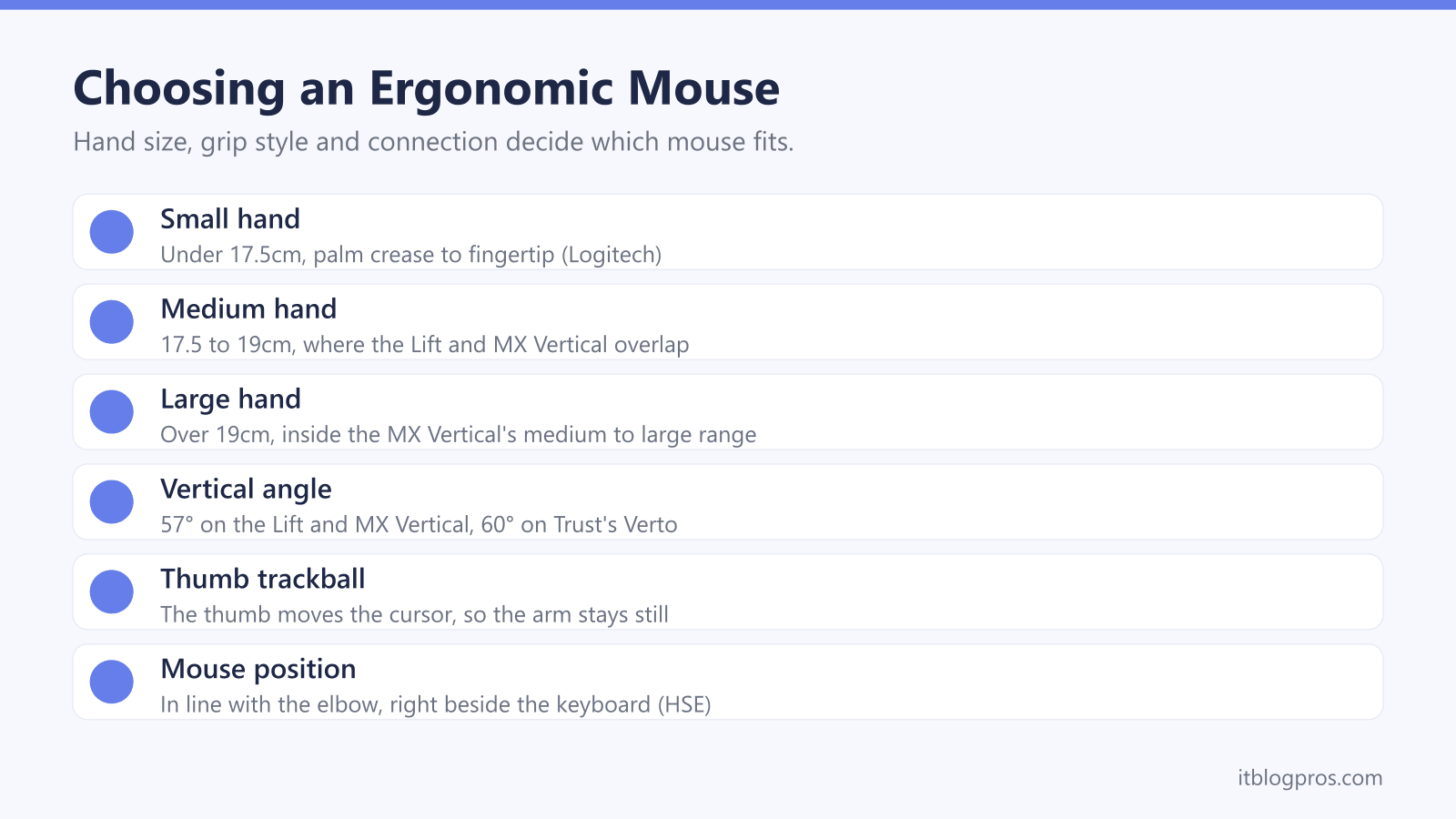
An ergonomic mouse changes how the hand sits on the desk. A vertical mouse turns the palm sideways into a handshake position, a trackball lets the thumb or fingers move the cursor while the arm stays put, and a contoured mouse keeps the familiar flat grip with more support. This guide sets out what the HSE and the NHS say about mouse use and RSI, how Logitech, Kensington and Trust describe their designs, how to size a mouse to a hand, and five mice worth shortlisting.
For most people, a vertical mouse sized to the hand is the place to start: Logitech sizes its Lift for small to medium hands and its MX Vertical for medium to large, both at a 57° handshake angle. A thumb trackball such as Logitech's ERGO M575S keeps the arm still instead. Position matters as much as shape, by the HSE's guidance, and the NHS does not describe an ergonomic mouse as an RSI treatment.
Key Takeaways
- The HSE's guidance puts the mouse in line with the elbow and right beside the keyboard, used with a straight wrist and the forearm supported on the desk.
- The NHS lists typing and poor posture at work among the causes of RSI and says an occupational therapist can suggest equipment, but it does not present any mouse as a treatment.
- Logitech sets the Lift and MX Vertical at a 57° handshake angle and Trust sets its budget Verto at 60°, and any strain-reduction figures are the makers' own.
- Logitech's chart measures from the crease below the palm to the middle fingertip, and sizes the Lift for small to medium hands and the MX Vertical for medium to large.
- Left-handers can choose Logitech's Lift Left or Signature M650 L Left, while Logitech says its ERGO M575S and MX Ergo S trackballs are right-handed only.
Mouse Position Matters as Much as Mouse Shape
Before buying anything, the desk itself deserves a look. The HSE's guidance on good posture puts the mouse in line with the elbow and the keyboard just below elbow height, with the screen and keyboard central so the back does not twist. Its leaflet on working with display screen equipment adds the detail: keep the mouse within easy reach so it can be used with a straight wrist, sit upright and close to the desk, support the forearm on the desk and do not grip the mouse too tightly.
The HSE's workstation checklist turns to the device itself. If a user is having problems, it says, try a different device, and it describes the mouse and trackball as general-purpose devices that come in a variety of shapes and sizes. Most devices, the checklist adds, are best placed right beside the keyboard. For laptops, the HSE suggests a separate keyboard and mouse so the screen can be raised on a riser, or a separate display. The laptop stand guide and monitor guide cover both.
An Ergonomic Mouse Is Not a Treatment for RSI
Repetitive strain injury, or RSI, is the worry that sends many people looking for an ergonomic mouse. The NHS page on RSI says it is caused by repeated use of a body part, such as the forearm, wrist or hand, and gives typing and poor posture when sitting at work among its examples. It also says repetitive work does not always cause RSI, and that arm pain is often caused by a combination of things.
What helps, in the NHS's account, is keeping active, painkillers such as paracetamol or ibuprofen, a cold pack, and speaking to an employer about changing the way you work. For symptoms that persist, it describes physiotherapy, and says an occupational therapist can suggest exercises, equipment or changes to the workspace. The page does not mention mice at all, and it does not present any piece of equipment as a treatment on its own. The NHS advises seeing a GP if symptoms are not going away or are getting worse, and that step comes before any shopping.
Vertical Mice Turn the Hand to a Handshake Angle
A vertical mouse stands on its side, so the hand holds it with the palm facing inwards rather than flat on top. Logitech's page on ergonomic mice says conventional flat mice force users to twist the hand, wrist and forearm down to meet and hold the mouse. Its Lift and MX Vertical both sit at 57°, which Logitech calls a natural handshake position, and Logitech says the Lift's angle puts less pressure on the wrist and places the arm and upper body in a more natural posture. Trust gives its budget Verto a 60-degree angle and says it reduces arm and wrist strain.
Where numbers appear, they are the makers' own. Logitech says the MX Vertical's handshake position reduces muscular strain by 10 percent compared with a traditional non-vertical mouse, and none of these pages claims a mouse treats anything. A vertical grip will not suit every hand, either. If one feels wrong after a fair try, the HSE checklist's advice to try a different device applies just as much to a trackball or a contoured mouse.
Hand Length Decides Between the Lift and the MX Vertical
Logitech's sizing guide measures the hand from the little crease below the palm to the tip of the middle finger. Under 17.5cm counts as small, 17.5 to 19cm as medium and over 19cm as large.
Logitech then maps its vertical mice onto those bands. Its FAQs say the Lift is optimised for small to medium hands and the MX Vertical is sculpted for medium to large hands. The spec pages show the gap: Logitech lists the Lift at 108mm high, 70mm wide and 71mm deep, and the MX Vertical at 120mm high, 79mm wide and 78.5mm deep. Trust lists its Verto as a medium-sized mouse, 120mm high and 63mm wide.
A medium hand falls inside both Logitech ranges, so the fit checks in the same guide help decide. Logitech says the fingers should reach the buttons and scroll wheel comfortably, the little finger should not have to stretch and the palm should be supported. Side buttons that are hard to reach mean the mouse is probably too large.
Trackballs and Contoured Mice Suit Different Grips
A trackball stays put while a ball moves the cursor. On a thumb trackball such as Logitech's ERGO M575S, the thumb does the work, so Logitech says the arm does not need to move. Logitech calls it a snug fit for most hand sizes and says it reduces forearm muscle strain by up to 25% compared with standard mice. The MX Ergo S adds a hinge that tilts from 0 to 20 degrees and is aimed at medium to large hands. Logitech's FAQs say both are right-handed only.
A finger trackball puts a larger ball under the fingertips instead. Kensington describes its Expert Mouse TB800 EQ as finger-operated, with a 55mm ball, for right- and left-handed users with average to larger hands.
Contoured mice keep the familiar flat grip but add shape. Logitech's Signature M650 has a contoured body, a soft thumb area and rubber side grips, with the M650 for small to medium hands, the M650 L for larger ones and an M650 L Left for left-handers. Mice built for games sit in the gaming mouse guide.
Logi Bolt, Unifying and Bluetooth Decide What Pairs Together
The receiver matters once a keyboard joins in. Logitech lists Bluetooth Low Energy and a Logi Bolt USB receiver for the Lift, the ERGO M575S and the MX Ergo S, while the MX Vertical connects over a Unifying receiver, Bluetooth or its USB-C charging cable. Logitech's support page says Logi Bolt products cannot pair with a Unifying receiver and vice versa, though both can run on one computer with two free USB ports. One Bolt receiver, Logitech says, pairs up to six Bolt devices through its Logi Options+ app.
Switching between computers varies. The Lift's Easy-Switch button toggles between up to three devices, the MX Vertical also pairs with three and the MX Ergo S with two. Trust's Verto uses a 2.4GHz receiver only, with no Bluetooth. Logitech lists a USB-A port as a requirement for the M575S receiver, so a USB-C-only laptop needs Bluetooth or a USB-C hub.
For the keyboard, Logitech's ergonomic FAQs advise keeping the mouse and keyboard close to the body, and the wireless keyboard and mouse guide covers ergonomic sets.
The Ergonomic Mice Worth Shortlisting
Each pick comes with a limit worth knowing. Logitech's Lift is the main choice for small to medium hands: a 57° angle, one AA battery that Logitech rates at up to 24 months, Logi Bolt or Bluetooth, and Easy-Switch across three devices. The Lift Left is the same design for the left hand, and Logitech's sizing guide points left-handers to it. Larger hands suit the MX Vertical, which recharges over USB-C, with Logitech quoting up to four months per full charge and about three hours from one minute of charging, though it uses Unifying rather than Bolt.
Logitech's ERGO M575S is the thumb trackball, with up to 18 months from an AA battery on the receiver, but it is right-handed only and its receiver needs a USB-A port. Trust's Verto is the budget way to try a vertical grip: a 60-degree angle, two AAA batteries that Trust rates at five months, a 2.4GHz receiver and a five-year warranty, for right hands only. None of these replaces the HSE's advice on where the mouse sits.
| Product | Best for | Key specs | Price | |
|---|---|---|---|---|
 | Logitech Lift Vertical Ergonomic Mouse Our pick | Small to medium hands, over Logi Bolt or Bluetooth | 57° angle, 1x AA up to 24 months, Easy-Switch 3 devices | Check price → |
 | Logitech MX Vertical Ergonomic Mouse Larger hands | Medium to large hands that want USB-C recharging | 57° angle, USB-C rechargeable, Unifying or Bluetooth | Check price → |
 | Logitech ERGO M575S Wireless Trackball Thumb trackball | Right-handers who want the arm to stay still | Thumb ball, 1x AA up to 18 months, Logi Bolt or Bluetooth | Check price → |
 | Trust Verto Wireless Vertical Ergonomic Mouse Budget | Trying a vertical grip for less, right hand only | 60° angle, 2.4GHz receiver, 2x AAA, 800 to 1600 DPI | Check price → |
 | Logitech Lift Left Vertical Ergonomic Mouse Left-handed | Left-handers with small to medium hands | 57° angle, 1x AA, Logi Bolt or Bluetooth, 3 devices | Check price → |