
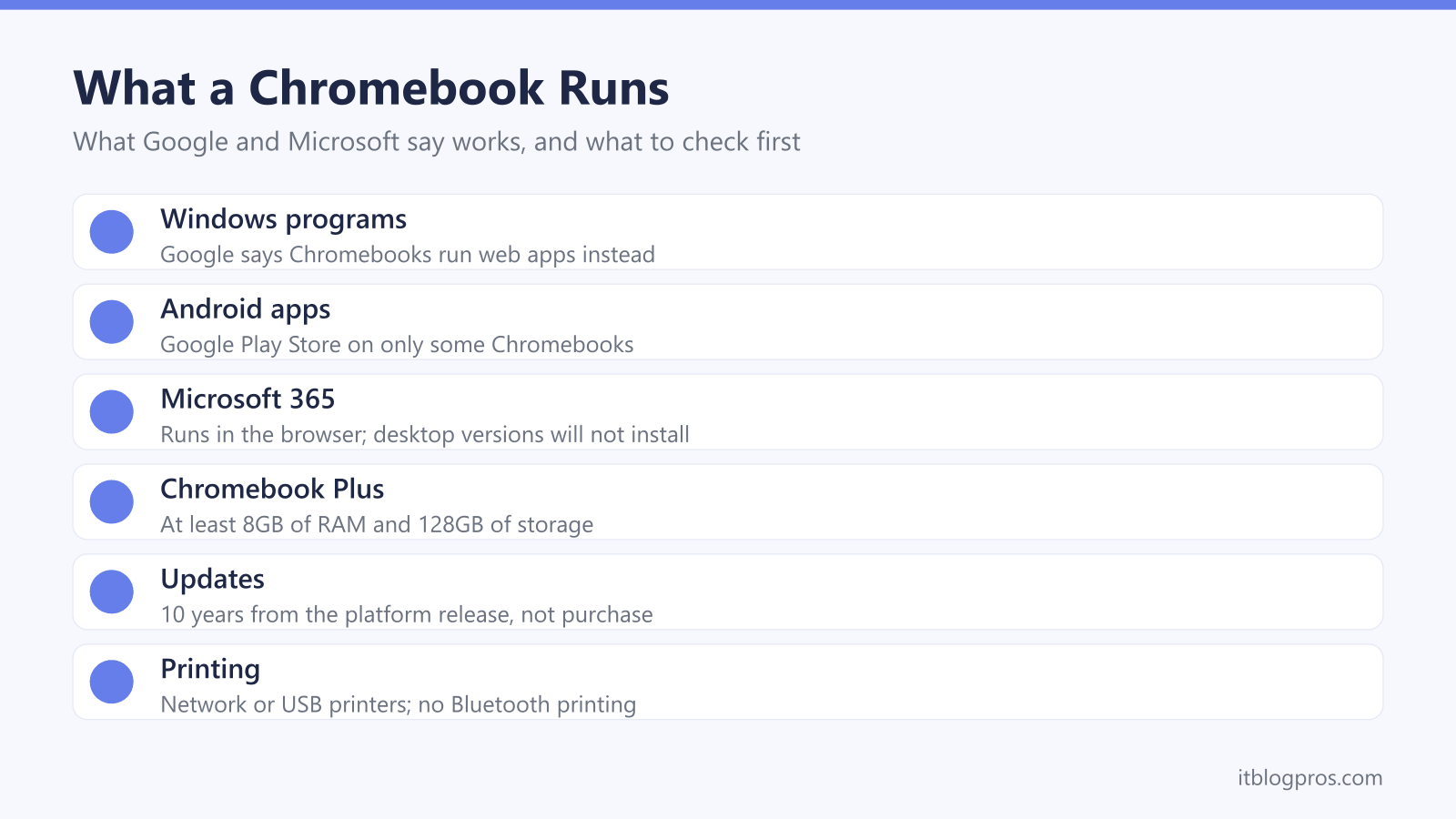
A Chromebook is a laptop that runs Google's ChromeOS rather than Windows or macOS, and that one difference decides whether it suits you. The browser does most of the work, some software has no route onto it, and every model stops getting updates on a fixed date. This guide sets out what Google and Microsoft say runs on a Chromebook, what Chromebook Plus adds, how to check a model's update date, who is better off with Windows or a Mac, and four models worth shortlisting.
A Chromebook suits work done in a browser. Google says it runs web apps instead of the software programs used on other computers, and Microsoft says desktop Microsoft 365 will not install, so Office runs at microsoft365.com. Android apps work on some models. Chromebook Plus means at least 8GB of RAM and 128GB of storage, and updates last 10 years from the platform's release, so check Google's date first.
Key Takeaways
- Google says a Chromebook runs web apps instead of the software programs used on other computers, so Windows software needs a web, Android or Linux alternative.
- Microsoft says desktop Microsoft 365 cannot be installed on a Chromebook and its Android versions are not currently supported there, so Office runs in the browser.
- Google's UK pages promise at least 8GB of RAM and 128GB of storage on a Chromebook Plus, against 32GB or more of storage on a standard Chromebook.
- Google gives Chromebooks 10 years of updates from the platform's release date, not the purchase date, and lists each model's end date in a public table.
- Offline use needs setting up while connected, because Google says Gmail offline must be switched on and Drive files marked Available offline first.
ChromeOS Runs Web Apps, Not Windows Programs
Google's Chromebook Help describes ChromeOS as an operating system with cloud storage, Google's apps built in and multiple layers of security, and its UK FAQ answers plainly that Chromebooks are laptops. The real difference is the software. Google's guide to switching says a Chromebook runs web apps instead of the software programs used on other computers, with new apps coming from the Chrome Web Store. Windows software therefore needs a web, Android or Linux alternative.
Two extras widen the choice. Google's help says the Google Play Store, and with it Android apps, is available for only some Chromebooks, that apps on a phone are not copied across automatically, and that a school or work account may block it. For developers, Google offers a Linux development environment under Settings, About ChromeOS, Developers, though its help page says cameras and hardware acceleration, including GPU and video decode, are not yet supported. Hardware is easier: Google says Mac or Windows USB drives, mice and keyboards work well with Chromebooks, which keeps a wireless keyboard and mouse set in play.
Microsoft 365 Works in the Browser on a Chromebook
Microsoft's support page is direct: the Windows and Mac desktop versions of Microsoft 365 cannot be installed on a Chromebook. Instead, Microsoft says to open the browser, go to microsoft365.com and sign in, where Word, Excel, PowerPoint, OneNote, OneDrive and Outlook run on the web, and to bookmark the page for quick access. The same page says the Android versions of Office, Outlook, OneNote and OneDrive are not currently supported on a Chromebook. Google's older Learn about Chromebooks page still says Office is available as an Android app, so the two companies disagree, and Microsoft's page is the one to follow.
Google's help on Office files adds the practical detail. The Microsoft 365 app on a Chromebook needs OneDrive to open and edit files, and prompts a move there if a file sits elsewhere. Offline, Google says Office files will not open in Microsoft 365 or in Google's own apps, leaving a basic offline editor with limited functionality. Online, Google Docs, Sheets and Slides open the same files with no setup, once the file is in Google Drive.
Chromebook Plus Sets a Higher Minimum Specification
Chromebook Plus is Google's label for faster models. The UK Chromebook Plus page promises at least 8GB of RAM and 128GB of storage, and Google's switching page adds a 1080p or better display and claims up to double the speed, memory and storage of a regular Chromebook, against the top-selling Chromebooks of 2023. Standard Chromebooks, on the same page, start at 32GB of storage.
The processor rule has moved. Google's October 2023 launch post set a floor of an Intel Core i3 12th Gen or AMD Ryzen 3 7000 series chip, a 1080p webcam and a Full HD IPS screen, while its help page on Chromebook Plus updates gives the AMD floor as Ryzen 3 5000 series. Newer models sit outside both lists, such as the Intel Core 3 N355 that Lenovo lists for its Chromebook Plus 2-in-1.
Plus also unlocks software. Google's help says a Chromebook Plus can make all of My Drive available offline in one setting, and Google's limited-time Google AI Pro trial runs 12 months with a Chromebook Plus, against three months with a standard Chromebook.
Every Chromebook Has an Update End Date
Google's Auto Update policy gives ChromeOS devices 10 years of updates, counted from the platform's release date rather than the day of purchase, so an older model still on sale has already used part of that time. Google's Chromebook Help adds that the manufacturer's end of sale date is unrelated to Google updates, and that after the final update, security fixes, bug fixes and new features stop. ASUS's spec pages also encourage buyers to check a Chromebook's date before purchase.
Google's table is the place to look, and the exact model code matters. Lenovo's spec sheet for the UK model 83LN002GUK calls it both the Chrome 2in1 14ITN10 and the Chromebook Plus 2-in-1 (14", 10), and Google's table dates the 14ITN10 to June 2035 but a separate (14", 10) entry to June 2033. On a Chromebook in hand, Google says Settings, About ChromeOS, Additional details, then Update schedule shows the device's own date. Older Samsung models show the spread, with Google listing the Galaxy Chromebook Go to June 2031 and the Galaxy Chromebook Plus to June 2032.
Offline Use and Storage Need Setting Up First
Google's UK FAQ says a Chromebook works offline to check email, look up a schedule and organise a to-do list, but its help page shows most of that needs preparing while still connected. Gmail offline has to be switched on in Gmail's settings, after which mail sent offline waits in an Outbox until the connection returns. Google Drive files need Available offline turned on in the Files app, and Google says that requires enough free space on the device. Google Keep notes save for offline use after the app has been opened online. Not everything follows: Google says YouTube Music on a Chromebook does not support offline playback.
Local storage needs watching too. Google's help says downloads go to a Downloads folder on the Chromebook's own drive, which has limited space, and that the Chromebook will sometimes delete downloaded files to clean up space. Files worth keeping belong in Google Drive, where Google includes 15GB at no charge shared with Gmail and Google Photos, or on a USB drive, which Google's switching guide suggests for backups.
A Windows Laptop or MacBook Suits Some Buyers Better
The software list settles most cases. Anyone who needs a Windows-only program, or the desktop versions of Word and Excel, needs Windows, given Microsoft's statement that those versions will not install on a Chromebook. University courses are a common example, and the student laptop guide sets out which universities advise against Chromebooks. Gaming is another: Google describes Steam for Chromebook as a beta on select models with at least an Intel i3 or Ryzen 3, 8GB of RAM and 128GB of storage, with known bugs and performance issues. For a home already built around Apple devices, the MacBook guide compares the current Air, Pro and Neo. A Windows laptop also brings drivers and adapters back into play, as the fixes for a laptop that will not connect to WiFi show.
Printing rarely rules a Chromebook out. Google says Chromebooks print to compatible printers on the same network or connected by USB cable, mostly over the Internet Printing Protocol, but do not support Bluetooth printing. A WiFi model from the home printer guide fits that pattern.
The Chromebooks Worth Shortlisting
Lenovo's Chromebook Plus 2-in-1 is the all-round choice: its spec sheet for the UK model 83LN002GUK lists an Intel Core 3 N355, a 14-inch 1920 x 1200 touchscreen and a fingerprint reader, but the 8GB of memory is soldered and not upgradable, storage is 128GB, and no power adapter comes in the box. It charges over USB-C at 45W to 65W, which the replacement laptop charger guide covers, and Lenovo lists DisplayPort 1.4 on both USB-C ports, which matters for a portable monitor.
ASUS's CM14 is the budget pick, with a MediaTek Kompanio 540, a 14-inch Full HD screen and a 1.35kg starting weight on ASUS's page, and updates to June 2036 in Google's table, though this version has 4GB of RAM. Acer lists a 16-inch screen, a Core i5-1334U and a 256GB SSD for its Chromebook Plus 516, at 1.70kg, with updates to June 2033. The Chromebook Plus Spin 714 is Acer's premium 2-in-1, with 16GB of memory, two Thunderbolt 4 ports and updates to June 2034. A laptop bag finishes the kit.
| Product | Best for | Key specs | Price | |
|---|---|---|---|---|
 | Lenovo Chromebook Plus 2-in-1 14-inch (14ITN10), 8GB, 128GB Our pick | A Chromebook Plus laptop that folds into a tablet | Core 3 N355, 8GB fixed, 128GB, 14in touch, no adapter | Check price → |
 | ASUS Chromebook CM14 (CM1405), Kompanio 540, 4GB, 128GB Budget | Browsing, email and Docs, with updates to June 2036 | Kompanio 540, 4GB, 128GB eMMC, 14in FHD, from 1.35kg | Check price → |
 | Acer Chromebook Plus 516 (CB516-1H), Core i5, 8GB, 256GB 16-inch screen | A bigger screen and more storage, updates to June 2033 | Core i5-1334U, 8GB, 256GB SSD, 16in 1920x1200, 1.70kg | Check price → |
 | Acer Chromebook Plus Spin 714 (CP714-1HN), Core Ultra 5, 16GB, 512GB Premium | Heavy multitasking on a 2-in-1, updates to June 2034 | Core Ultra 5 125U, 16GB, 512GB SSD, 14in touch, 1.45kg | Check price → |