
Vodafone supplies a perfectly decent hub with every plan, so the first honest question is whether you even need to buy a router at all. For most homes the answer is a coverage or control upgrade, not a speed one. This guide gives a clear top pick, a value pick and a whole-home mesh pick, each chosen for how it behaves on a real Vodafone line. It also covers the part most buying guides skip: whether you are allowed to drop the Vodafone hub at all depends on which plan you are on, and buying for the wrong answer wastes money. Everything below is grounded in Vodafone's own support pages and how Vodafone lines actually connect in 2026.
The best router for Vodafone broadband is a strong WiFi 6 or WiFi 7 unit, and on a standard plan Vodafone lets you use it in place of the hub outright as long as it is Openreach-approved. The TP-Link Archer BE550 is the top all-rounder, the TP-Link Archer AX73 the value pick, and the TP-Link Deco X50 the whole-home mesh choice. Pro Broadband, 5G Broadband and Digital Voice plans keep the Vodafone hub.
Key Takeaways
- On a standard Vodafone broadband plan you may use your own Openreach-approved router instead of the hub, so the buying decision is a straight one about which router suits the house.
- Vodafone requires its own router on Pro Broadband, on 5G Broadband and on any plan that includes Digital Voice, and on those plans the hub stays put and a better router runs behind it with the hub's WiFi switched off.
- Replacing the hub needs your broadband username and password, which Vodafone issues over the phone rather than printing on the unit, so budget one support call into the plan.
- For the top all-round pick the TP-Link Archer BE550 gives tri-band WiFi 7 and, by TP-Link's listing, a 2.5 Gbps WAN port and four 2.5 Gbps LAN ports; the TP-Link Archer AX73 is the value choice and the TP-Link Deco X50 mesh is the answer for whole-home coverage.
- A new router will not make a Vodafone line faster than the speed paid for, so buy one to fix patchy coverage, weak control or a tired hub, not to magically increase a Full Fibre headline number.
The picks at a glance
| Product | Best for | Key specs | Price | |
|---|---|---|---|---|
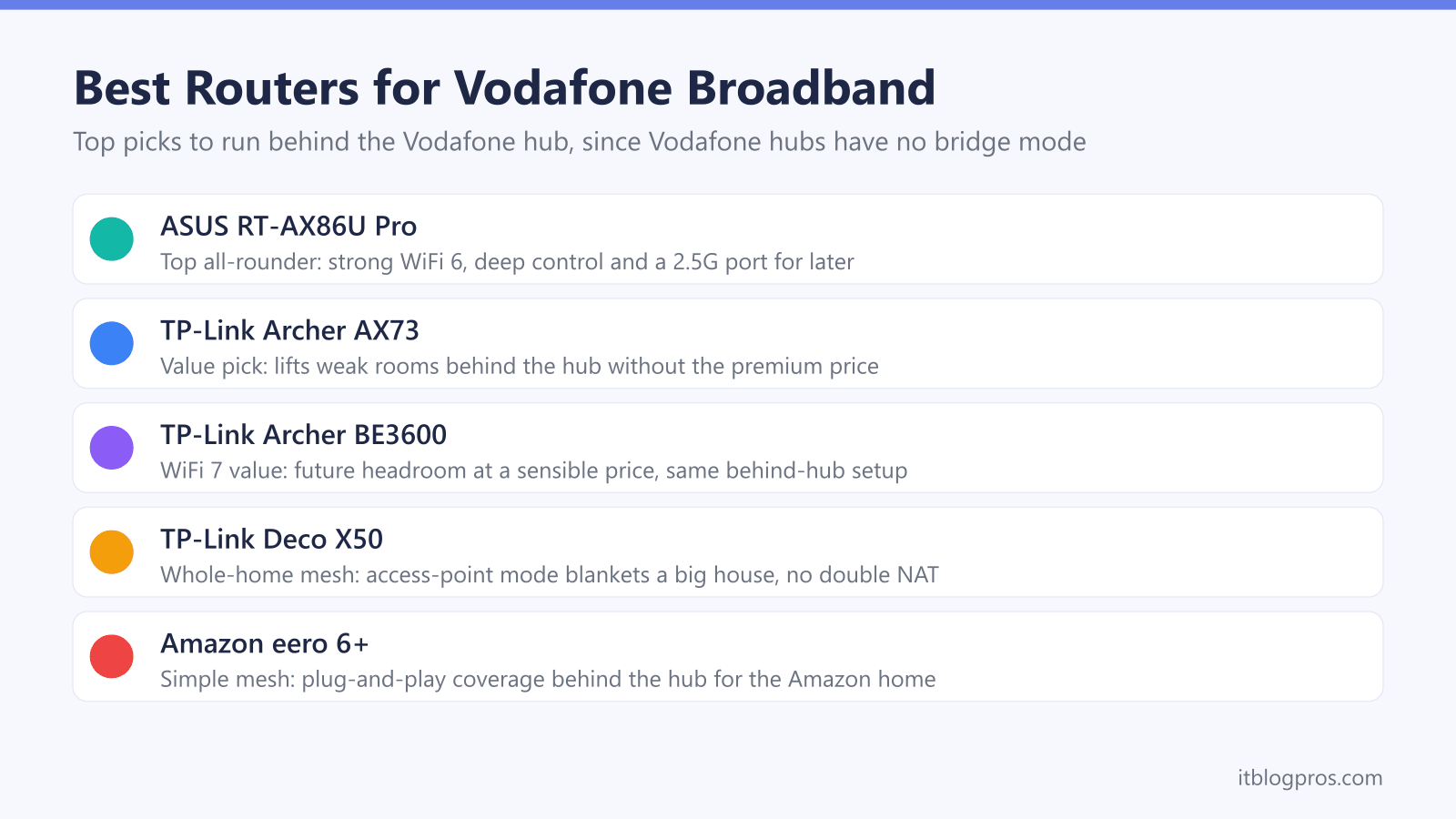
 | TP-Link Archer BE550 Top pick | Busy homes wanting WiFi 7 and 2.5G wired ports | Tri-band WiFi 7 (BE9300), 2.5G WAN, four 2.5G LAN | Check price → |
 | TP-Link Archer AX73 Value | Most homes, the sensible-money upgrade | WiFi 6 (AX5400), gigabit, six antennas | Check price → |
 | TP-Link Archer BE3600 WiFi 7 value | Future-proofing on a budget | WiFi 7 (BE3600), 2.5G WAN, one 2.5G and three 1G LAN | Check price → |
 | TP-Link Deco X50 Mesh | Large or multi-floor homes with dead zones | WiFi 6 mesh (AX3000), whole-home | Check price → |
 | Amazon eero 6+ Simple mesh | Plug-and-play whole-home coverage | WiFi 6 mesh (AX3000), app-driven | Check price → |
A new router fixes coverage and control on Vodafone, not raw line speed
Start with the honest framing, because it saves money. The Vodafone hub that comes with your plan handles the connection to Vodafone's network and hands out WiFi to the whole house. A third-party router does not change the speed Vodafone delivers to the property; on Full Fibre that headline figure, up to 910 Mbps on the standard Power Hub line for example, is set by your plan, not your hardware.
What a better router genuinely changes is everything after the connection arrives: WiFi reach into far rooms, stability with a houseful of devices, and the depth of controls for things like guest networks, parental controls and quality of service. The Power Hub runs WiFi 6 and connects over 100 devices, and the Pro II Ultra Hub steps up to WiFi 6E for over 150 devices with 4G backup, so the supplied kit is far from bad. The reasons people still upgrade are a large or awkwardly shaped home, a hub parked in a poor spot by the master socket, or simply wanting proper control the hub does not give. If your line speed is the disappointment, a router will not fix it; if coverage or control is the problem, the right one transforms the experience.
Your Vodafone plan decides whether the hub can leave the chain
This is the single most important fact for anyone wanting to run their own router on Vodafone, and it is where many guides quietly mislead. Whether the hub can go is not a question about the hardware, it is a question about the plan. Vodafone requires its own router on Pro Broadband, on 5G Broadband and on any plan that includes Digital Voice. On every other plan you may use your own router outright, provided it is Openreach-approved, and you get the broadband username and password by ringing Vodafone and asking.
Bridge mode is the murkier question, and it is worth deflating. Vodafone UK publishes nothing about bridge or modem-only mode on any of its hubs, in either direction. TP-Link's UK support pages do say Vodafone will not allow their hubs into bridge mode, and eero is reported to say much the same, but both are describing the older Vodafone WiFi Hub rather than the Power Hub or the Ultra Hub, so neither settles anything about the kit Vodafone ships now. Vodafone's German arm, for what it is worth, documents a modem-only mode on its own routers, which is a reminder that this is a UK policy question rather than a law of physics.
That leaves two realistic routes. The first, and by far the easiest, is to leave the Vodafone hub doing its job and connect your own router to one of the hub's LAN ports, then let your router handle the WiFi. This is the route to take on Pro Broadband, 5G Broadband or a Digital Voice plan, where the hub has to stay anyway, and it is a fair choice on a standard plan if you would rather not make the phone call. It creates double NAT, meaning two routers are doing routing in series. For ordinary browsing, streaming and gaming that is usually fine; it can complicate advanced features such as some port forwarding and certain server setups. The standard fix is to disable the Vodafone hub's WiFi so only your router broadcasts, which removes the interference and gives you a clean single network to manage.
The second route, open to you on a standard plan, is to remove the Vodafone hub entirely and connect your own router straight to the Openreach fibre modem. That avoids double NAT, and the next section covers exactly what it takes.
Replacing the hub on Full Fibre means PPPoE credentials and VLAN 911 from Vodafone
If you want to bin the hub completely on a Vodafone Full Fibre (FTTP) line and you are on a standard plan, this is a supported setup rather than a workaround. Your own router, which needs to be Openreach-approved, connects to the Openreach optical network terminal and dials the connection itself using PPPoE. For that you need three things: your broadband username, your broadband password, and the VLAN ID, which on Vodafone FTTP is 911.
The one piece of friction is that the credentials are not printed on the hub and cannot be self-served. Vodafone issues the broadband username and password on request, typically sent by SMS once your line is live, so you must contact Vodafone and specifically ask for them. In your router you then set the WAN connection type to PPPoE, tag it with VLAN ID 911, and enter the username and password. Some people find they must try a different VLAN value if 911 does not take, and a few report needing to clone the original hub's MAC address if the connection refuses to come up.
Two things are worth settling before the hub goes in the loft rather than the bin. Vodafone will ask you to reconnect its hub before it investigates any speed or reliability complaint, so keep it to hand. And this route is closed on Pro Broadband, on 5G Broadband and on any plan that includes Digital Voice, because Vodafone requires its own router on those; the behind-the-hub method in the previous section is the answer there.
The TP-Link Archer BE550 is the top all-round pick for a Vodafone line
For the best balance of WiFi and control behind a Vodafone hub or in place of one, the TP-Link Archer BE550 is the pick. TP-Link rates it as a tri-band WiFi 7 router at BE9300 and lists a dedicated 2.5 Gbps WAN port and four 2.5 Gbps LAN ports, so a fast wired link is covered if you ever drop the hub and run PPPoE directly. For control, TP-Link lists QoS by Device, which lets a work laptop or a console be prioritised by device, along with OpenVPN, PPTP, L2TP and WireGuard VPN clients.
It suits a Vodafone line in two ways. Run behind the Power Hub or Ultra Hub it takes over the WiFi and gives you the control the hub's interface does not, and turning the hub's WiFi off leaves you a single clean network to manage. If you later take the full-replacement route on Full Fibre, TP-Link's specification page lists PPPoE among its WAN types and Tag VLAN, and TP-Link's online firmware emulator for the US model shows an Internet VLAN ID field with an 802.1Q tag option, which is where the VLAN 911 value goes. It is the top single-box choice on this page for a demanding Vodafone household.
The TP-Link Archer AX73 is the value pick that still upgrades the hub
Not everyone needs a premium box. The TP-Link Archer AX73 is the value choice that still meaningfully beats the supplied hub for coverage and control without the top-tier price. It is a capable WiFi 6 router with six antennas, solid range for the money, easy app setup and the usual TP-Link guest network and parental controls.
On a Vodafone line it shines in the most common scenario: a medium home where the hub's WiFi is fine near the router but thin at the edges. Connected to a LAN port on the Power Hub or Ultra Hub with the hub's WiFi disabled, the AX73 takes over broadcasting and lifts the weak rooms noticeably. It is a gigabit-WAN unit rather than multi-gig, so it is best thought of as a behind-the-hub coverage and control upgrade rather than a full hub replacement on the fastest tiers. For most Vodafone homes that is exactly the right job, and the price makes it the easiest recommendation to justify.
Check the TP-Link Archer AX73 price on Amazon UK →
If you want WiFi 7 headroom for newer phones and laptops at a similar value price, the TP-Link Archer BE3600 is the natural step up while keeping the same behind-the-hub setup.
Check the TP-Link Archer BE3600 price on Amazon UK →
The TP-Link Deco X50 mesh is the answer for whole-home Vodafone coverage
When the real problem is a big or multi-storey home where one router never reaches everywhere, a single box is the wrong tool and a mesh is the right one. The TP-Link Deco X50 is the whole-home pick: a clean WiFi 6 mesh that blankets a house with one seamless network and roams devices between nodes without dropouts.
It pairs neatly with Vodafone whatever plan you are on, because access point mode works perfectly well with the hub still in the chain. Put the Deco into access-point mode, connect the main node to a LAN port on the Vodafone hub, switch the hub's WiFi off, and the Deco handles coverage across every room while the hub quietly keeps the connection. That avoids the double-NAT complications that come with leaving both devices routing, and gives a genuinely whole-home result. For homes that want the same simplicity with the Amazon ecosystem, the eero 6+ is an equally valid plug-and-play mesh that works the same way behind the hub. Either way, a mesh is the honest fix for coverage that no single router, hub or otherwise, can solve.
Check the TP-Link Deco X50 mesh on Amazon UK →
Check the Amazon eero 6+ mesh price on Amazon UK →
Match the pick to your actual problem before you spend
Pull it together with a simple decision. If your gripe is control, stability and reach in a normal home, buy one strong router: the TP-Link Archer BE550 for the best all-round result, or the Archer AX73 to save money. If your gripe is dead zones across a large or multi-floor home, buy a mesh: the Deco X50 or the eero 6+. Then check your plan. On a standard Full Fibre plan you can put that router in place of the hub using PPPoE and VLAN 911, after one call to get your broadband username and password. On Pro Broadband, 5G Broadband or anything with Digital Voice the hub stays and the new kit runs behind it, which is why the behind-the-hub setup is covered for every pick above.
Whatever you choose, set the expectation correctly. None of these makes the Vodafone line itself faster than the plan allows; they fix coverage, control and reliability, which is what most people are actually unhappy about. If your hub is genuinely misbehaving rather than merely limited, it is worth confirming that first: our guides to Vodafone router lights and Vodafone broadband not working help you tell a faulty hub from a coverage problem before you spend a penny on new hardware.