
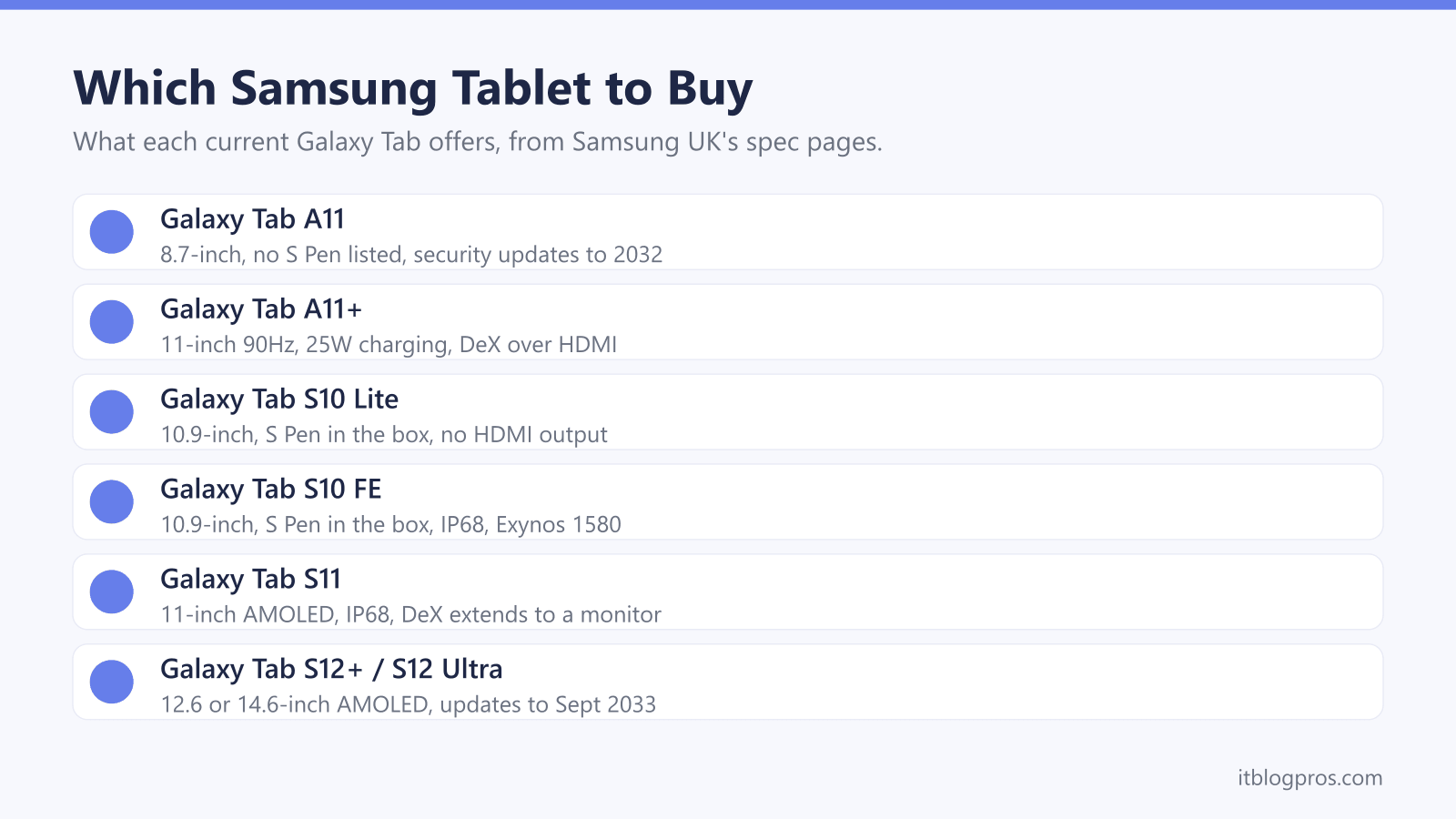
Samsung sells more Galaxy Tabs in the UK than the names make clear, from the 8.7-inch Tab A11 to the 14.6-inch Tab S12 Ultra. The models differ on screen, chip, S Pen, water resistance, Galaxy AI features, update dates and whether they can run Samsung DeX on a monitor. This guide takes each difference from Samsung's own product, spec and support pages, then covers WiFi or 5G, Samsung Kids for children and the charger most boxes leave out.
For most people the Galaxy Tab S10 FE is the one to buy: Samsung lists a 10.9-inch 90Hz screen, the Exynos 1580, an S Pen in the box and IP68 water resistance. The Tab A11+ costs less, but Samsung lists no S Pen support for it. The Tab S10 Lite is the cheapest way to an S Pen, and the Tab S11 and S12 series add AMOLED screens and DeX on a monitor.
Key Takeaways
- Samsung UK's pages cover nine Galaxy Tabs: the Tab A11 and A11+, the Tab S10 Lite, the Tab S10 FE and FE+, the Tab S11 and S11 Ultra, and the Tab S12+ and S12 Ultra.
- Samsung lists an S Pen in the box with every Tab S model and no S Pen support for the Tab A11 or A11+, and rates only the S10 FE, S11 and S12 models at IP68.
- Samsung UK's spec pages give security update end dates from 30 April 2032 for the Tab S10 FE to 30 September 2033 for the Tab S12+ and S12 Ultra.
- Samsung's DeX support pages say the Tab S10 FE, S10 FE+ and S10 Lite cannot output to an HDMI monitor, while the Tab A11+, S11 and S12 series can.
- Samsung UK's pages leave the charger out of the box on most models, and Samsung's charger guide says 45W charging needs a 45W adapter and a 5A cable.
Samsung's Range Runs From the Tab A11 to the Tab S12 Ultra
Samsung UK's tablet pages cover nine Galaxy Tabs in three groups. The Tab A11 and A11+ are the entry models, the Tab S10 Lite and the Tab S10 FE and FE+ sit in the middle, and the Tab S11, S11 Ultra, S12+ and S12 Ultra are the flagships. The S12 buy page names only the S12+ and S12 Ultra.
Screens mark the steps. Samsung's pages list TFT panels on the cheaper models: 8.7 inches on the A11, 11 inches on the A11+, 10.9 inches on the S10 Lite and S10 FE and 13.1 inches on the FE+, all at 90Hz. The S11 moves to an 11-inch Dynamic AMOLED 2X display, which its UK FAQ puts at 120Hz, the S12+ to 12.6 inches and both Ultras to 14.6 inches. For chips, Samsung's launch announcements name the Exynos 1380 in the S10 Lite and the MediaTek Dimensity 9400+ in the S11 series, and its UK pages name the Exynos 1580 in the S10 FE and the 3 nm MediaTek Dimensity 9500 in the S12 models.
The S Pen and IP68 Rating Belong to the Tab S Models
Samsung's spec pages list S Pen support for the Tab S10 Lite, S10 FE, S11 and S12 models and leave it off the Tab A11 and A11+. Samsung's FAQs put an S Pen in the box with the S10 Lite, S11 and S12 models, and Samsung UK's support page on the S10 FE lists an in-box S Pen with Bluetooth (BLE) not supported. The S11's UK page calls its hexagon-shaped pen charge-less and says it is designed for the S11 and S11 Ultra only.
Water resistance follows the same line. Samsung UK's pages rate the S10 FE and FE+, the S11 and the S12 models at IP68, which Samsung's footnote defines as lab-tested submersion in up to 1.5 metres of fresh water for up to 30 minutes, not advised for beach or pool use. The A11, A11+ and S10 Lite pages give no water resistance rating.
Headphones differ too. Samsung lists a 3.5mm headphone jack on the A11 and A11+ only, and the Tab S spec pages list USB Type-C for audio, which makes Bluetooth wireless earbuds the simple option.
Galaxy AI Features Vary From Model to Model
Samsung UK's Galaxy AI page says Galaxy AI is supported on tablets but that the level of support depends on the model and OS version. The Tab A11 page lists no AI features. The A11+ page lists Gemini Live, Google's assistant, for talking about what is on screen or in front of the camera, and footnotes it as available only to users aged 18 or over.
Samsung's S10 Lite page lists Solve Math, Handwriting Help and Object Eraser, all used with the S Pen. Samsung UK's support page on the S10 FE lists those three plus Circle to Search and Auto Trim. The S11 page adds Drawing Assist, Writing Assist and Gemini Live screen sharing, and its FAQ lists Note Assist, Browsing Assist, Interpreter and Transcript Assist. The S12+ page goes furthest, with Now Nudge, Now Brief, Ask anything in Samsung Browser, Automated App Action, Creative Studio and a choice of Bixby, Gemini or Perplexity as the assistant. Samsung's footnotes on the S11 and S12 pages say Galaxy AI may be limited for minors in some regions.
Samsung States Up to Seven Years of Security Updates
Each Samsung UK spec page carries a Security Update Period line with an end date. It reads 30 April 2032 for the Tab S10 FE and FE+, 31 August 2032 for the S10 Lite, 30 September 2032 for the A11, S11 and S11 Ultra, 30 November 2032 for the A11+ and 30 September 2033 for the S12+ and S12 Ultra.
Android version upgrades are stated less evenly. Samsung UK's S11 buy page says the S11 series is eligible for up to 7 generations of Android OS upgrades and 7 years of security updates from global launch. The S12 pages promise up to 7x OS upgrades and security updates, with a footnote counting a total of 7 software updates from the initial year of global release. Samsung's launch announcement for the A11 and A11+ promises up to seven generations of software upgrades, while the UK pages for the S10 FE and S10 Lite give only the security date. Samsung's security updates page lists the A11, A11+, S10 Lite, S10 FE and S11 models for quarterly patches rather than monthly ones.
Samsung DeX and External Displays Need the Right Tab
Samsung's S12+ page describes Samsung DeX as a PC-like desktop with up to four workspaces. Samsung's US support page on DeX for tablets lists the Tab S11 series and Tab A11+ for DeX over an HDMI cable, on the tablet screen and wirelessly, and its wider DeX page adds the Tab S12 series for cable and wireless use. The same pages say the Tab S10 FE, S10 FE+ and S10 Lite are not compatible with HDMI output or wireless DeX, and the S10 Lite cannot run standalone DeX either. The base Tab A11 appears on none of the lists.
Samsung UK's S11 page says DeX can extend the display to a monitor, while Samsung's A11 launch notes say the A11 and A11+ do not support Extended Mode for a dual-screen setup. Samsung's tablet DeX page says a DeX cable, a USB-C to HDMI cable or an HDMI adapter makes the connection. Port speed matters for a USB-C hub: the spec pages list USB 3.2 Gen 1 on the S11 and S12 models and USB 2.0 on the rest.
Storage, WiFi and 5G Are Separate Choices
Samsung's spec pages list microSD support up to 2TB on every model, with built-in storage from 64GB on the A11 to 1TB on the top S12 Ultra. The A11+ page adds a caveat: external memory stores photos, video and music, but not apps. Memory runs from 4GB on the 64GB A11 to 16GB on the 1TB S12 Ultra, and the S12 buy page starts both S12 models at 12GB and 256GB.
WiFi standards climb with the price. The spec pages list 802.11ac on the A11 and A11+, 802.11ax (Wi-Fi 6) on the S10 Lite and S10 FE, 802.11ax with 6GHz on the S11 and S12+, and 802.11be on the two Ultras, which the S12 buy page calls Wi-Fi 7.
The 5G versions add mobile data away from home. Samsung UK's A11+ 5G page lists a single SIM plus microSD, while the S10 FE 5G page lists a SIM, an embedded SIM and microSD, so check that a network supports eSIM before relying on it.
Samsung Kids, Chargers and Five Tablets for Different Buyers
Samsung UK's Samsung Kids page says the mode opens from the Quick panel with the tablet's own PIN or biometrics, and lets parents limit playtime, allow only chosen contacts and apps, approve websites and check a usage report. Samsung UK lists a foam Kids Cover for the A11+ with reinforced corners and a rotating handle, and the Fire tablet guide covers Amazon's own children's tablets.
Charging needs a plan. Samsung UK's pages say the travel adapter is not included with the A11, A11+, S10 Lite and S11, and the S12+ FAQ says the charger is not in the box. Samsung's charger guide says 45W charging needs a 45W adapter and a 5A cable, while the S12+ box holds a 3A cable, so see the USB-C charger guide.
The Tab S10 FE is the all-round pick, the A11+ the budget choice, the S10 Lite the cheapest S Pen model and the S12+ the one for DeX on a monitor; Amazon's Kids Edition listing pairs a 128GB A11+ with a blue case. For Apple's tablets, see the iPad guide.
| Product | Best for | Key specs | Price | |
|---|---|---|---|---|
 | Galaxy Tab S10 FE 128GB Wi-Fi, Grey Our pick | Most people: S Pen, IP68 and a 10.9-inch screen | 10.9-inch 90Hz, Exynos 1580, 8GB, IP68, S Pen in box | Check price → |
 | Galaxy Tab A11+ 256GB Wi-Fi, Silver Budget | Video, browsing and homework on a budget | 11-inch 90Hz, 8GB, 256GB, microSD to 2TB, 25W | Check price → |
 | Galaxy Tab S10 Lite 128GB Wi-Fi, Grey Cheapest S Pen | Notes and sketching for less, S Pen in the box | 10.9-inch 90Hz, Exynos 1380, 6GB, S Pen in box | Check price → |
 | Galaxy Tab S12+ 256GB Wi-Fi, Grey Top end | DeX on a monitor, drawing and long update support | 12.6-inch AMOLED, Dimensity 9500, 12GB, IP68, S Pen | Check price → |
 | Galaxy Tab A11+ Kids Edition 128GB Wi-Fi, Blue Case For children | Children, with Samsung Kids and a protective case | 11-inch 90Hz, 6GB, 128GB, microSD to 2TB | Check price → |