
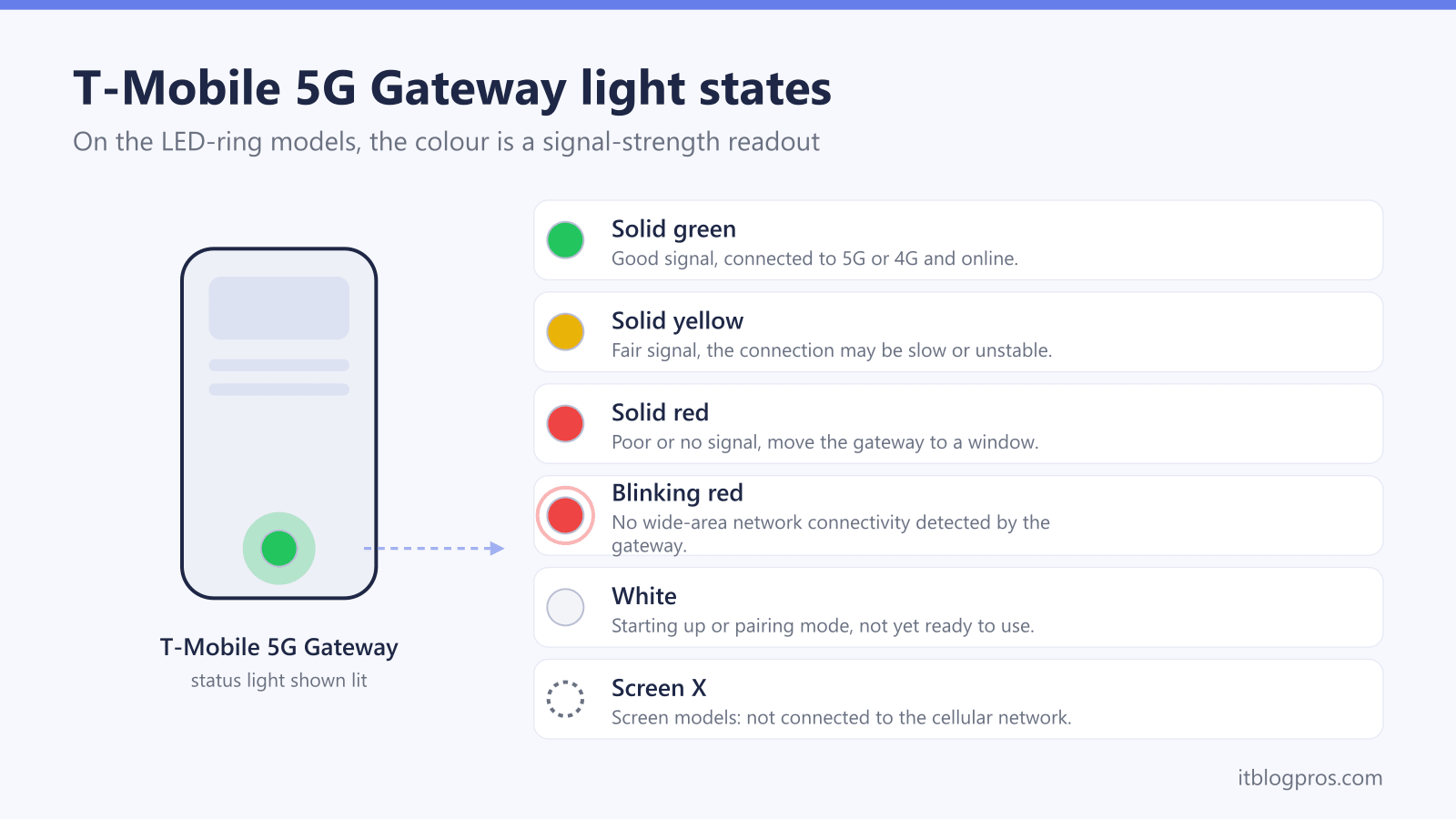
A red light on a T-Mobile 5G Home Internet gateway points to one thing far more often than any other: a poor cellular signal. Unlike a cable or fibre box, the T-Mobile gateway pulls its internet from the same 5G and LTE network that phones use, so the colour on the device is really a signal-strength readout. Green means a healthy connection, yellow means the signal is fair, and red means the gateway cannot find enough signal to stay online. The fix is almost never a cable. It is where the box sits. T-Mobile also ships several different gateways, and only some of them use a coloured light at all, so the first step is knowing which model is on the shelf.
A red light on a T-Mobile 5G gateway signals a weak or missing cellular connection, not a wiring fault. The cure is placement: move the gateway to a window, raise it off the floor, and watch the colour or signal bars change to green. Older Nokia and Sagemcom cylinders use a coloured LED ring, while newer Arcadyan and Sagemcom models show signal bars on a small screen instead.
Key Takeaways
- Red on a T-Mobile 5G gateway almost always means poor or no cellular signal, so the fix is placement near a window, not swapping cables.
- Green is a good signal, yellow is fair, and red is poor or none on the Nokia and Sagemcom LED-ring models.
- Newer T-Mobile gateways drop the coloured ring and show signal bars on a small screen, where an X means no network connection at all.
- Raising the gateway, moving it to an upstairs window, and keeping it clear of metal and microwaves often lifts a red light to green.
- T-Mobile never asks you to ring a number from a text or search result to fix a red light, so treat those messages as scams.
The red light is a signal warning, not a cable fault
T-Mobile 5G Home Internet works by receiving the carrier's 5G and 4G LTE signal over the air, the same network a phone uses, and then sharing it over Wi-Fi inside the home. There is no coaxial cable, no fibre line, and no phone socket carrying the internet into the box. That single fact explains the red light.
On the gateways that use a coloured light, the colour reports how strong the cellular signal is at that exact spot in the home:
- Green means a good, stable connection to the 5G or 4G network.
- Yellow or amber means a fair signal that may work but can be slow or drop out.
- Red means the signal is poor or missing, and the gateway cannot get reliably online.
Because the problem is reception rather than wiring, unplugging and replugging Ethernet cables will not move a red light to green. The thing that changes the colour is moving the gateway to a spot where more signal reaches it.
Two different T-Mobile gateways show the colour very differently
T-Mobile has shipped several gateway models over the years, and they do not all use a coloured light. Knowing which one is in the home decides where to look.
LED-ring models (older units)
The tall grey Nokia gateway (the Nokia 5G21 or FastMile, widely nicknamed the "trash can") and the grey Sagemcom Fast 5380 (model KVD21) use a glowing light on the body. These are the units that literally turn green, yellow or red. On the Nokia, the number of lit segments also reflects signal strength, with three lit meaning a very good signal and one meaning a weak one.
Screen models (newer units)
The newer self-branded T-Mobile gateways, including the Arcadyan G4AR and G4SE, the Sagemcom Fast 5688W, and the G5AR and G5SE, do not use a coloured ring at all. Instead they have a small LCD screen on the front that shows signal bars, up to five of them. On these units there is no red light to chase. The equivalent warning is a low number of bars, or an X, which means the gateway is not connected to the cellular network.
So "my T-Mobile gateway is red" almost always means a Nokia or older Sagemcom cylinder. If the device has a screen with bars, treat one or two bars, or an X, as the same warning a red light would give.
The colour and screen states at a glance
This table covers the indicators on the common T-Mobile 5G Home Internet gateways. Solid versus blinking matters, so both are listed where relevant.
| Indicator | Model type | What it means |
|---|---|---|
| Solid green | LED-ring (Nokia, Sagemcom 5380) | Good signal, connected to 5G or 4G, online |
| Solid yellow or amber | LED-ring | Fair signal, connection may be slow or unstable |
| Solid red | LED-ring | Poor or no 4G/LTE/5G signal, needs repositioning |
| Blinking red | LED-ring (Nokia) | No wide-area network connectivity detected |
| White | Mesh extender and during boot | Starting up or in pairing mode, not yet ready |
| 4 to 5 signal bars | Screen (G4AR, G5, Sagemcom 5688W) | Strong cellular signal, healthy connection |
| 1 to 2 signal bars | Screen | Weak signal, the screen-model equivalent of red |
| X on screen | Screen | Not connected to the cellular network at all |
A quick warning on signal-strength readouts: a momentary dip to yellow during a network blip is normal. A light or bar count that sits at red or one bar for minutes at a time is the real signal problem worth fixing.
Fix a red light by moving the gateway, not the cables
Because red is a reception problem, the repair is about location. Work through these placement steps, giving the gateway a minute to re-measure the signal after each move.
- Move it to a window. An exterior-facing window, especially one facing the nearest T-Mobile tower, gives the gateway a much clearer path to the signal than the middle of a room.
- Get it up high. Signal usually improves with height. An upstairs window or the top of a shelf often beats a ground-floor floor or a basement.
- Keep the line of sight clear. Thick exterior walls, brick, concrete, metal, foil-backed insulation, and large appliances all block cellular signal. Pull the gateway away from radiators, fridges and microwaves.
- Try several spots before settling. Carry the gateway to two or three windows on different sides of the home and watch the colour or bar count at each. The best spot is rarely obvious until it is tested.
- Use the T-Mobile Internet app to find the strongest position. The app reports a live signal reading and helps compare locations without guessing at the light.
- Reboot once placement looks good. After finding a stronger spot, a single power cycle lets the gateway lock onto the better signal and clear a stale red state.
Most red lights turn yellow or green within a few placement attempts. If every window in the home still shows red, the issue may be genuine coverage rather than placement, which is worth confirming with T-Mobile before assuming the hardware has failed.
When a reset helps, and how to do it safely
A reboot or reset rarely fixes a true signal problem, but it does clear a gateway that is stuck in a red or error state after placement has already improved. Try the gentle steps before the destructive one.
- Power cycle first. Unplug the gateway, wait about 30 seconds, and plug it back in. This is the safe, non-destructive step and fixes most stuck states without erasing settings.
- Reset port on screen models (Arcadyan G4AR and similar). Insert a paperclip into the recessed Reset port and hold for roughly 5 to 10 seconds until the screen shows it is restarting or resetting, then release.
- Reset on the Nokia. Insert a paperclip into the Reset port on the back and hold for about 5 to 10 seconds until the device restarts.
A factory reset wipes every change made since setup, including the Wi-Fi name and password, returning the gateway to the defaults printed on its label. Use it only as a last resort, and never as a first response to a red light, since it will not create signal that is not there.
Most households run the gateway exactly as T-Mobile supplies it. There is no separate modem to buy here, unlike a cable service where a personal modem can replace a rented box. The gateway is the modem, the router and the antenna in one unit, so the lever that matters is where it sits.
A quick security note on red-light scams
A red light or a brief outage is a moment scammers like to exploit. Fake texts and calls claiming to be T-Mobile may warn that an "account is suspended", a "modem is compromised", or that internet will be cut off unless a number is called or a link is tapped. These messages create urgency on purpose.
T-Mobile does not fix a red gateway light by asking anyone to ring a number from a text message or a number that appears in a search result. The genuine fix is placement, done by the customer, with no phone call required. A few habits keep an account safe:
- Never call a phone number or tap a link inside an unsolicited text or email about the connection.
- Reach T-Mobile only through the official app or the number on a real bill.
- Report suspicious texts by forwarding them to 7726 (SPAM).
- Treat any caller who asks for an account PIN, password, or a one-time code as a fraud attempt and hang up.
The gateway light is a hardware signal indicator. No legitimate support process turns it green by handing over personal details over the phone.