
A power cut kills full-fibre broadband instantly, because the router and the ONT on the wall have no battery of their own. The fix is a small battery backup, and the sizing question turns out to be far simpler than UPS spec sheets make it look. Two numbers decide everything: the watt-hours stored in the battery and the watts your kit draws. This guide verifies the real draws, walks through two worked examples, and gives a runtime table you can plan around.
A router and ONT together draw roughly 15 to 25 watts, so runtime is measured in hours, not minutes. A 650VA/400W UPS such as the APC Back-UPS BE650G2-UK should manage about 2 to 2.75 hours at 20W on this site's estimate; a 98Wh mini DC UPS manages around four because it skips inverter losses. Divide battery watt-hours by load watts, then take off about a third for real-world losses.
Key Takeaways
- Battery watt-hours decide runtime; the VA rating only sets the maximum load a UPS can carry, so a 650VA unit is not automatically a long runner.
- A UK router and ONT together draw about 15 to 25W, a load even a small backup battery can carry for hours.
- Runtime in hours is roughly battery watt-hours multiplied by 0.65 and divided by load watts for a small AC UPS; use 0.85 for a mini DC UPS.
- Inverter overhead punishes tiny loads, so a 98Wh mini DC UPS often outlasts a physically bigger 650VA AC UPS running the same router.
- Ofcom expects providers to give at-risk digital landline users a free backup solution covering at least one hour of emergency calls, and a properly sized UPS comfortably beats that.
What a Router and ONT Actually Draw
Home broadband kit sips power. Most ISP routers sit between 8 and 18W in normal use; BT's own consumption sheet for the Smart Hub 2 lists roughly 10.8W typical and about 14W maximum, and third-party routers land in the same band. The ONT is even lighter: typically 2 to 5W, with the standard Openreach unit rated at around 4 to 5W and often measuring lower at idle. Add them together and a full-fibre setup draws about 15 to 25W, which is less than half a laptop charger. Each mesh satellite adds roughly 5 to 10W; eero's published figures put an eero Pro 6 at about 9W per unit. One caution when checking your own kit: the label on the power adapter states the maximum the adapter can supply, not what the device actually uses, and the real draw is usually well below it. A smart plug with energy monitoring gives the true figure in seconds.
Watt-Hours Decide Runtime, Not the VA Rating
UPS marketing leads with VA, and VA answers the wrong question. A 650VA/400W rating describes the ceiling, the biggest load the unit can carry without tripping, and says nothing about how long the battery lasts. Runtime lives in the battery specification. The fuel tank inside the APC Back-UPS BE650G2-UK, for example, is a single 12V 7Ah lead-acid cartridge, which APC lists as the APCRBC110; multiplying 12 by 7, this guide's own arithmetic, gives about 84 watt-hours. Mini DC UPS units quote milliamp-hours instead, and the conversion trips people up: a 27,000mAh unit sounds enormous, but lithium cells are counted at 3.7V, so 27,000mAh multiplied by 3.7 and divided by 1,000 is roughly 100Wh. Never multiply the mAh figure by 12V; that triples the number and the disappointment. Two products with wildly different marketing can therefore hide near-identical fuel tanks, and what separates them in practice is how much of that stored energy actually reaches your router.
The Simple Runtime Formula, With the Honest Correction
The naive sum is runtime in hours equals watt-hours divided by load watts, so 84Wh divided by 20W promises 4.2 hours. Reality delivers less, for two reasons. First, a mains UPS has to convert battery DC back into 230V AC through an inverter, and that inverter burns several watts just being switched on, regardless of load. UPS efficiency curves are at their best between roughly 30 and 80 percent of rated capacity; a 20W router is about 5 percent load on a 650VA/400W unit, deep in the inefficient zone where the overhead becomes a large slice of every watt-hour. Second, batteries age; a lead-acid cartridge loses real capacity over three to five years. The honest rule of thumb: multiply the watt-hours by about 0.65 for a small AC UPS at router-sized loads, or by about 0.85 for a mini DC UPS, then divide by the load. Halve the answer again for a battery nearing the end of its life. A manufacturer runtime chart beats any formula, but the published charts rarely go down to 20W loads.
Worked Example One: A 650VA/400W UPS on a Router and ONT
The UK example here is the APC Back-UPS BE650G2-UK. APC lists eight BS1363A sockets, six of them battery backed, a 650VA/400W ceiling and a user-replaceable APCRBC110 cartridge rated at 12V 7Ah, which this guide's arithmetic puts at about 84Wh. APC's UK brochure for the BE range gives 70 minutes at 40W for this unit, a load it describes as an entry-level desktop with a 20in monitor plus an internet modem and router, and publishes nothing lower. At a 20W router-and-ONT load the naive sum gives 4.2 hours, and applying the 0.65 correction for inverter overhead at tiny loads gives about 2.7 hours. APC's 40W point implies the unit delivers roughly 0.56 of the battery's nominal 84Wh, and if the same share held at 20W the result would be about 2.3 hours. The sensible plan, which is this site's estimate rather than an APC figure, is about 2 to 2.75 hours on a healthy battery and closer to 1 to 1.4 hours on an aged one. That is still hours, not minutes. The everyday advantages are that everything plugs into normal mains sockets with no adapters or barrel-tip matching, the same unit will also carry a cordless phone base or a switch, and APC lists the battery cartridge as user-replaceable, so it can be swapped when it ages.

Worked Example Two: A 98Wh Mini DC UPS at the Same Load
A mini DC UPS takes the opposite approach: it feeds the router and ONT directly at 5V, 9V or 12V DC, so there is no inverter and almost no overhead. A typical 98Wh lithium unit delivers about 83Wh after conversion losses, which is around four hours at a 20W router-and-ONT load, six to seven hours running a 12W router alone, and the better part of a day keeping just a 5W ONT alive. The caveats matter and come first. The output voltage must exactly match each device, the barrel tip and polarity must match too, and many units ship with 5.5mm tips only, so kit with unusual plugs is out. Each port has a current cap, commonly 2A on the 12V output, which is a 24W ceiling per device. And a DC unit cannot power anything that needs a mains plug, such as a cordless phone base or a powerline adapter. Within those limits it is the runtime-per-pound winner for broadband kit; the UK battery backup buying guide covers specific tested models.
Runtime Table for Common UK Setups
The table assumes healthy batteries and uses the corrected maths above. The AC column is this site's estimate for the 84Wh battery in the APC BE650G2-UK: it runs from the 0.65 factor down to the lower share implied by APC's published 70 minutes at 40W, the only APC runtime point near these loads, with the fixed inverter overhead weighted more heavily at the smallest loads. The DC column uses a 0.85 factor for a 98Wh mini DC UPS. Halve every figure for a battery three or more years old.
| Load | Typical kit | 98Wh mini DC UPS | 650VA/400W AC UPS (84Wh battery, estimate) |
|---|---|---|---|
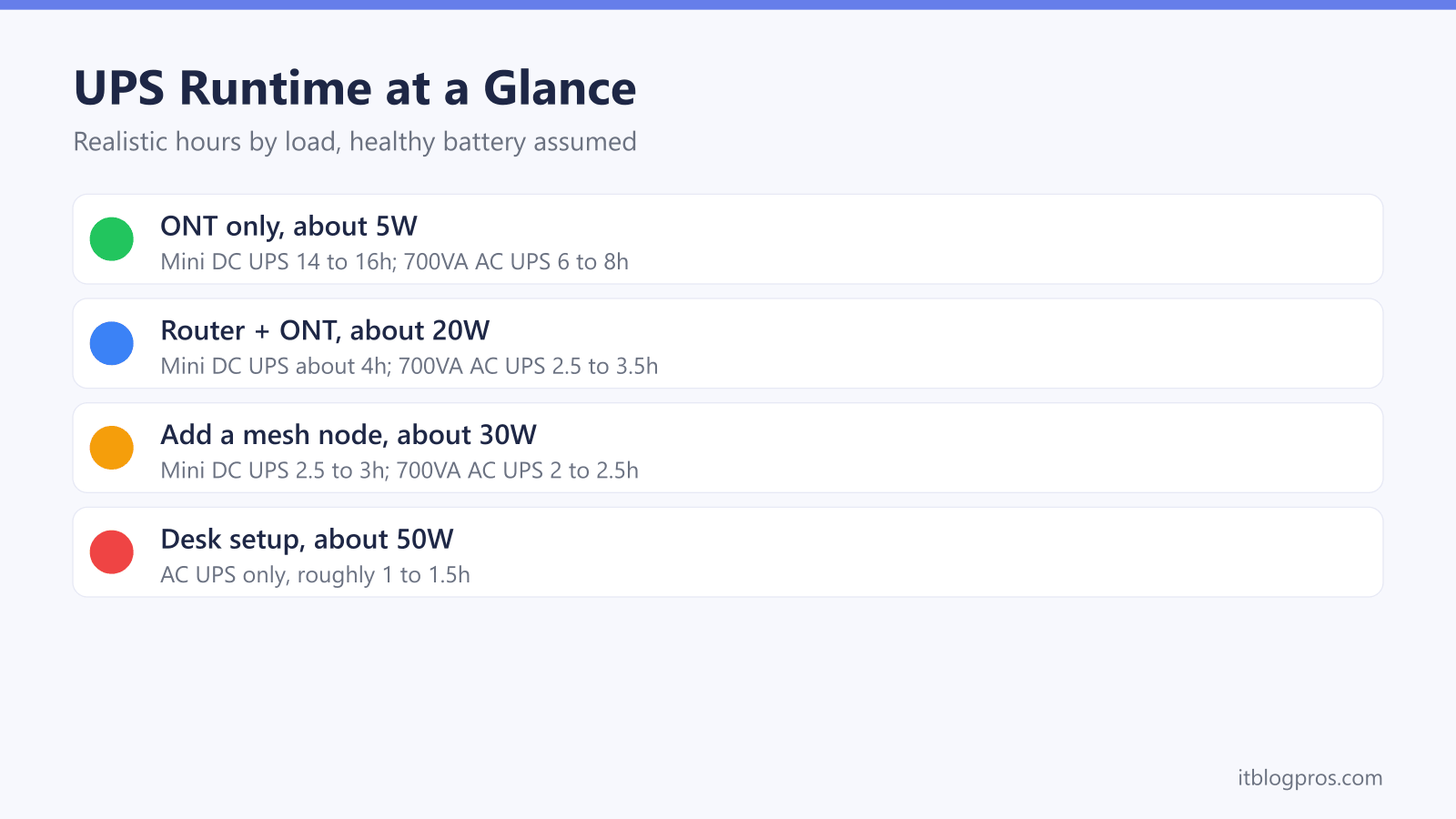
| 5W | ONT only | 14 to 16 hours | About 4.5 to 6 hours |
| 12W | Router only | 6 to 7 hours | About 3 to 4 hours |
| 20W | Router + ONT | About 4 hours | About 2 to 2.75 hours |
| 30W | Router + ONT + one mesh node | 2.5 to 3 hours, if within port limits | About 1.5 to 2 hours |
| 50W | Adds a second node and a small switch | Usually over the DC output limit | About 45 to 65 minutes |
The pattern is the lesson: at broadband-sized loads the smaller lithium unit matches or beats the bigger AC UPS, because the inverter tax falls away. The AC UPS earns its keep once the load grows or once devices without DC inputs need covering.
Stretching Runtime During a Power Cut
Runtime planning does not end at purchase. Back up only what keeps the connection alive: the ONT, the router and, if the landline matters, the cordless phone base. Set-top boxes, printers and powerline adapters belong on ordinary sockets. In a longer cut, unplug mesh satellites; the main router keeps WiFi running near itself, and every 9W node switched off adds meaningful minutes. Resist charging phones from the UPS, since a fast-charging handset can draw as much as the router and ONT combined. Test the setup twice a year by pulling the UPS mains plug and timing how long the broadband survives; a big gap between the timed result and the table above usually means the battery is ageing. On a lead-acid UPS the cartridge is user-replaceable and a fresh one restores the original figures, which is far cheaper than replacing the whole unit.
The Digital Landline Rules Raise the Stakes
The runtime maths stopped being a hobbyist concern when UK landlines moved onto broadband. A digital voice service dies the moment the router loses power, which is why Ofcom requires providers to offer customers who depend on their landline, such as those without usable mobile coverage, a free solution that keeps emergency calls working for at least one hour in a power cut. Providers typically meet that with a small battery pack for the hub, and one hour is the floor, designed for 999 calls rather than comfort. The maths in this guide shows how cheaply a household can do better: a 100Wh battery turns the mandated single hour into an afternoon of working broadband and phone. The digital landline power cut rules guide explains who qualifies for a free provider unit, what each network supplies, and where a bought UPS fills the gaps.
Sizing Up Without Overspending
The sizing rules fall straight out of the worked examples. For a router and ONT alone, a battery of roughly 80 to 100Wh is the sweet spot; both a 98Wh mini DC UPS and the 650VA desktop unit in worked example one deliver hours of cover, and spending more mostly buys sockets rather than time. Choose the DC route for maximum runtime per pound on pure broadband kit, accepting the voltage and tip-matching homework. Choose a compact AC UPS for plug-and-forget simplicity, mains sockets for a phone base, and a swappable battery. Step up to a larger AC unit only when the protected load genuinely grows, for instance a NAS, a desktop PC or CCTV, because at 20W a bigger inverter mostly burns its own battery. The specific UK models worth buying for each approach, with verified listings and current prices, are ranked in the best battery backup for router and ONT guide.