
A gaming keyboard is usually a mechanical or magnetic keyboard built for fast, reliable key presses, and the spec sheets bury the useful parts under lighting and esports claims. The switch type, the size and the layout decide far more than the RGB. This guide takes each spec as Logitech G, Razer, Corsair, SteelSeries and CHERRY describe it, explains why a UK ISO layout matters on a British PC, then lists five UK-layout keyboards, from a budget full-size board to a magnetic rapid-trigger model.
For most players, a tenkeyless or 75% mechanical keyboard with a UK ISO layout covers everything: linear switches for fast taps, or tactile ones for gaming and typing. Magnetic Hall effect boards add adjustable actuation and Rapid Trigger, which SteelSeries pitches at stopping a strafe the instant a key lifts. Check the listing says UK, because Microsoft's UK layout puts £ on Shift and 3 and moves @ away from the 2.
Key Takeaways
- Corsair says linear is the most popular switch type, tactile switches add a bump, and clicky switches add a click that can often be heard through a microphone.
- Corsair says a Hall effect switch reads a magnet in the key stem, so actuation can be set per key, and Razer and SteelSeries list a range of 0.1 to 4.0 mm.
- SteelSeries says Rapid Trigger resets a key as soon as the finger lifts, and Razer says it is off on the Huntsman V3 HE's factory default profile.
- Logitech says UK ISO boards have a tall, L-shaped Enter key, and Microsoft's UK layout puts £ on Shift and 3 and @ on the apostrophe key.
- Corsair lists 1,000Hz polling on the K70 CORE TKL and K65 PLUS WIRELESS, and its manual says rates above 1,000Hz are not supported by Xbox or PlayStation consoles.
Linear, Tactile and Clicky Switches Change the Feel
Logitech defines a mechanical keyboard as one with a mechanical switch for each key, and says some are rated for as many as 100 million keystrokes, while the rubber domes in a membrane keyboard can wear out. Mechanical boards are also significantly louder, Logitech adds.
Corsair's switch guide sorts them into three types. Linear switches have smooth, consistent travel, and Corsair calls linear the most popular type. Tactile switches add a noticeable bump partway down. Clicky switches have the same bump plus an audible click, which Corsair warns can often be heard through a microphone, so it points regular Discord users towards linear. The gaming headset guide covers the microphone side.
Force varies by maker. Razer lists its Yellow linear switch at 45 g with a 1.2 mm actuation point, and its Orange tactile and Green clicky switches at 50 g. CHERRY gives 45 cN for MX Red, 55 cN for MX Brown, a good compromise for gamers who type a lot, and 60 cN for MX Blue, which it says is too noisy for large offices.
Hall Effect Switches Bring Adjustable Actuation and Rapid Trigger
A traditional switch, Corsair's Hall effect explainer says, brings two metal contacts together, which needs a debounce delay and fixes the actuation point. Razer says its optical switches use light to actuate, which eliminates any debounce delay.
Corsair says a Hall effect switch has a magnet in the key stem and a sensor beneath it that reads how close the magnet is, so the actuation point can be set per key. Razer lists 0.1 to 4.0 mm on the Huntsman V3 HE, and SteelSeries gives the same range on the Apex Pro Gen 3.
Reading the key's depth allows Rapid Trigger. SteelSeries says a standard key resets only once the finger lifts past a fixed point, while Rapid Trigger resets it as soon as the finger lifts, so a character stops strafing at that moment. Razer says Rapid Trigger is off on the Huntsman V3 HE's factory default profile until switched on in Razer Synapse or with Fn and Caps Lock. SteelSeries' Rapid Tap prioritises the last pressed key in a pair, and Razer offers a similar Snap Tap mode.
Full Size, TKL, 75% and 60% Trade Keys for Mouse Room
Corsair's guide to keyboard sizes starts with full size, which keeps the numpad, the function row and the arrow keys. A tenkeyless (TKL) board drops only the numpad. Logitech counts 87 keys on a standard TKL against 104 on a full-size board, and says the space saved gives the mouse more room, which helps players track enemies without running out of mouse pad. SteelSeries calls TKL the preferred form of top esports players.
Smaller sizes cut deeper. A 75% board, Corsair says, keeps the function row and arrows but loses the control keys above the arrows, with Print Screen, Scroll Lock, Pause, Insert and End often absent. Logitech says a 65% board removes a row of keys and has 68 in total. A 60% board keeps only the letters, number row and modifiers, losing the arrows, numpad and function row.
Full size still has a place. SteelSeries suggests it for anyone who wants the numpad, perhaps for extra macros, and Logitech says it may be the better choice if a numpad helps someone work more efficiently.
A UK ISO Layout Keeps £, @ and Enter Where Expected
Logitech says the ISO layout is standard across the UK and the rest of Europe, with a tall, L-shaped Enter key, a shorter left Shift with an extra key beside it, and an AltGr key. On US ANSI boards, Logitech says, the Enter key is wide and the left Shift long. Corsair lists 88 keys for the UK K70 CORE TKL.
Microsoft's United Kingdom layout puts £ on Shift and 3, the double quote on Shift and 2, @ on the apostrophe key and the backslash on that extra key. Its US layout puts @ on Shift and 2 and # on Shift and 3, so a US-printed keyboard set to UK in Windows types a quote mark from the key marked @.
Listings mix the two, so look for UK or QWERTY UK in the title. Logitech sells the PRO X TKL in English UK and English International versions, and Razer the Huntsman V3 HE in UK and US layouts. If @ and the quote mark swap, Microsoft says the Windows logo key and Spacebar cycle through installed layouts.
Wired, 2.4GHz Wireless and Bluetooth Each Suit a Different Desk
A cable needs no charging. For wireless gaming, makers use their own USB receiver, which Corsair lists as 2.4GHz on the K65 PLUS WIRELESS. Logitech calls LIGHTSPEED a low-latency, end-to-end wireless solution and claims it beats most competitors' wired connections, and its PRO X TKL page says a supported mouse and keyboard can share one adapter. Razer says the same of select HyperSpeed devices. The gaming mouse guide covers both.
Bluetooth is for moving between devices. Logitech's PRO X TKL setup guide uses separate LIGHTSPEED and Bluetooth buttons, and Corsair says the K65 PLUS WIRELESS saves up to three Bluetooth devices. The wireless keyboard and mouse guide covers Bluetooth sets.
Polling rate is how often the keyboard reports to the PC. Corsair lists 1,000Hz for the K70 CORE TKL and K65 PLUS WIRELESS, Logitech gives the PRO X TKL a 1 ms report rate, and Razer lists 8,000Hz for the Huntsman V3 HE. Corsair claims 8,000Hz registers inputs up to 8x faster than standard gaming keyboards, but its manual says Xbox and PlayStation consoles do not support more than 1,000Hz.
PBT Keycaps Last Longer and Hot-Swap Sockets Keep Options Open
Corsair's comparison of keycap plastics says most keycaps are ABS, which slowly becomes shiny over time, while PBT is far more robust and wears more slowly, with a slightly rougher surface and a slightly higher price. Logitech says PBT gives excellent heat and wear resistance on its G413 SE. In the table, the G413 SE, Corsair's K65 PLUS WIRELESS and Razer's Huntsman V3 HE list PBT keycaps, while Corsair lists ABS double-shot keycaps on the K70 CORE TKL.
Hot-swappable sockets let the switches themselves be pulled out and replaced. Corsair suggests a hot-swap keyboard for anyone unsure which switch they will like, since the switches can be changed whenever the owner wants, and describes the K65 PLUS WIRELESS as 5-pin hot-swap compatible. It is the only board in the table whose maker lists hot-swap sockets.
Razer says the Huntsman V3 HE's magnetic switches are not hot-swappable and that replacing them would reduce performance, while the maker pages for the G413 SE, PRO X TKL and K70 CORE TKL do not list hot-swap sockets.
Five UK-Layout Keyboards Cover the Common Setups
A new keyboard changes how inputs feel and register, but it does nothing for lag in online games. That comes from the connection, covered in the best router for gaming guide, and games that suit a pad are covered in the controller guide.
Every pick in the table is a UK-layout listing. Logitech's PRO X TKL LIGHTSPEED is the wireless pick, with tactile switches, LIGHTSPEED and Bluetooth, and up to 50 hours of battery. The G413 SE is the budget full-size board with PBT keycaps, though Logitech lists 6-key rollover and white lighting only, where Corsair gives the K70 CORE TKL full n-key rollover. That K70 CORE TKL is a wired TKL with MLX Red linear switches, two sound dampening layers and FlashTap, which lets the first, last or neither of two opposing keys win. Corsair's K65 PLUS WIRELESS shrinks to 75% with hot-swappable switches and up to 266 hours with RGB off. Razer's Huntsman V3 HE is the rapid-trigger choice, with 8,000Hz polling, but its switches cannot be swapped.
| Product | Best for | Key specs | Price | |
|---|---|---|---|---|
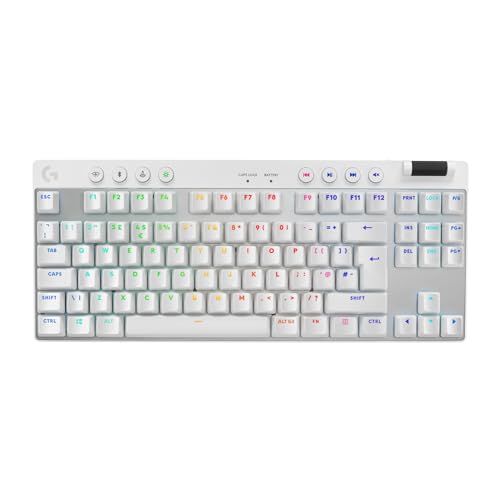 | Logitech G PRO X TKL LIGHTSPEED (White, UK) Our pick | A wireless TKL that can share one adapter with a G mouse | TKL, tactile, LIGHTSPEED and Bluetooth, up to 50 h | Check price → |
 | Logitech G413 SE Full-Size (UK) Budget | A first mechanical keyboard that keeps the numpad | Full size, tactile 50 g, PBT keycaps, 6-key rollover | Check price → |
 | Corsair K70 CORE TKL RGB (UK) Wired TKL | Smooth linear switches on a quieter wired TKL | 88 keys, MLX Red linear, 1,000Hz, NKRO, FlashTap | Check price → |
 | Corsair K65 PLUS WIRELESS 75% (UK) 75% hot-swap | A compact wireless board with swappable switches | 75%, MLX Red linear, hot-swap, PBT, 2.4GHz/Bluetooth | Check price → |
 | Razer Huntsman V3 HE Magnetic Tenkeyless (UK) Rapid trigger | Competitive shooters that reward instant key resets | Hall effect, 0.1 to 4.0 mm actuation, 8,000Hz, PBT | Check price → |