
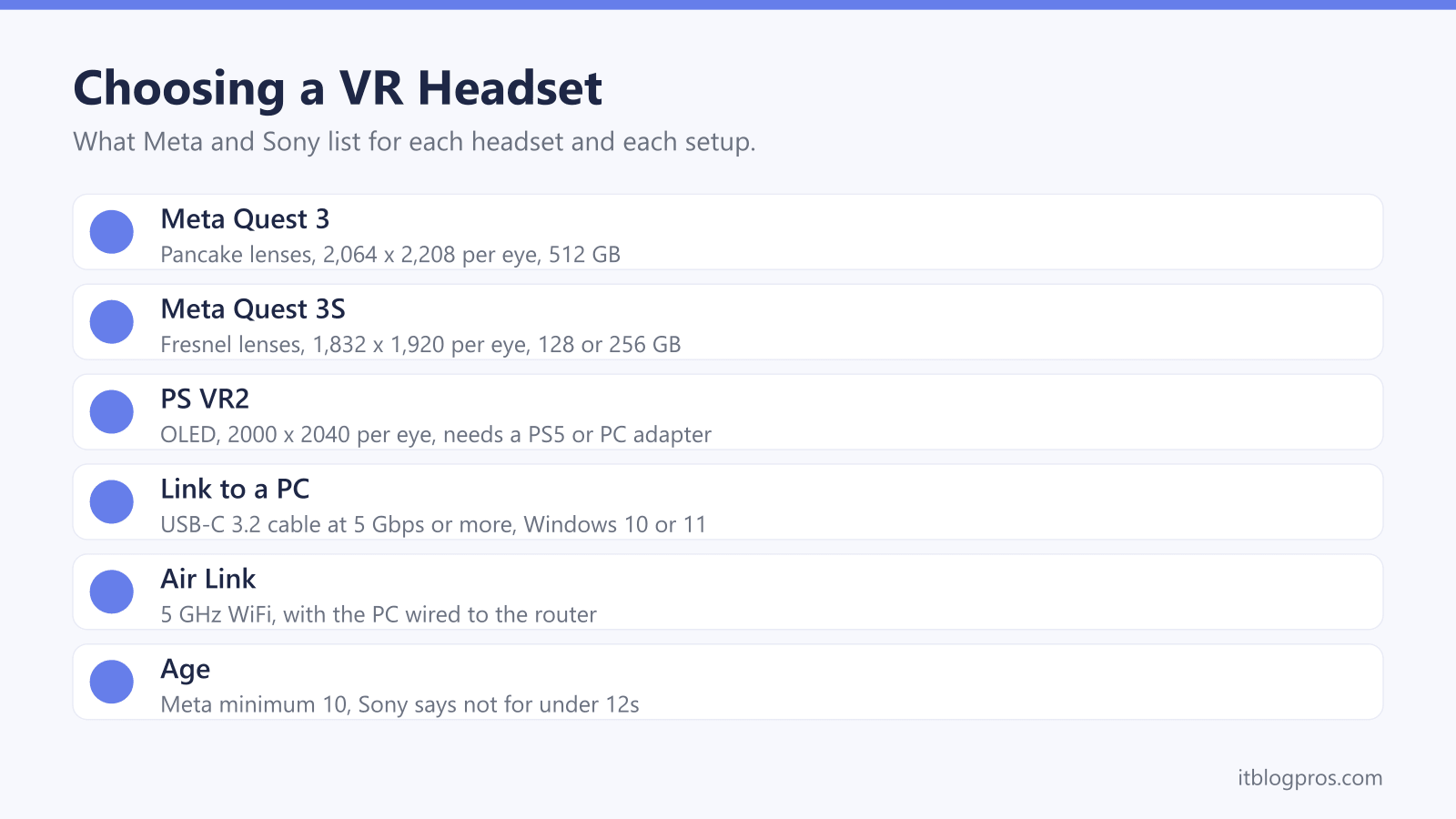
Meta's UK comparison page lines up two Quest headsets, the Quest 3 and the Quest 3S, and both run the same processor, so the choice comes down to lenses, screen, storage and battery. Sony's PS VR2 is the other mainstream option, built around the PS5. This guide takes each difference from Meta's and Sony's own pages: display and lens specs, standalone play against PC VR over Link and Air Link, the WiFi that wireless streaming needs, glasses, age rules and the space to play in.
For most buyers the Meta Quest 3S is the one to start with: Meta lists the same Snapdragon XR2 Gen 2 chip, 8 GB of memory and full-colour passthrough as the Quest 3, with 128 or 256 GB. The Quest 3 adds pancake lenses, a sharper 2,064 x 2,208 display per eye, a depth sensor and 512 GB. PS VR2 suits PS5 owners, since Sony says it needs a PS5 or its PC adapter.
Key Takeaways
- Meta's comparison page gives the Quest 3 pancake lenses, 2,064 x 2,208 pixels per eye and 512 GB, against Fresnel lenses, 1,832 x 1,920 pixels and 128 or 256 GB on the Quest 3S.
- Both headsets run the Snapdragon XR2 Gen 2 with 8 GB of memory and 4 MP full-colour passthrough, and Meta's developer comparison lists a depth sensor on the Quest 3 only.
- Meta's minimum PC for Link is an Intel i5-4590 or AMD Ryzen 5 1500X with 8 GB of RAM on Windows 10 or 11, and Meta's Air Link advice is 5 GHz WiFi with the PC wired to the router.
- Sony says PS VR2 needs a PS5, or a Windows PC with its PS VR2 PC adapter and a DisplayPort 1.4 cable, and that it is not for children under 12.
- Meta sets a minimum age of 10, with parent-managed accounts for ages 10 to 12, and recommends a clear space of at least 2 m by 2 m for Roomscale play.
The Quest 3 and Quest 3S Share a Chip but Not the Lenses
Meta's comparison page lists the same Snapdragon XR2 Gen 2 processor, 8 GB of memory and 72, 90 and 120 Hz refresh rates on both headsets. The differences sit in front of your eyes. The Quest 3 uses pancake lenses with continuous lens spacing, while the Quest 3S uses Fresnel lenses with three spacing positions.
Resolution follows the lenses. Meta lists 2,064 x 2,208 pixels per eye on the Quest 3, which it says is 30% more pixels than the 3S at 1,832 x 1,920. The same page gives the Quest 3 a 110 degree horizontal field of view against 96 degrees on the 3S, so more of the scene sits in view at once.
Storage is the other gap: Meta sells the Quest 3 with 512 GB and the Quest 3S with 128 GB or 256 GB. Passthrough, the camera view of your room that mixed reality uses, appears identically on Meta's comparison page as full-colour at 4 MP. Meta's developer comparison, though, lists a depth sensor alongside it on the Quest 3 only.
Battery Life, Straps and Glasses Shape Each Session
Meta's UK store pages list a 2.2-hour battery life for the Quest 3 and 2.5 hours for the Quest 3S, though Meta's developer comparison puts the Quest 3 at about 2 hours. Meta's charging page asks for an 18 W adapter on both and puts a full charge from the wall at about two and a half hours.
Meta says its Elite Strap with Battery adds two hours of headset use and fits both models. The plain Elite Strap has no battery, and Meta says its soft silicone support reduces strain on your face.
Glasses fit differently on each. Meta's Quest 3 setup page points to depth adjustment buttons that move the lenses further from your eyeglasses, while its Quest 3S page mentions the glasses spacer in the box. Meta's glasses page suggests frames no wider than 142 mm and no taller than 50 mm. Its Zenni help page lists prescription inserts in separate styles for the Quest 3 and 3S, and Meta's safety warnings note that glasses may raise the risk of facial injury in a fall.
A Quest Works on Its Own, and Meta Horizon Link Adds a PC
A Quest needs no console or computer. Meta's setup pages ask for a phone with the Meta Horizon mobile app, a Meta account and WiFi. Meta's blog says the app took over from the Meta Quest app name in 2024 without losing any features, and its help page lists iOS 10 or Android 5.0 as the minimum phone software.
Meta calls its PC app Meta Horizon Link, and its help page asks for at least 4 GB of space on a Windows computer. For a cable, Meta's setup page wants a USB-C 3.2 cable that supports at least 5 Gbps in a USB 3.2 port, and its requirements page suggests a cable of at least 3 metres, adding that Meta sells a branded Link cable.
Meta's minimum PC is an Intel i5-4590 or AMD Ryzen 5 1500X with 8 GB of RAM on Windows 10 or 11. It recommends an Nvidia RTX 20 Series or AMD Radeon RX 6000 Series card with 16 GB of RAM, and says the RTX 2050 and Intel Arc cards are not supported.
Air Link and Steam Link Lean on a Fast 5 GHz Router
Air Link is the wireless version of Link, streaming the PC's picture to the headset over your home network. Meta's setup page asks for a WiFi network, preferably 5 GHz, and switches it on from Quick controls, then Link, then Use Air Link.
Meta's Air Link troubleshooting page goes further. It suggests connecting the PC to the router with an Ethernet cable so only the headset uses WiFi, and setting the router to 5 GHz with the channel width locked at 80 MHz where the router allows it. Meta also suggests playing in the same room as the router with a clear line of sight, keeping devices between computer and headset to a minimum and considering a dedicated router for Air Link.
Valve's Steam Link page sets a similar floor for SteamVR games: a 5 GHz, Wi-Fi 5 router, a wired connection from the PC and an Nvidia GTX 970 or better. It names the Quest 2, 3 and Pro, without listing the 3S by name. The gaming router guide covers routers suited to this.
PS VR2 Needs a PS5, or a PC and Sony's Adapter
Sony's PS VR2 page says a PlayStation 5 console is required and sold separately, and Sony's support page adds that PS VR2 is not compatible with PS4 consoles. Sony's tech specs list OLED displays at 2000 x 2040 per eye, 90 and 120 Hz refresh rates, a field of view of approximately 110 degrees and an IR camera per eye for eye tracking. Its FAQ describes a single cable with a USB-C connector.
The PC route needs Sony's PS VR2 PC adapter. Sony's UK support page lists Windows 10 or 11 64-bit, 8 GB of RAM, an Nvidia GTX 1650 or AMD Radeon RX 5500XT or later, a USB 3.0 port and Bluetooth 4.0 or later. The DisplayPort 1.4 cable is sold separately and must go into a dedicated DisplayPort or Mini DisplayPort output, because Sony says DisplayPort over USB-C is not compatible. Steam, SteamVR and the PlayStation VR2 App are all free.
On PC, the PlayStation Blog says HDR, headset feedback, eye tracking, adaptive triggers and haptic feedback other than rumble are not available.
Meta Sets a Minimum Age of 10 and Asks for a Clear Space
Meta's safety pages give a minimum age of 10, which may vary by country. Meta's account help says a parent or guardian must set up and manage the account of a child aged 10 to 12, from the Meta Horizon app, and that people manage their own account from 13. Meta's parent information page says parent-managed accounts are only available on the Quest 2 and 3, and it does not mention the 3S.
For teens aged 13 to 17, Meta's supervision tools let parents set daily time limits, allow apps case by case and block Link and Air Link. Sony says PS VR2 is not for children under 12.
For space, Meta recommends a clear area of at least 2 m by 2 m for Roomscale, or Stationary mode with a 1 m by 1 m boundary. Its safety warnings suggest a buffer of 30 to 60 cm beyond the boundary and, when starting out, sessions of 30 minutes at most followed by a 15-minute break. Sony asks for the same 2 m by 2 m for PS VR2 roomscale.
The Headsets and Accessories Worth Shortlisting
The Quest 3S 128 GB is the starting point for most people. Meta lists the same chip, memory and passthrough as the Quest 3 and a longer rated battery, with Fresnel lenses and a lower resolution as the trade-off. The Quest 3 512 GB is sold through Meta's own store, and its pancake lenses, sharper display and depth sensor are the reasons to pay more.
For PS5 owners, PS VR2 connects to the console with one cable, and Sony's PC adapter opens up SteamVR games later, minus the features Sony keeps to the console. Meta's Elite Strap with Battery suits long sessions on either Quest, and the plain Elite Strap is the option without a battery.
Sony's PS VR2 box includes stereo headphones with three pairs of earpieces. For chat in flat-screen games on a PC or console, the gaming headset guide covers the options, and the controller guide covers pairing a pad for PC games played outside VR.
| Product | Best for | Key specs | Price | |
|---|---|---|---|---|
 | Meta Quest 3S 128 GB Our pick | A first standalone headset, with Link or Air Link to a PC | Fresnel lenses, 1,832 x 1,920 per eye, XR2 Gen 2, 128 GB | Check price → |
 | PlayStation VR2 For PS5 | PS5 owners who want VR on the console | OLED, 2000 x 2040 per eye, eye tracking, single USB-C cable | Check price → |
 | PlayStation VR2 PC Adapter PS VR2 on PC | PS VR2 owners who want SteamVR games on a Windows PC | Needs DisplayPort 1.4 cable, USB 3.0 and Bluetooth 4.0 | Check price → |
 | Meta Quest Elite Strap with Battery Longer sessions | Longer play on a Quest 3 or Quest 3S | Fits Quest 3 and 3S, two extra hours of headset use | Check price → |
 | Meta Quest Elite Strap Comfort | Comfort on a Quest 3 or Quest 3S, without a battery | Fits Quest 3 and 3S, soft silicone support, no battery | Check price → |