
A first 3D printer is a bigger decision than the price tag suggests. Filament or resin, open frame or enclosure, one colour or four: each choice changes what the printer can make, where it can live and how much cleaning up follows. This guide takes those choices in turn, as Bambu Lab, Creality, Prusa and Anycubic describe them, then covers filaments, resin safety, free slicers and model libraries such as Printables and MakerWorld, and five printers for common starting points.
For most first-time buyers, a filament (FDM) printer running PLA is the simpler start. Creality calls FDM printers easier to maintain and cheaper to run, while resin printers excel in fine detail but need washing and UV curing, and Prusa advises gloves and a ventilated room for resin. Bambu Lab's wiki says PLA, PETG and TPU print on open-frame machines, while ABS, ASA, PC and PA need an enclosure.
Key Takeaways
- Creality says FDM printers are easier to maintain and cheaper to run, while resin printers excel in fine detail, though uncured resin is toxic and prints need washing and UV curing.
- Bambu Lab's wiki says PLA, PETG and TPU are not prone to warping and suit open-frame or enclosed printers, while ABS, ASA, PC and PA need an enclosed printer.
- Bambu Lab says the A1 series takes one AMS lite for up to four colours, but soft TPU such as 95A and 85A cannot be used in it.
- Prusa's resin advice is to wear gloves, ventilate the room during printing, keep resin away from children and pets, and never put resin bottles in regular waste.
- Prusa says Printables hosts over 2 million free models open to all printer brands, and PrusaSlicer is free, open-source and needs no account.
FDM Printers Suit Bigger Parts, While Resin Printers Suit Fine Detail
Filament printers use fused deposition modelling, or FDM, the technology Creality lists for the K1C. Bambu Lab's wiki describes the A1 mini melting filament in its hotend and laying it in thin layers. Resin printers differ: Prusa says liquid resins are photosensitive and cured by UV light, sunlight included.
Creality's guide sets out the trade-off. FDM printers, it says, are easier to maintain, cheaper to run and suited to larger, functional parts, while resin printers excel in fine detail such as miniatures, with messier post-processing. Creality lists 0.1 to 0.35 mm layers for the Ender-3 V3 SE; Anycubic lists 0.01 to 0.15 mm for the Photon Mono 4.
Build volume, the largest single part, varies too. Bambu Lab gives the A1 mini 180 x 180 x 180 mm and the A1 256 x 256 x 256 mm, Creality lists 220 x 220 x 250 mm for the Ender-3 V3 SE and K1C, and Anycubic gives the Photon Mono 4 143 x 89 x 165 mm. Prusa says PrusaSlicer can split bigger models and add alignment pins.
Open Frames Suit PLA, While Enclosures Suit ABS and ASA
An open frame leaves the print area exposed; an enclosure surrounds it. Bambu Lab's filament guide says ABS, ASA, PC and PA need higher heatbed and chamber temperatures to suppress warping, so it recommends an enclosed printer for them. PLA, PETG and TPU are not prone to warping and suit either type, though Bambu suggests an enclosure for PETG so a cold room does not weaken its layers.
Creality agrees that open-frame Ender printers suit PLA, PETG and TPU, and says enclosures reduce warping and contain toxic fumes from ABS and nylon. Its K1C pairs a glass door with an active carbon filter, and Creality quotes 45 dB or less in silent mode at one metre. Prusa says ABS fumes could pose a health risk, so ABS should print in a well-ventilated room, without a draught across the model.
Bambu Lab does not recommend enclosing the A1 mini. It quotes under 48 dB in Silent Mode, and its FAQ asks for a room at 10 to 30°C and about 390 mm of space front to back for the heatbed.
PLA Is the Beginner Filament, With PETG and TPU Next
Filament is the plastic an FDM printer melts. Prusa describes PLA as inexpensive, easy to print and suitable for beginners, but warns that it softens and deforms above 60°C, degrades under UV light and is not suited to technical or outdoor use. PETG comes next: Prusa calls it one of the most easily printable materials, suitable for beginners and fine for indoor and most outdoor parts below 80°C, though prone to stringing.
Flexible TPU is harder going. Prusa says flexible filaments suit mostly advanced users, and that the softer the filament, the harder it is to print. Bambu Lab's spec pages rate PLA, PETG, TPU and PVA as ideal for the A1 and A1 mini, and ABS, ASA, PC, PA and fibre-filled filaments as not recommended. Creality lists PLA, PETG and TPU 95A for the Ender-3 V3 SE.
Storage matters as well. Bambu Lab's wiki says all filaments absorb some moisture from the air, and damp filament causes stringing, air bubbles and weaker prints. Prusa does not recommend any filament for dishes or anything touching food.
Multi-Colour Printing Runs Through a Feeder Such as the AMS Lite
Bambu Lab's wiki says the A1 mini's toolhead hub takes four filament tubes, enabling multi-colour printing when paired with a feeder. That feeder is the AMS, short for Automated Material System. The A1 series takes one AMS lite, for up to four colours. Bambu says the AMS lite does not work with its P1 and X1 printers, which need the full AMS, with an extra drive gear that helps feed softer or rougher filaments.
The AMS lite has limits worth knowing before buying a combo. Bambu's FAQ says to avoid TPU, TPE and damp PVA in it, lists 95A and 85A TPU as unusable, and warns that carbon and glass fibre filaments can break inside or wear the feeder channel. It should sit about 50 mm from the printer and cannot be wall-mounted.
Other makers do it differently. Creality's K1C page lists a CFS upgrade kit for multicolour printing on the K1 series, and Prusa says PrusaSlicer can schedule filament changes at set layers for basic multicolour prints without extra hardware.
Resin Printing Needs Gloves, Ventilation and Careful Disposal
Resin calls for more care than filament. Prusa, which makes resin printers and resins, says to wear gloves to avoid skin contact, recommends a simple respirator, and says resin produces fumes, so the room should be ventilated during printing. Resin should be kept out of reach of children and pets, washed off skin or eyes with soap and water, and stored away from light at 18 to 32°C. Some people are allergic to resin, Prusa adds, and anyone with itching or a rash should stop and contact a doctor.
Prusa's blog recommends disposable gloves and protective eyewear, warns that isopropanol can partly dissolve some gloves, and suggests standing the printer in a disposable tray to catch leaks. Disposal needs planning too: Prusa says resin bottles, empty or full, must not go in regular waste, and liquid resin should be treated as a dangerous chemical.
Creality's guide also says uncured resin is toxic. Anycubic's guide for the Photon Mono 4 says to filter the resin back into its bottle if the printer will sit unused for 48 hours.
Free Slicers and Libraries Such as Printables and MakerWorld
Every printer needs a slicer, the program that turns a 3D model into layer-by-layer instructions. Bambu Lab calls Bambu Studio open-source and lists Windows 10 (64-bit) or macOS 10.15 and later, with Linux builds on GitHub, so a Windows mini PC qualifies. The A1 also accepts G-code from PrusaSlicer or Cura, Bambu says, though some advanced features may not work. Creality Print is Creality's own FDM slicer, with remote monitoring and control. Prusa says PrusaSlicer is free, open-source and needs no account, on Windows, Mac and Linux.
For models, Prusa says Printables hosts over 2 million free models, open to all printer brands, with no account needed to browse. Bambu Lab describes MakerWorld as its model platform with one-click printing from the Bambu Handy app.
Files reach printers in different ways. Bambu says the A1 mini has no built-in memory and ships with a 32 GB microSD card; the SD card guide covers spares. Anycubic says the Photon Mono 4 has no WiFi and cannot read USB drives of 32 GB or more, which narrows the USB stick choice.
Five Printers Cover a First Build, Colour, ABS and Resin
First, the caveats. Bambu Lab rates ABS, ASA, PC and PA as not recommended on the A1 and A1 mini and does not recommend enclosing the A1 mini, so neither is an ABS machine. Bambu's spec pages list 2.4 GHz WiFi (802.11 b/g/n) for both, so the router's 2.4 GHz band must be switched on; the smart plug WiFi guide covers the same setup snags. Resin also needs the gloves, ventilation and disposal plan above.
The table covers the common starting points. The Bambu Lab A1 mini is the compact first printer, and Bambu says it calibrates the bed level, Z-offset, vibration and nozzle pressure automatically for every print. The A1 Combo adds the larger 256 x 256 x 256 mm build volume and an AMS lite for four colours. Creality's K1C is the enclosed choice for ABS, ASA and carbon fibre filaments. The Ender-3 V3 SE is the budget pick, which Creality says arrives pre-assembled and pre-calibrated, with CR Touch auto levelling. Anycubic's Photon Mono 4 is the resin option for miniatures, with a 7-inch 10K screen.
| Product | Best for | Key specs | Price | |
|---|---|---|---|---|
 | Bambu Lab A1 mini + LED Lamp Kit Beginner pick | A first printer for small models on a desk | 180 x 180 x 180 mm, full-auto calibration, open frame | Check price → |
 | Bambu Lab A1 Combo + LED Lamp Kit Multi-colour | Four-colour prints and larger parts | 256 x 256 x 256 mm, AMS lite, up to four colours | Check price → |
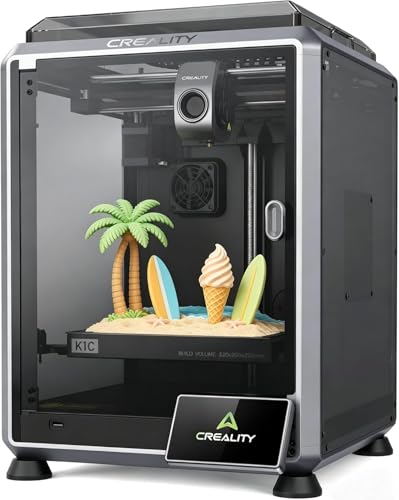 | Creality K1C Enclosed | ABS, ASA and carbon fibre filaments | 220 x 220 x 250 mm, enclosed, carbon filter, AI camera | Check price → |
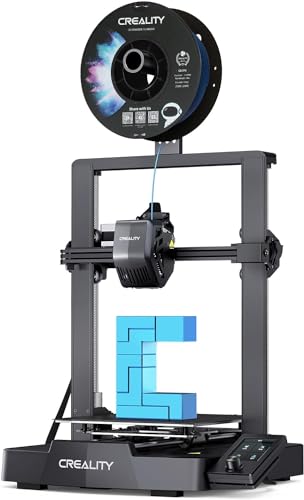 | Creality Ender-3 V3 SE Budget | PLA, PETG and TPU on a tight budget | 220 x 220 x 250 mm, CR Touch levelling, SD card | Check price → |
 | Anycubic Photon Mono 4 Resin | Miniatures and fine detail, with ventilation | 143 x 89 x 165 mm, 7-inch 10K screen, USB, no WiFi | Check price → |