
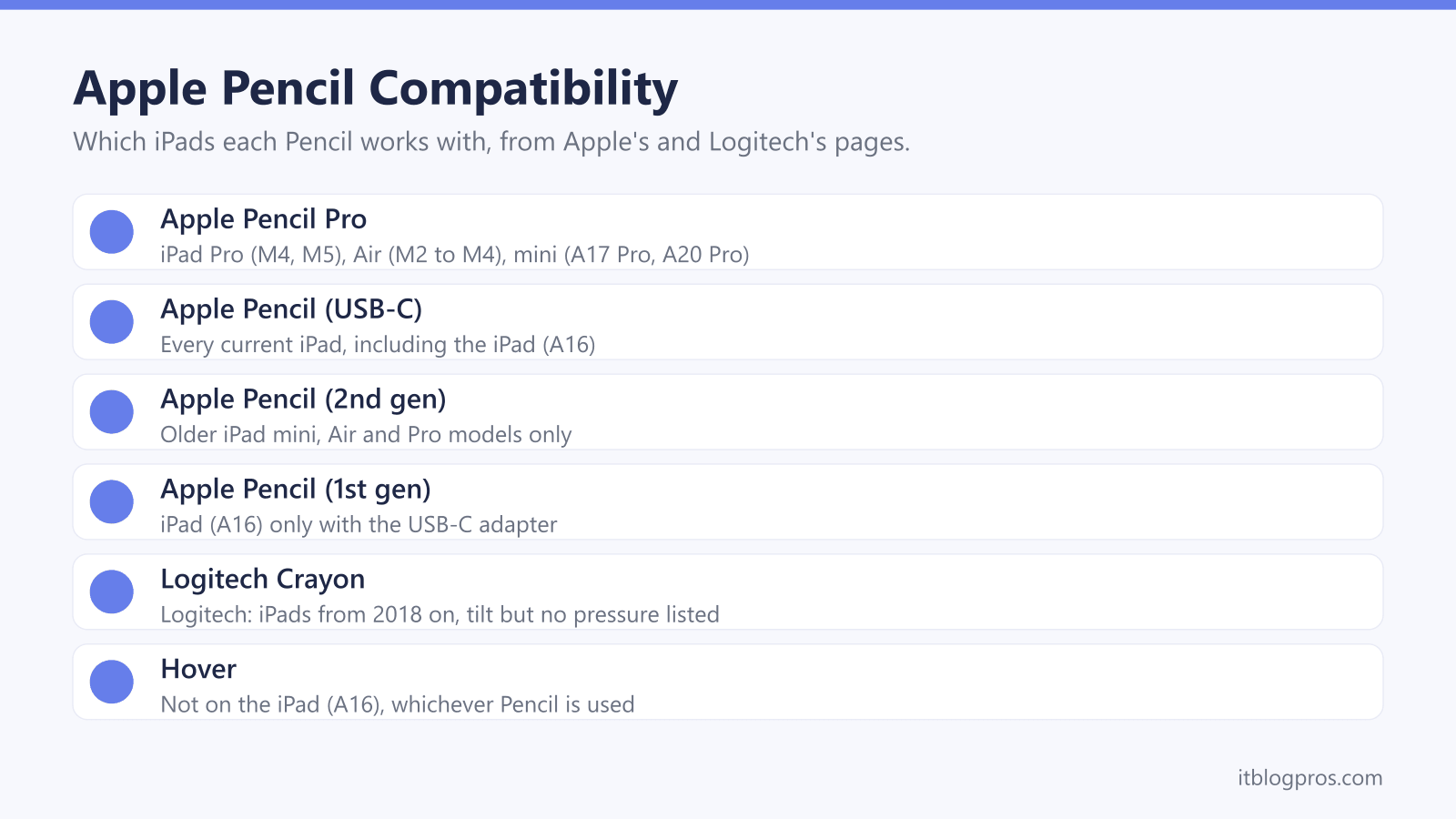
Apple sells four Apple Pencils, and each works with a different set of iPads. Picking the wrong one is the classic mistake: Apple's UK store still sells the Apple Pencil (2nd generation), yet Apple's compatibility list names none of the current iPads for it. This guide matches every Pencil to every iPad from Apple's own lists, sets out how each pairs and charges, covers the Logitech Crayon as the third-party choice, and lines up the keyboard cases Apple and Logitech list for each model.
Check the iPad model first, under Settings > General > About > Model Name, as Apple's Pencil page advises. Apple's compatibility lists put Apple Pencil (USB-C) on every current iPad, and Apple Pencil Pro on the iPad Pro (M4 and M5), iPad Air (M2, M3 and M4) and iPad mini (A17 Pro and A20 Pro), but not the iPad (A16). The Apple Pencil (2nd generation) fits only older models.
Key Takeaways
- Apple's compatibility page lists Apple Pencil (USB-C) for every current iPad, from the iPad (A16) to the iPad Pro (M5).
- Apple Pencil Pro works with the iPad Pro (M4 and M5), iPad Air (M2, M3 and M4) and iPad mini (A17 Pro and A20 Pro), and Apple does not list it for the iPad (A16).
- Apple's UK store still sells the Apple Pencil (2nd generation), yet Apple's compatibility page lists it for none of the iPads Apple sells today.
- Apple's Pencil page gives pressure sensitivity, squeeze, barrel roll, haptic feedback and Find My to Apple Pencil Pro and none of them to Apple Pencil (USB-C).
- Keyboards are model-specific too: Apple lists the Magic Keyboard Folio for the iPad (A16), and Logitech sells separate Combo Touch cases for the iPad, iPad Air and iPad Pro.
Apple Pencil Pro Works With the Newest iPad Pro, Air and mini
Apple's compatibility page says Apple Pencil Pro works only with the iPad Pro 13-inch and 11-inch (M4 and M5), the iPad Air 13-inch and 11-inch (M2, M3 and M4) and the iPad mini (A17 Pro), on iPadOS 17.5 or later. Apple's own pages disagree slightly here. The Apple Pencil page and the iPad User Guide add the new iPad mini (A20 Pro), while the support article stops at the A17 Pro model.
The base iPad (A16) is missing from every version of the list, so Apple Pencil Pro will not work with it. Older models such as the iPad Pro 11-inch (4th generation) and the iPad Air (5th generation) are missing too.
Pairing takes one step. Apple's iPad User Guide says to attach Apple Pencil Pro to the magnetic connector on the long side of a compatible iPad, which pairs and charges it, with Bluetooth turned on in Settings. The same guide shows the battery level in the Batteries widget or under Settings > Apple Pencil, and Apple's store page lists nothing in the box but the Pencil itself.
Apple Pencil (USB-C) Works With Every Current iPad
Apple's compatibility page gives Apple Pencil (USB-C) the widest list: the iPad Pro (M4 and M5), the iPad Pro 11-inch (1st to 4th generation) and 12.9-inch (3rd to 6th generation), the iPad Air (M2, M3 and M4), the iPad Air (4th and 5th generation), the iPad (A16) and (10th generation), and the iPad mini (A17 Pro) and (6th generation), on iPadOS 17.1.1 or later. Apple's Pencil page adds the iPad mini (A20 Pro). Apple's iPhone Duo page also says that phone will work with it.
Pairing uses a cable rather than magnets. Apple's iPad User Guide says to slide open the end of the Pencil, connect it to the USB-C charge cable that came with the iPad, plug the other end into the iPad and tap Tap to Connect. It stays paired until the iPad restarts, Bluetooth goes off or it pairs elsewhere. Apple's store page lists only the Pencil in the box, and Apple's iPad Pro specs page lists no charge cable, so a spare USB-C cable helps.
The Second-Generation Pencil Fits Only Older iPads
Apple's compatibility page limits the Apple Pencil (2nd generation) to the iPad mini (6th generation), the iPad Air (4th and 5th generation), the iPad Pro 12.9-inch (3rd to 6th generation) and the iPad Pro 11-inch (1st to 4th generation). None of the iPads Apple sells today is on that list, even though Apple's UK store still sells this Pencil. On a compatible iPad, Apple's guide pairs and charges it on the magnetic connector on the right side.
The Apple Pencil (1st generation) covers older models such as the iPad (6th to 9th generation), iPad Air (3rd generation) and iPad mini (5th generation), plus the iPad (A16) and iPad (10th generation). Apple footnotes those last two: they need the USB-C to Apple Pencil Adapter to pair and charge. Apple's store page lists that adapter in the box, along with a Lightning adapter and an extra tip. On iPads with a Home button, Apple's guide says to remove the cap and plug the Pencil into the Lightning connector. Apple's iPad (A16) specs page lists both this Pencil and Apple Pencil (USB-C).
Pressure, Hover, Squeeze and Find My Set the Models Apart
Apple's UK Apple Pencil page compares the two newest models. Both get pixel-perfect precision, low latency, tilt sensitivity, hover and magnetic attachment. Only Apple Pencil Pro adds pressure sensitivity, double-tap, squeeze, barrel roll, haptic feedback, Find My, free engraving and wireless pairing and charging. Apple says squeeze opens a palette of tools, line weights and colours, and barrel roll uses a gyroscope to rotate shaped pen and brush tools.
Hover depends on the iPad as much as the Pencil. Apple's footnote says hover works with the iPad Pro (M4 and M5), iPad Pro 11-inch (4th generation), iPad Pro 12.9-inch (6th generation), iPad Air (M2, M3 and M4) and iPad mini (A17 Pro and A20 Pro). The iPad (A16) is not on it, so neither Pencil hovers there.
Pressure matters most for drawing. Apple Pencil (USB-C) lacks it, while Apple's store page says the Apple Pencil (1st generation) is sensitive to pressure and tilt. On an iPad (A16), that makes the older Pencil the one for shading and artwork, and the USB-C model the simpler choice for notes.
Logitech Crayon Is the Third-Party Alternative
Logitech's Crayon is made with Apple Pencil technology, and its UK page describes the USB-C version as a digital pencil for all iPad models from 2018 onwards. Logitech's spec sheet lists tilt sensitivity for dynamic line weight, palm rejection, up to 7 hours of active writing and charging through the iPad's USB-C cable. It does not list pressure sensitivity, hover or magnetic charging. Setup is simpler too: Logitech says the Crayon connects to iPad instantly with no complex Bluetooth pairing, and its support article advises disconnecting any Apple Pencil in Bluetooth settings, or turning Bluetooth off, before using it.
Compatibility needs a closer look. Logitech's spec sheet gives iPads (2018 and later) as the supported hardware at release and names no individual models. Apple's UK store listing for the same Crayon names models from the iPad (A16) to the iPad Pro (M5), but leaves out the iPad mini (A17 Pro) and iPad mini (A20 Pro). Logitech also sells a Lightning version that, by its UK page, charges through an iPad Lightning cable, for older iPads with that port.
Keyboard Cases Are Matched to Each iPad Model
Apple's keyboards page lists the Magic Keyboard for iPad Pro only for the iPad Pro (M4 and M5), and the Magic Keyboard for iPad Air for the iPad Air (M2, M3 and M4) plus the iPad Air (4th and 5th generation). The Magic Keyboard Folio fits the iPad (A16) and iPad (10th generation). Apple lists a 14-key function row and a trackpad on all three, and USB-C pass-through charging on the Pro and Air versions. Apple's iPad mini page lists Bluetooth keyboards only, which the wireless keyboard and mouse guide covers.
Logitech sells Combo Touch as a separate case for each size and generation. Its UK pages list cases for the iPad Pro (M4 and M5), iPad Pro 12.9-inch (5th and 6th gen) and 11-inch (1st to 4th gen), for the iPad Air (M2, M3 and M4) and iPad Air (5th gen), and for the iPad (10th gen and A16), with another for the 7th to 9th gen. Each draws power through the Smart Connector, and Logitech says the Air and Pro cases let Apple Pencil attach to the iPad.
Five Picks for Writing and Typing on an iPad
Two caveats first. A Pencil cannot add what the iPad lacks: hover needs an iPad on Apple's hover list, whatever the Pencil. And a keyboard case is a compact way to type, not a full laptop, which the student laptop guide and the MacBook guide cover.
Apple Pencil Pro is the pick for the iPad Pro (M4 and M5), iPad Air (M2, M3 and M4) and iPad mini (A17 Pro and A20 Pro), with pressure, squeeze, barrel roll and Find My. Apple Pencil (USB-C) is the one Pencil Apple lists for every current iPad, and the easy choice for notes on an iPad (A16). The Logitech Crayon in the table is the Education version, which Logitech's UK page lists with a Lightning charge port, so it suits a 2018-or-later Lightning iPad.
For typing, Apple lists the Magic Keyboard Folio for the iPad (A16), and the Magic Keyboard for iPad Air 11-inch for the M2, M3 and M4 models; Apple's store pages say both need iPadOS 18.3 or later. Anyone still choosing a tablet should start with the iPad buying guide.
| Product | Best for | Key specs | Price | |
|---|---|---|---|---|
 | Apple Pencil Pro Our pick | Current iPad Pro, iPad Air and iPad mini owners | Pressure, hover, squeeze, barrel roll, Find My | Check price → |
 | Apple Pencil (USB-C) Any current iPad | Notes on any current iPad, including the iPad (A16) | Tilt, hover on some iPads, USB-C pairing, no pressure | Check price → |
 | Logitech Crayon for Education (Lightning) Lightning iPads | Older iPads with a Lightning port, from 2018 on | Tilt, palm rejection, up to 7.5 hrs, Lightning charging | Check price → |
 | Apple Magic Keyboard Folio for iPad (A16), British English iPad (A16) | Typing and a trackpad on the iPad (A16) | Trackpad, 14-key function row, two-piece design | Check price → |
 | Apple Magic Keyboard for iPad Air 11-inch, British English, Black iPad Air | iPad Air 11-inch (M2, M3 and M4) owners | Trackpad, 14-key row, USB-C pass-through charging | Check price → |